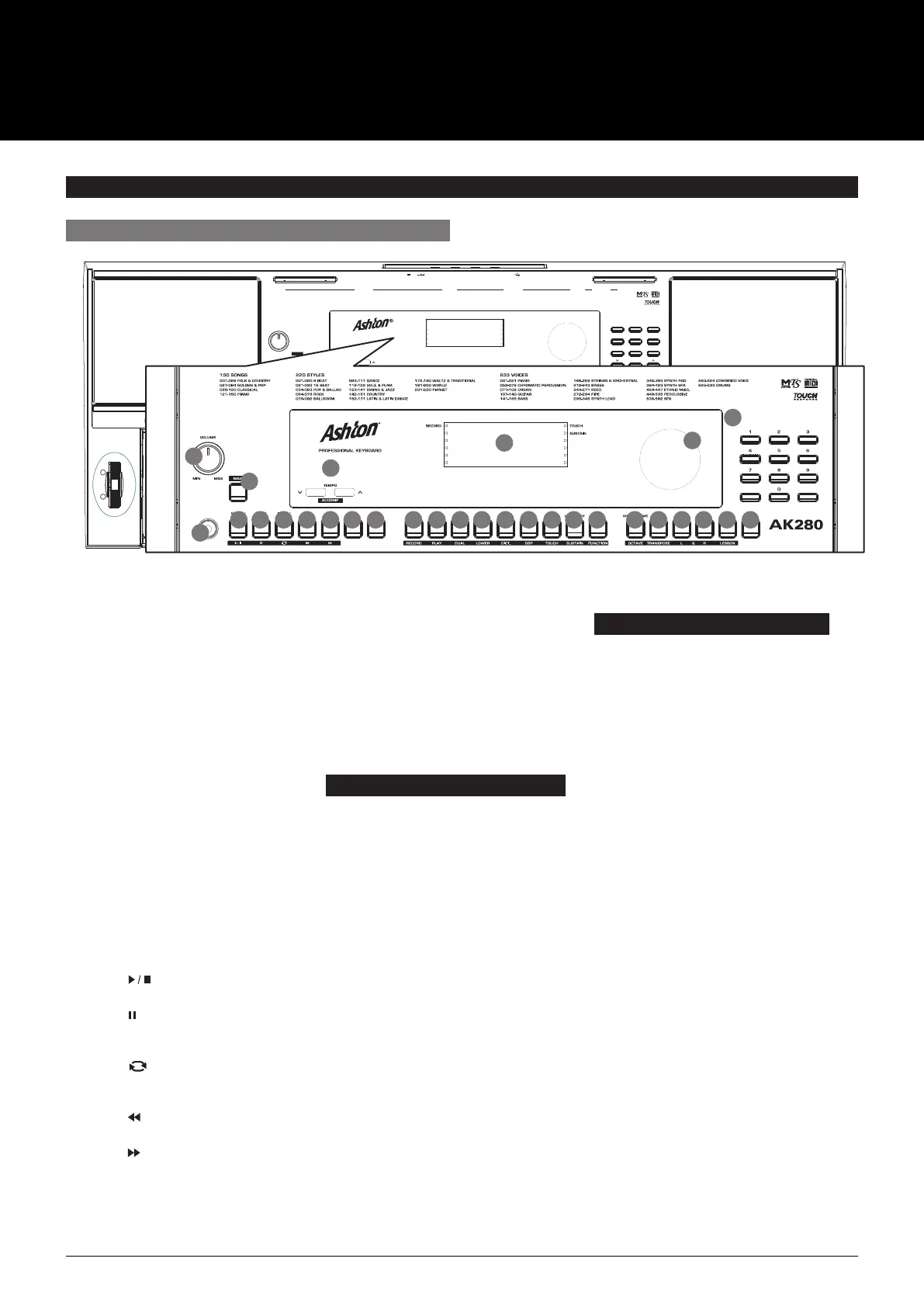
1. VOLUME knob
Adjust the master volume.
2. POWER SWITCH
Turn the Power on or off.
3. [SHIFT] button
Select the secondary functions
of other buttons.
10. [FADE] button
Turn the fade–in or fade–out
function on or off.
11. [CHORD] button
Enter Chord mode.
26. [DEMO] button
Enter Demo Mode.
27. LCD Display
Display all parameters and values
related to the current operation.
28. DATA DIAL
Adjust the parameter value.
29. [–]/[+] and NUMERIC buttons
Set parameters value or select
the number.
In Song Mode:
5. [ ] button
Start or Stop playing the song.
6. [ ] button
Pause or continue playing
the song.
7. [ ] button
Set the beginning and the end for
a loop section of the current song.
8. [ ] button
Rewind the song.
9. [ ] button
Fast forward the song.
1
PANEL & DISPLAY DESCRIPTION
FRONT PANEL
12V MIC
AUX IN PHONES/OUTPUT SUSTAIN USB
87
0
9
54 6
21 3
METRONOME MIXER VOICE STYLE SONG DEMOBANK STORE M1 M2 M3 M4 O.T.S. HARMONY PIANO
START/
STOP
SYNC
START
INTRO/
ENDING FILL A FILL B FADE CHORD
VOLUME
MIN MAX SHIFT
ACCOMP
TEMPO
RECORD TOUCH
SUSTAIN
RECORD PLAY DUAL LOWER DICT. DSP TOUCH SUSTAIN FUNCTION OCTAVE TRANSPOSE L & R LESSON
B7( 13) 7(13) 7(
#
11) dim7 ROOT Cdim 7aug aug 7sus4 sus4 C
#
/D D D
#
/E F F
#
/G G G
#
/A A A
#
/BEC
#
3 D3 E 3 E3 F3 F
#
3 CHORD CHORD TYPE M M(9) 6 mM7 M7 m m(9) m6 m7(9) m7 m7 5 7 7( 9) 7(9) 7(
#
9)
#
G2 A 2 A2 B 2 B2 C3E2 F2 F 2C2 C
#
2 D2 E 2
61 KEY ELECTRONIC KEYBOARD
AK280
61 KEY ELECTRONIC KEYBOARD
AK280
220 STYLES
001-020 8 BEAT
021-033 16 BEAT
034-063 POP & BALLAD
064-078 ROCK
079-092 BALLROOM
093-111 DANCE
112-122 SOUL & FUNK
123-141 SWING & JAZZ
172-190 WALTZ & TRADITIONAL
191-200 WORLD
201-220 PIANIST
142-151 COUNTRY
152-171 LATIN & LATIN DANCE
633 VOICES
001-051 PIANO
052-076 CHROMATIC PERCUSSION
077-106 ORGAN
107-140 GUITAR
141-165 BASS
166-209 STRINGS & ORCHESTRAL
210-243 BRASS
244-271 REED
272-294 PIPE
295-345 SYNTH LEAD
346-393 SYNTH PAD
394-423 SYNTH SFX
583-624 COMBINED VOICE
625-633 DRUMS
424-447 ETHNIC MISC.
448-535 PERCUSSIVE
536-582 SFX
001-026 FOLK & COUNTRY
027-084 GOLDEN & POP
085-120 CLASSICAL
121-150 PIANO
150 SONGS
In Style Mode
5. [START/ STOP] button
Start or Stop playing the style.
6. [SYNC START] button
Turn the Sync Start on or off.
7. [INTRO/ ENDING] button
Play the Intro or Ending.
8. [FILL A] button
Play the fill–in pattern A.
9. [FILL B] button
Play the fill–in pattern B.
When the [SHIFT] button released
4. [TEMPO +]/[TEMPO –] button
Adjust the current Tempo.
12. [BANK] button
Select a memory bank.
13. [STORE] button
Register the panel settings.
14–17. [M1]– [M4] buttons
Recall a registered
panel setting.
18. [O.T.S.] button
Turn the One Touch Setting
function on or off.
19. [HARMONY] button
Turn the Harmony effect on
or off.
20. [PIANO] button
Enter the Piano Mode.
21. [METRONOME] button
Turn the metronome on or off.
22. [MIXER] button
Enter the Mixer menu.
23. [VOICE] button
Enter Voice mode.
24. [STYLE] button
Enter Style mode.
25. [SONG] button
Enter Song mode.
When the [SHIFT] button pressed
12. [RECORD] button
Enter Recording mode.
13. [PLAY] button
Play back the recording.
14. [DUAL] button
Turn the Dual function on or off.
15. [LOWER] button
Turn the Lower function on
or off.
16. [DICT.] button
Enter the Chord Dictionary.
17. [DSP] button
Turn the DSP function on or off.
18. [TOUCH] button
Enter the Touch setting menu.
19. [SUSTAIN] button
Turn the Sustain function on
or off.
20. [FUNCTION] button
Enter the Function menu.
21. [OCTAVE] button
Enter the Octave setting menu.
22. [TRANSPOSE] button
Enter the Transpose
setting menu.
23. [L HAND] button
Choose to practise the left
hand part in Lesson Mode.
24. [R HAND] button
Choose to practise the right
hand part in Lesson Mode.
25. [LESSON] button
Enter Lesson Mode.
2
3
4
1
11 13 15 1712 14 16 18 195 6 7 8 9 10 21 22 2320 24
27
28
29
25 26
USER MANUAL
AK280
61 KEY ELECTRONIC KEYBOARD



 To Next Page