OM226142 rev C
45
It is possible because all units are constantly in operation and feed the load in parallel at
“total load / n”, where “n” is the number of the UPS.
The AC automatic current sharing control equalizes the currents of the “n” units and
reduces the total unbalance to less than 10%, under all load conditions.
The load is supplied by the inverters in parallel for an instantaneous overload up to “n x
200%” of the nominal load of a single unit.
In case of a failure in one unit, the other units supply the load. The load is supplied by the
static bypass, only if there is an additional failure in the other units.
6.12 ARC – FREE VOLTAGE CONTACT CARD
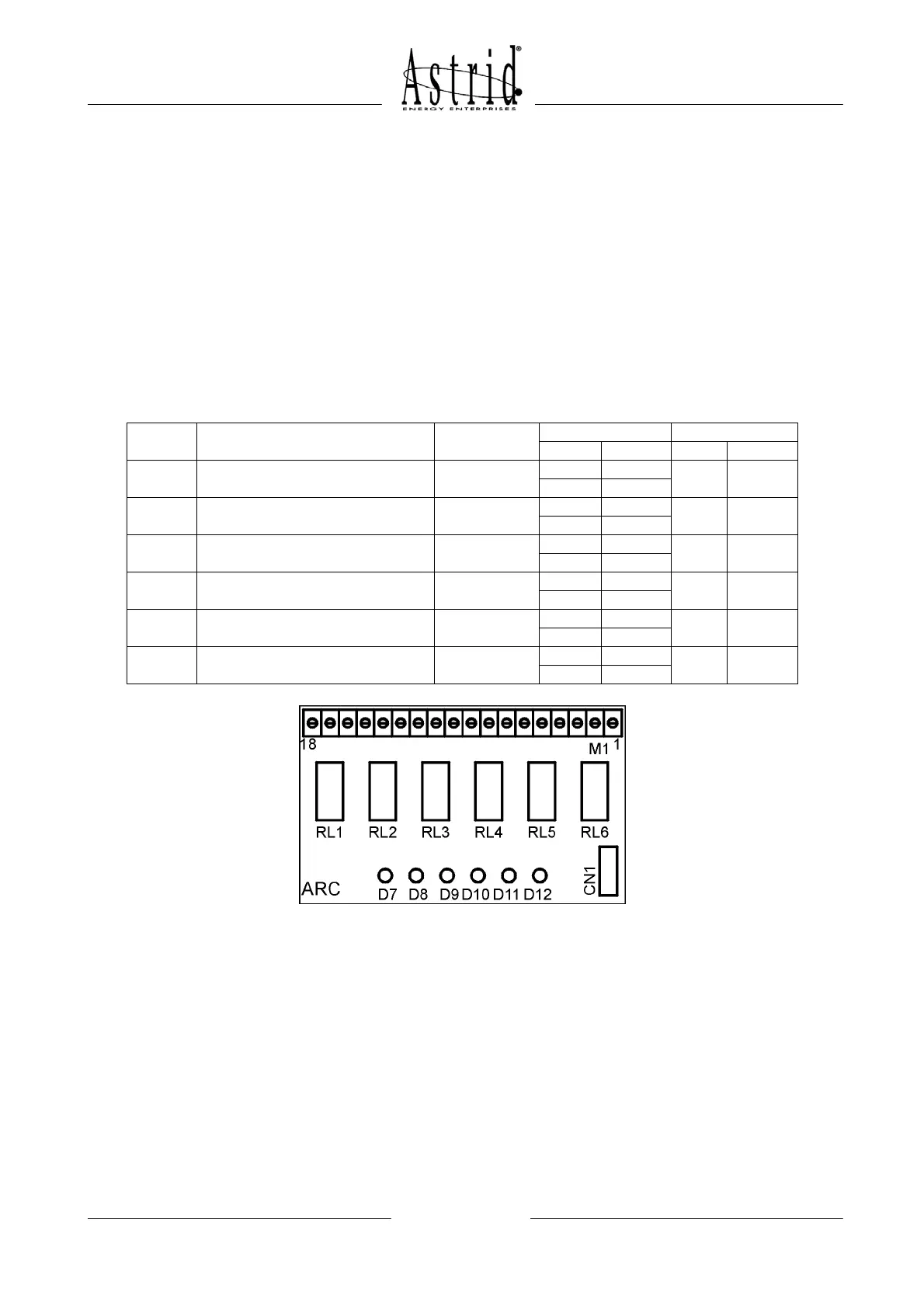
The standard ARC card is used to repeat to a remote location some UPS status and
alarms, by means of SPDT (Single-Pole-Double-Throw) voltage free contacts.
During normal operating conditions, with no alarms, all relays are energized.
Relay Alarms/Status Status
M1 Led
Pins Status Name Status
RL1 Not available
17-18
D7
16-17
RL2 Not available
14-15
D8
13-14
RL3 Status = Inverter feeds the load Energized
11-12 Closed
D9 On
10-11 Open
RL4 Alarm = Bypass feeds the load
Not
energized
8-9 Open
D10 Off
7-8 Closed
RL5 Alarm = Battery low
Not
energized
5-6 Open
D11 Off
4-5 Closed
RL6 Alarm = Mains fault
Not
energized
2-3 Open
D12 Off
1-2 Closed
Picture 37 – ARC card layout
Relays specification: Voltage 120 VAC Current 1A
Voltage 50 VDC Current 1A DC1
6.13 ADDITIONAL ALARMS (INT5ARC + 2ARC)
The INT-5ARC is an interface able to multiply the free contacts related to the different
function and alarm conditions up to a maximum of 12 (two additional ARC card) instead of
the 4 provided by the standard ARC card (see paragraph 6.13).
The list of alarms (among the 25 provided by the UPS) must always be communicated
during the order phase and cannot personalized on site but changing the software release
of the UPS.


 To Next Page