Chapter 2: Hardware setup
2-2
2.1 Chassis cover
2.1.1 Removing the rear cover
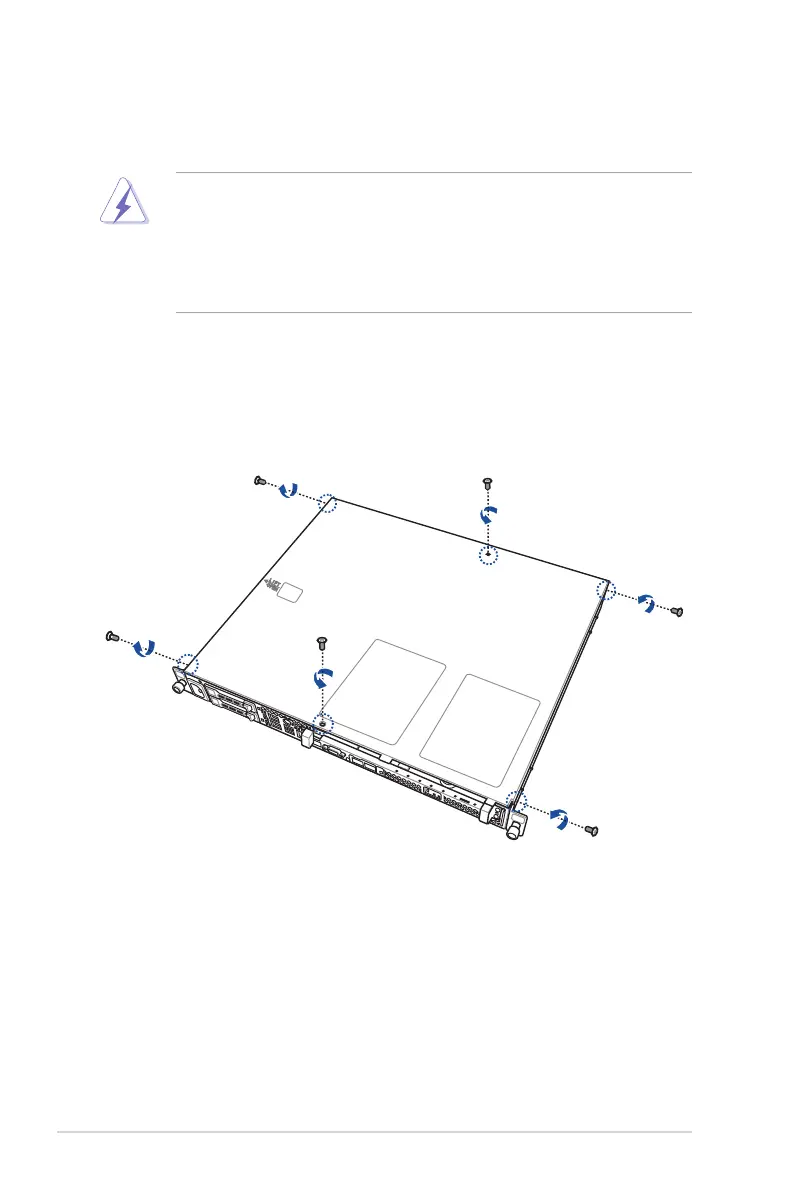
To open the chassis cover:
1. Loosen the six thumbscrews on the cover with a Phillips screwdriver to release the
cover from the chassis.Keep the screws for later use.
• Unplugthepowercordfromthepowerconnectorbeforeremovingthecover.
• Becarefulwhenremovingthechassiscover.Whenremovinganysystemcomponent,
becarefulwiththeCPUfan,chassisfanandothersharpedgetoavoidhurtingyour
ngers.
• Theillustrationsinthischapterareforreferenceonly.Theappearancemayvary
dependingonthemodel,buttheinstallationstepsarebasicallythesame.













 To Next Page