Chapter 2: Hardware setup
2-24
2.7 Removable/optional components
You may need to remove previously installed system components when installing or removing
systemdevices.Oryoumayneedtoinstalltheoptionalcomponentsintothesystem.This
sectiontellshowtoremove/installthesystemfans:
Ensure that the system is turned off before removing any components from your system.
2.7.1 System fans
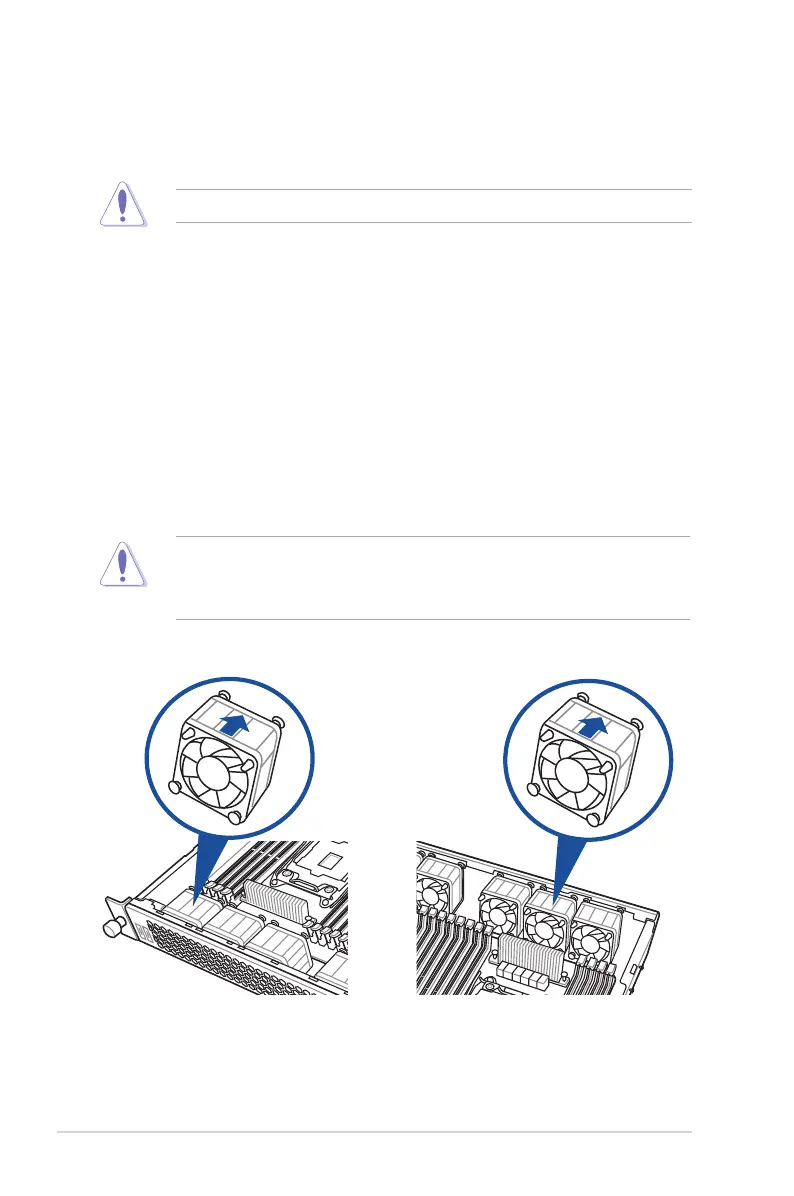
Touninstallthesystemfans:
1. Disconnect the system fan cable from the fan connector on the motherboard.
2. Liftthefan,thensetaside.
3. Repeat steps 1 to 2 to uninstall the other system fans.
To reinstall the system fans
1. Insert the fan to the fan cage.
RS400-E8-PS2 RS400-E8-PS2-F
2. Connect the system fan cable to the fan connector on the motherboard.
Ensurethatthefansareinstalledinthecorrectdirection.ForRS400-E8-PS2,theairow
directional arrow on the fan side should point to the inner part of the chassis; for RS400-
E8-PS2-F,theairowdirectionalarrowonthefansideshouldpointtotheouterpartofthe
chassis













 To Next Page