2-17
ASUS RS400-E8-PS2, RS400-E8-PS2-F
2.5 Expansion slot
2.5.1 Installing an expansion card to the riser card bracket
The barebone server comes with two riser card brackets allowing you to install PCI Express
x8 or x16 expansion cards.
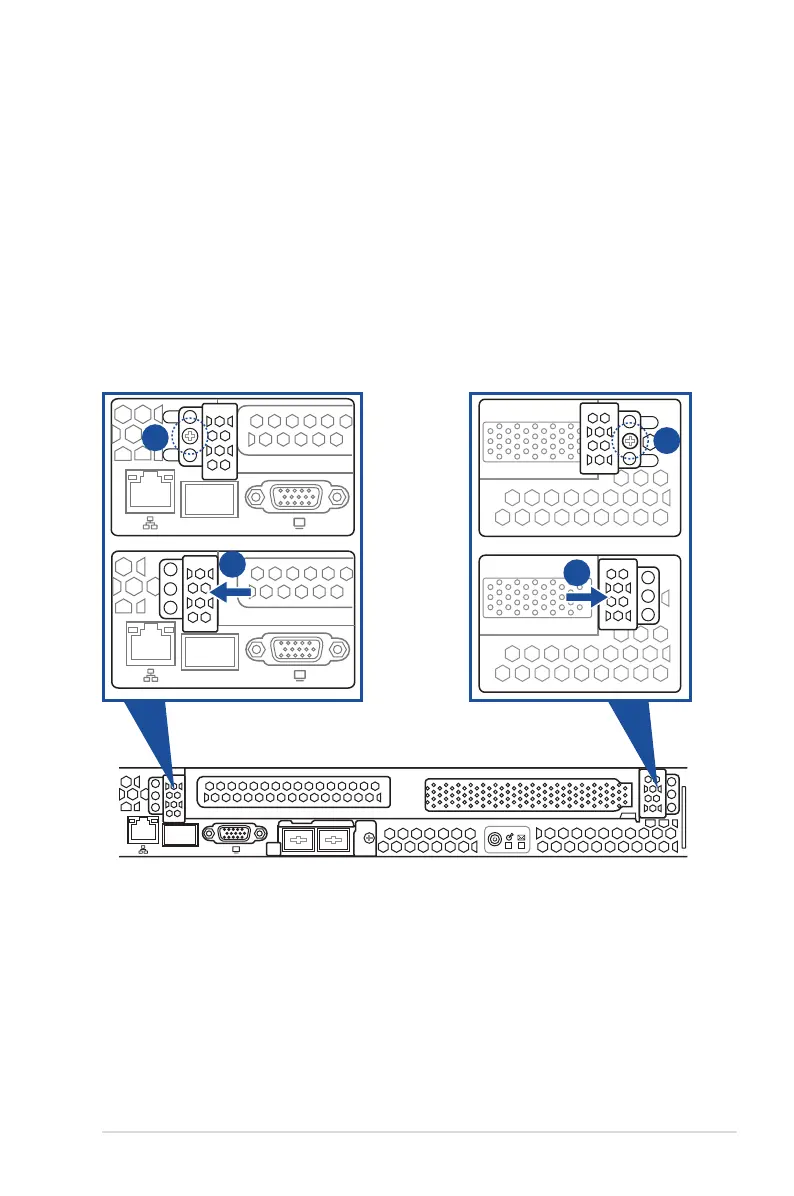
Openthesecurelock
Beforeunmountingtherisercardbracket,followthestepsbelowtoopenthesecurelock:
1. Remove the screws on the secure lock of the reiser card bracket using a screw driver
(one on each side).
2. Push the right secure lock to the right and the left secure lock to the left to release the
riser card bracket. Then remove the riser card bracket.
Q-Code
1
Q-Code
1
Q-Code
1
1
2
1
2













 To Next Page