2-7
ASUS RS400-E8-PS2, RS400-E8-PS2-F
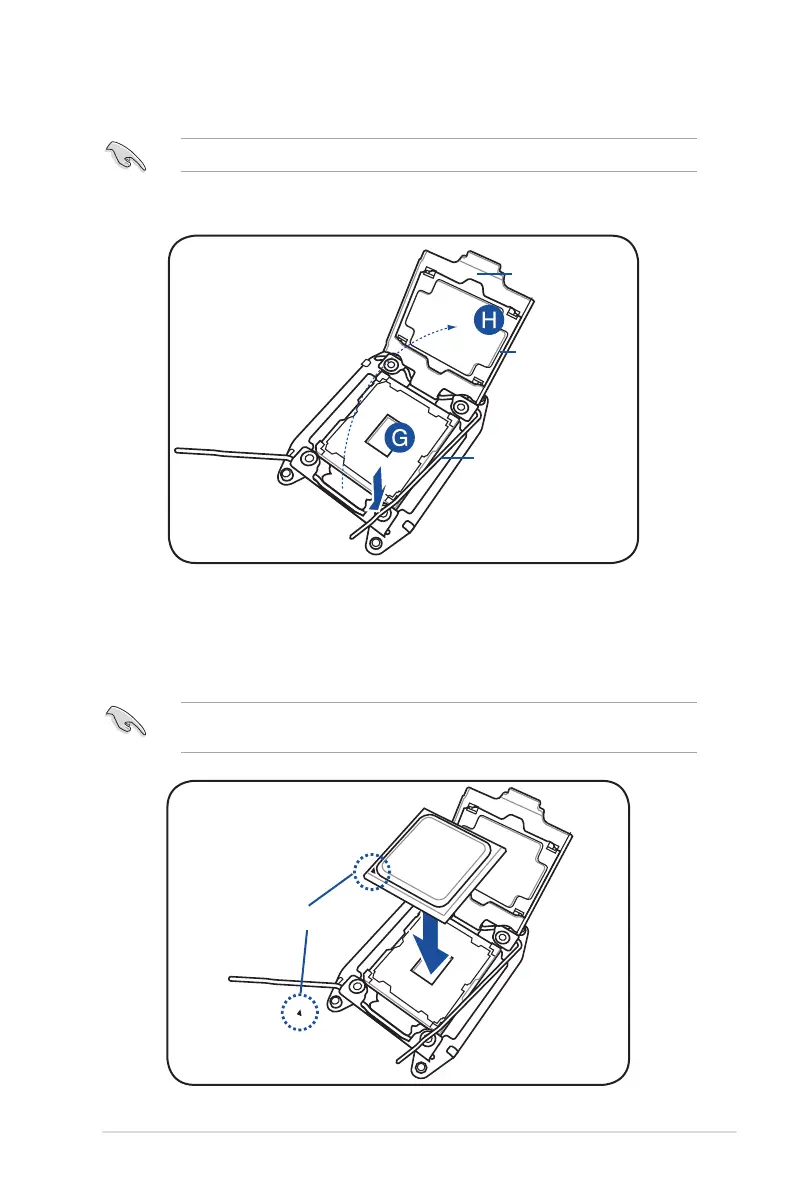
5. Gently push the right load lever down to slightly lift the load plate (G).
Do not insert the load lever into the retention tab.
6. Hold the edge then gently lift the load plate (H).
Load plate
Load lever
edge of the Load plate
TheCPUtsinonlyonecorrectorientation.DONOTforcetheCPUintothesocketto
preventbendingtheCPUpinsonthesocket.
7. GettheCPU.
8. AlignandpositiontheCPUoverthesocketensuringthatthetrianglemarkontheCPU
matches the triangle mark on the socket box.
Triangle mark
9. InstalltheCPUintotheslot.













 To Next Page