46
4 MACHINE DESCRIPTION / CONTROLS
RT-75 / RT-75HD US O&M
0405-073 2020-07
4.11 Premium Operator Interface
The operator interface allows the operator to monitor machine systems. Data is
displayed in various formats to keep the operator informed during operation. The
display is equipped with a user friendly touch screen. To make a selection, simply
touch the screen over active selection options to open sub-menus and screens.
User Guide - Initial View
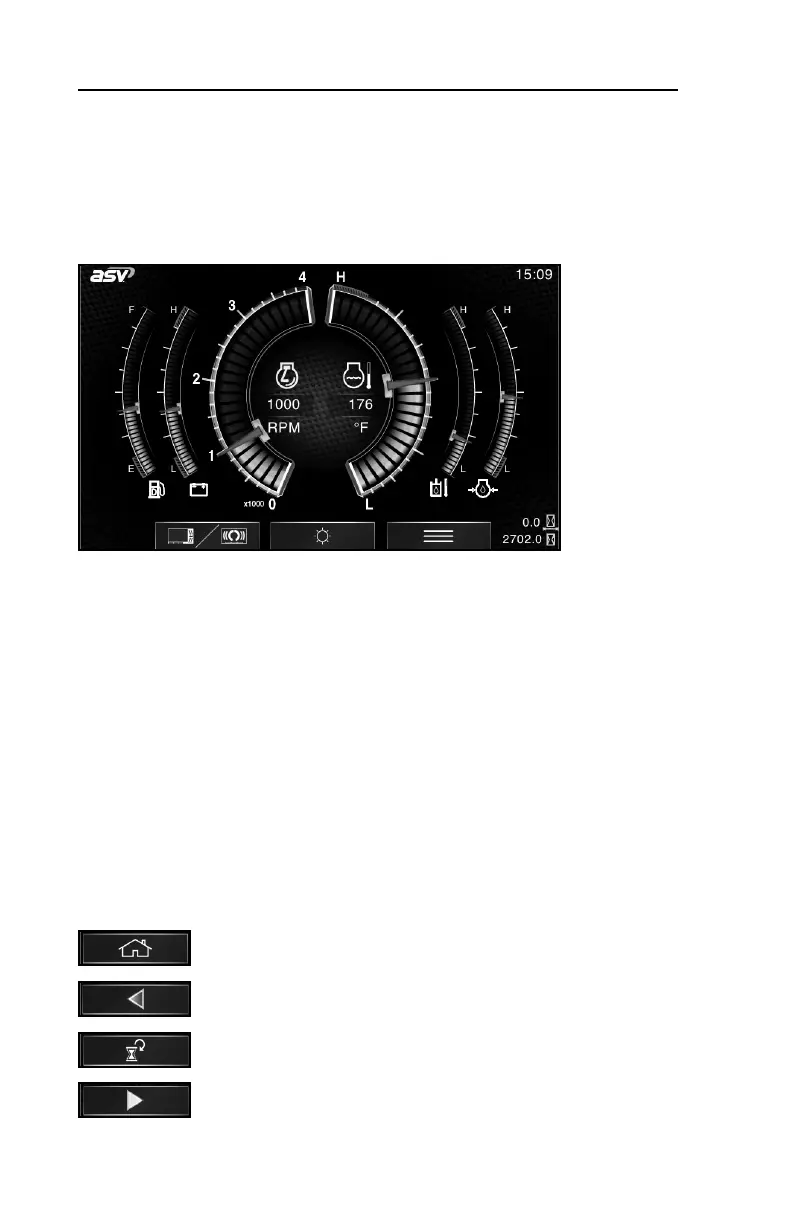
When the key is turned on, the operator interface powers up to display the full
gauge screen as shown (or password lock screen if enabled, see pg. 54). This
screen displays many critical operating parameters such as: engine RPM, engine
oil pressure, engine coolant temperature, hydraulic oil temperature, fuel level and
battery voltage. Total engine hours and trip engine hours are also displayed.
The selection bar visible on the bottom of this screen allows the operator to:
• Toggle between auto backup camera (full gauge screen) and split-screen
(gauges and backup camera) modes (left). This selection will not be present if
the backup camera is disabled.
• Access the brightness adjustment screen (middle).
• Access the main menu (right).
To access these sub-menus / screens, touch the screen over the desired icon.
User guide - Common Selections
To return to the gauge screen from sub-menus or screens, press
the “home” icon.
To return to the previous screen, press the left arrow. Other
directional arrows may appear to toggle between options.
To reset maintenance or job clocks, press the “reset” icon.
To start a job clock, press the “play” icon.



 To Next Page