- 54 -
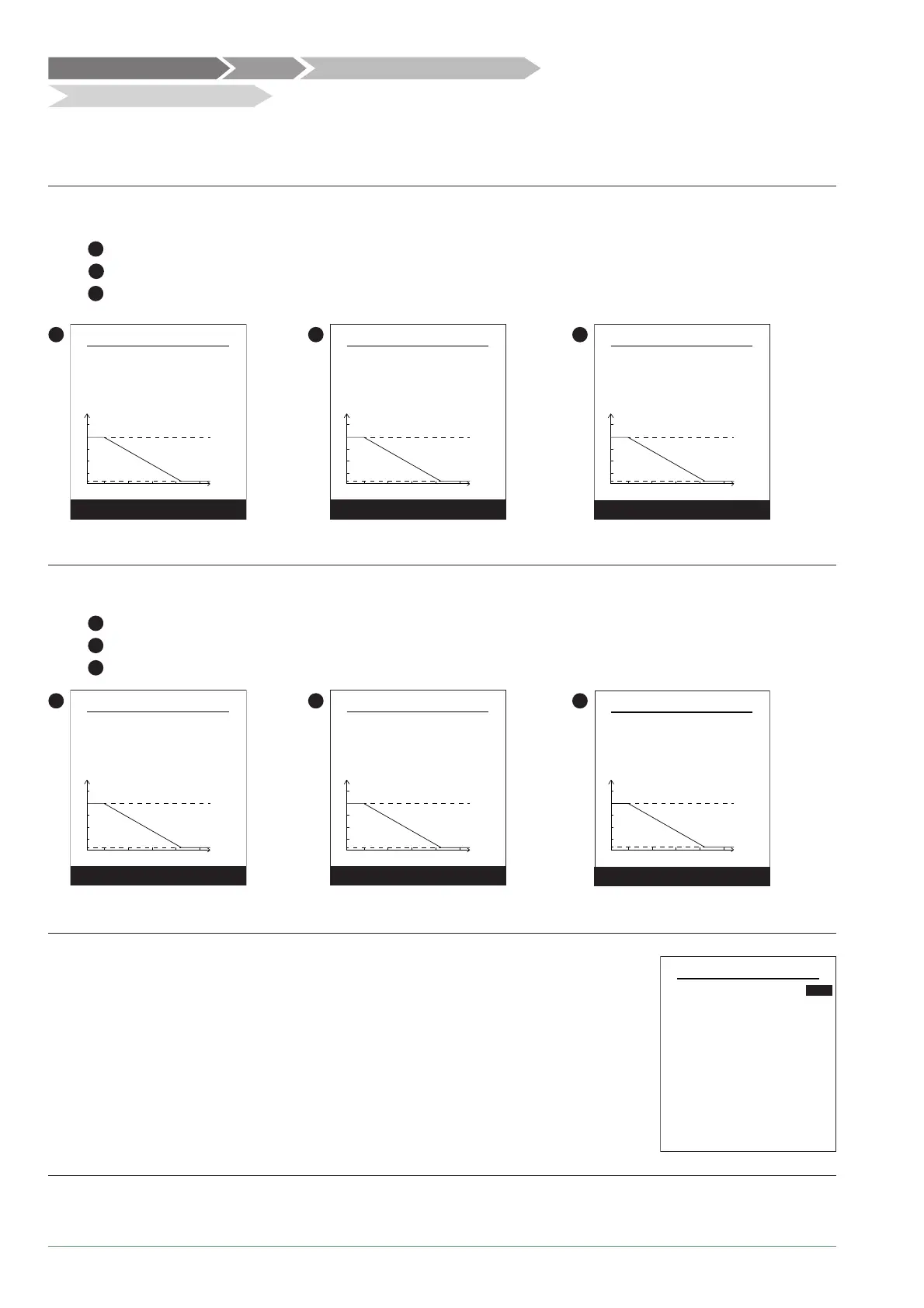
Choose the temperature control to adjust: "Heating".
Two methods for adjusting the temperature control are available: fl ow temperature or gradient control.
● Control using fl ow temperature
1
- Set "Room T° infl uence" then select "Advanced settings".
2
- Set "Display" to "fl ow T°". Set "fl ow T° to -10°C" and "fl ow T° to +20°C".
3
- Set "Max fl ow T°" and "Min fl ow T°".
1
Area 1 Heating
Room T° infl uence
Outd. T°
20-10
65
50%
fl ow T°
Advanced settings
15
fl ow T° at -10°C 34°C
2
Display
fl ow T°
fl ow T° at -10°C
fl ow T° at +20°C
34°C
21°C
Area 1 Heating
Outd. T°20-10
15
65
fl ow T°
Next
3
Max fl ow T°
Min fl ow T°
Outd. T°
20
-10
15
65
55°C
17°C
fl ow T°
Complete
Area 1 Heating
● Control using gradient
1
- Set "Room T° infl uence" then select "Advanced settings".
2
- Set "Display" to "Gradient". Set "Gradient" and "Off -set".
3
- Set "Max fl ow T°" and "Min fl ow T°".
1
Area 1 Heating
Room T° infl uence
Outd. T°
20-10
65
50%
fl ow T°
Advanced settings
15
fl ow T° at -10°C 34°C
2
Display
Gradient
Gradient
Off-set
0,5
0°C
Area 1 Heating
Outd. T°20-10
15
65
fl ow T°
Next
3
Max fl ow T°
Min fl ow T°
Outd. T°20-10
15
65
55°C
17°C
fl ow T°
Complete
Area 1 Heating
● Use 100% ambient temperature
If set to use 100%, adjust the radiator type.
Room T° infl uence
Emitters type
100%
Radiator
Area 1 Heating
Max fl ow T°
Min fl ow T°
55°C
17°C
Control / Temperature control
Temperature control
Hydraulic confi guration Area 1
Alfea Extensa A.I. R32 / INSTALLATION / 2114 - EN




 To Next Page