- 60 -
►
System status
System status
Active functions
Control panel
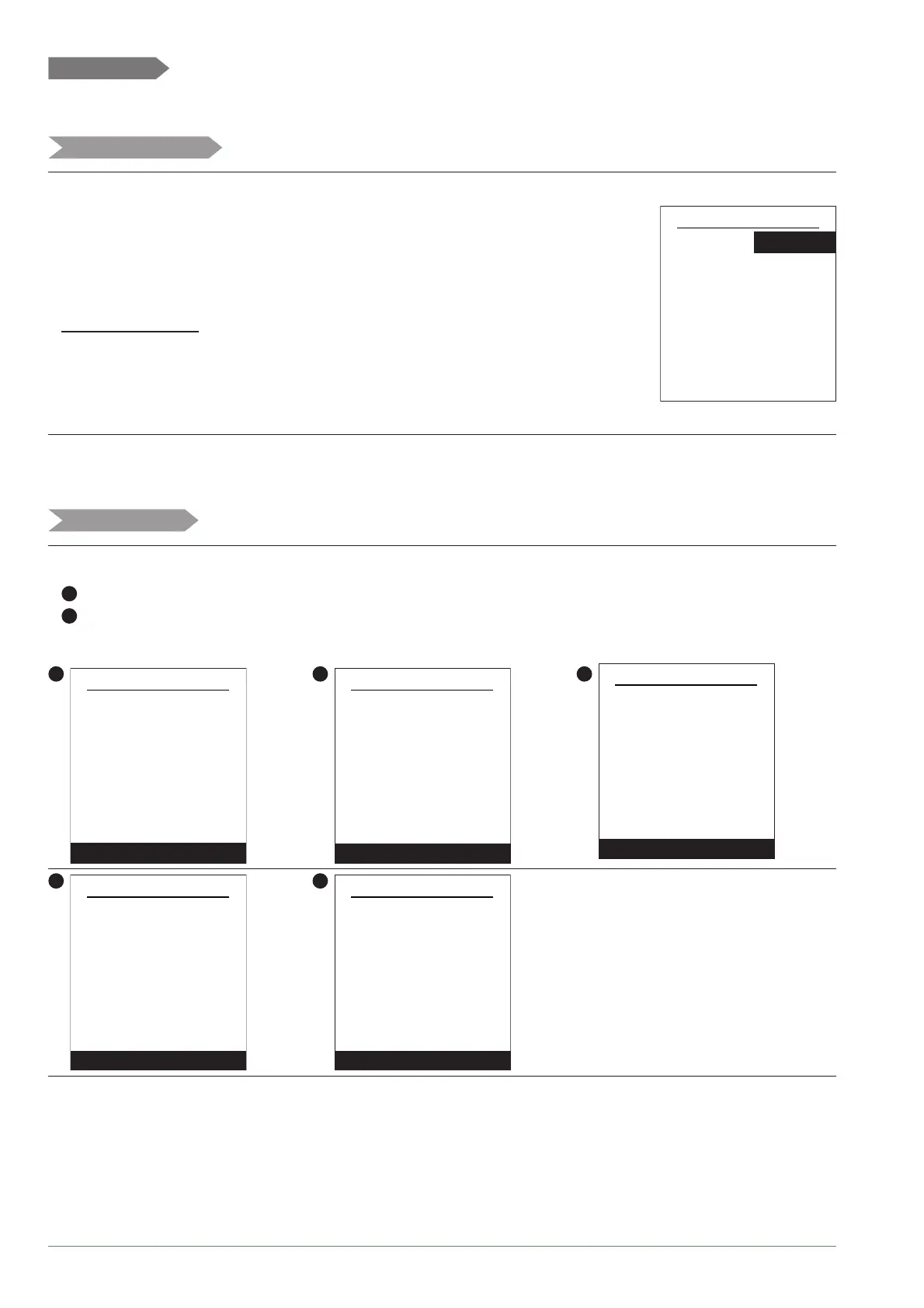
The "Active Functions" page tells you which services are operating and allows you to
change their status.
-"Indoor comfort": Heating / Cooling / Stop.
- "Area 1" / "Area 2" / "Hot water" / " Emergency mode" : ON / Stop.
If "Indoor Comfort" is set to "Stop", Area 1 and 2 cannot be modifi ed.
"Emergency mode" :
"Stop" : The HP is operating normally (with backup if necessary).
"Start" : The HP is using the backup heating or boiler connection.
Use the "Start" setting only in emergency or test mode
as your heating bill could be large.
Active functions
Area 1 Start
Indoor comfort Heating
StartArea 2
Start
Stop
Hot water
Emergency mode
The "Control Panel" allows you to see the status of the diff erent functions and actuators.
1
- Press the knob to access the "Control Panel" second screen.
5
- Press the knob to return to the "System Status" menu.
1
Control panel
Next
Generator 40%
Return T° 50°C
Mode Heating
Elec. backup Stop
HP circulation pump ON
Flow setpoint 26°C
Flow temp 60°C
Outdoor T° 20°C
2
Control panel
Next
Setpoint T° 20°C
Area 1
Flow T° setpoint 26°C
3
Control panel
Next
Setpoint T° 20°C
Area 2
Flow T° setpoint
26°C
Flow temp 22°C
Circulation ON
Valve Opening
4
Control panel
Next
Setpoint T° 55°C
DHW
T° 52°C
Valve Circuit
Back-up ON
5
Control panel
Complete
Power shedding input Inactive
Off-peak hours input Active
External fault input Inactive
Alfea Extensa A.I. R32 / INSTALLATION / 2114 - EN




 To Next Page