Setting Up Your t170
Positioning Your t170
12
Step 2: Understand Your Stand / VESA Mount Kit for t170
The stand for your t170 is dual-purpose: it can be used as a stand or as a VESA mount kit. All screws of dierent types
supplied with the stand / VESA mount kit can be stored away inside the main bracket when not needed.
Screws Stored Away inside the Bracket
The following gure shows dierent types of screws stored away inside the main bracket.
Screw Type Number Description
1 2
The largest-size screws used to secure the bracket to a monitor as a VESA mount if
the middle-size screws cannot rmly secure the bracket and your t170 to the monitor.
2 4
The middle-size screws used to secure the bracket to your t170 and to a monitor
when using the bracket as a VESA mount.
3 1 The smallest-size screw used to secure the bracket to your t170 as a stand.
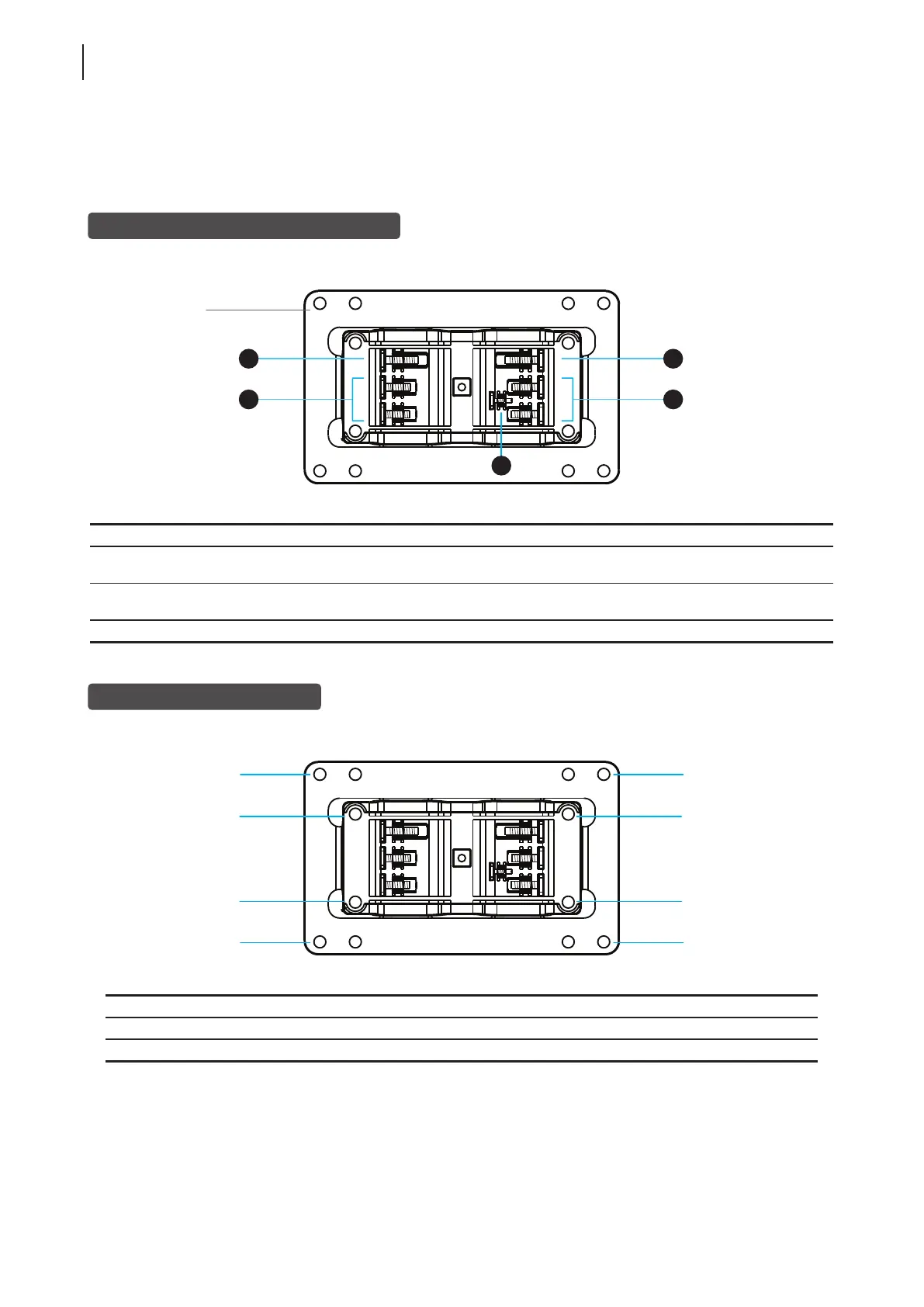
Mount Holes on the Bracket
Refer to the following gure and descriptions for the VESA mount holes on the bracket.
Mount Hole Description
1 The VESA mount holes used to secure the bracket to a monitor (only two of them will be used).
2 The VESA mount holes used to secure the bracket to your t170 (only two of them will be used).
1
2
1
2
3
Dual-purpose
bracket
1
2
1
2
1
2
1
2



 To Next Page