e-tron
@ Tips
- The device runs a self test after power has
been restored to the control unit.
- You can activate a PIN for the control unit
¢page 115.
- The vehicle cannot be started if a charging
connector is connected .
Before charging
Applies to: vehicles with plug- in hybrid drive
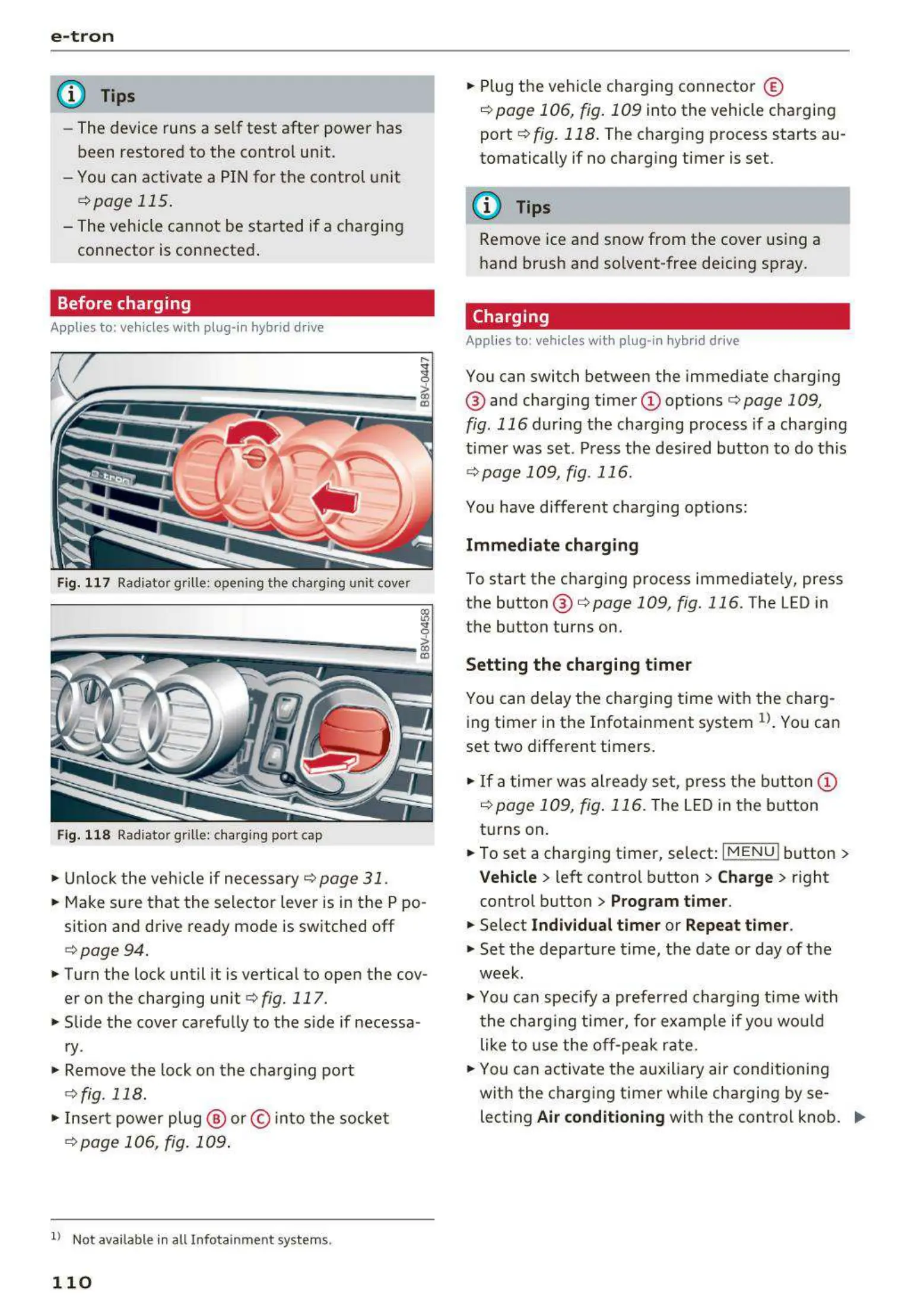
Fig. 117 Radiator grille: opening the charging unit cover
lll
~;:::;::.::.=;;.;;;:;;:--------- !
Fig. 118 Radiator grille: charging port cap
.. Unlock the veh icle if necessary¢ page 31 .
.. Make sure that the selector lever is in the P po -
sition and drive ready mode is switched off
¢ page 94 .
.. Turn the lock until it is vertical to open the cov-
er on the charging unit ¢
fig. 117.
.. Slide the cover carefully to the side if necessa -
ry .
.. Remove the lock on the charging port
¢ fig. 118.
.. Insert power plug @ or © into the socket
¢p age 106, fig. 109 .
ll Not availab le in a ll Infotainment systems.
110
.. Plug the vehicle charging connector ©
¢ page 106, fig. 109 into the vehicle charging
port
¢ fig. 118. The charging process starts au-
tomatically if no charging timer is set.
(D Tips
Remove ice and snow from the cover using a
hand brush and solvent-free deicing spray.
Charging
Applies t o: vehicles wit h pl ug -in hybrid drive
You can switch between the immediate charging
@ and charging timer
<I) options¢ page 109,
fig. 116 during the charging process if a charging
timer was set . Press the desired button to do this
¢ page 109, fig. 116.
You have different charging options:
Immediate charging
To start the charging proc ess immediately, press
the button @ ¢
page 109, fig. 116 . The LED in
the button turns on.
Setting the charging timer
You can delay the charging time with the charg-
ing timer in the Infotainment system
1
>. You can
set two different timers .
.. If a timer was already set, press the button @
i:!.> page 109, fig. 116. The LED in the button
turns on.
.. To set a charging timer, select:
I MENU ! button >
Vehicle > left control button > Charge > right
control button
> Program timer.
.. Select Individual timer or Repeat timer .
.. Set the departure time , the date or day of the
week .
.. You can specify a preferred charging t ime with
the charging timer, for example if you would
like to use the off-peak rate.
.. You can activate the auxiliary air conditioning
with the charging timer while charging by se-
lecting
Air conditioning with the control knob. ..,_



 To Next Page