e-tron
After charg ing
Applies to: vehicles with plug-in hybrid drive
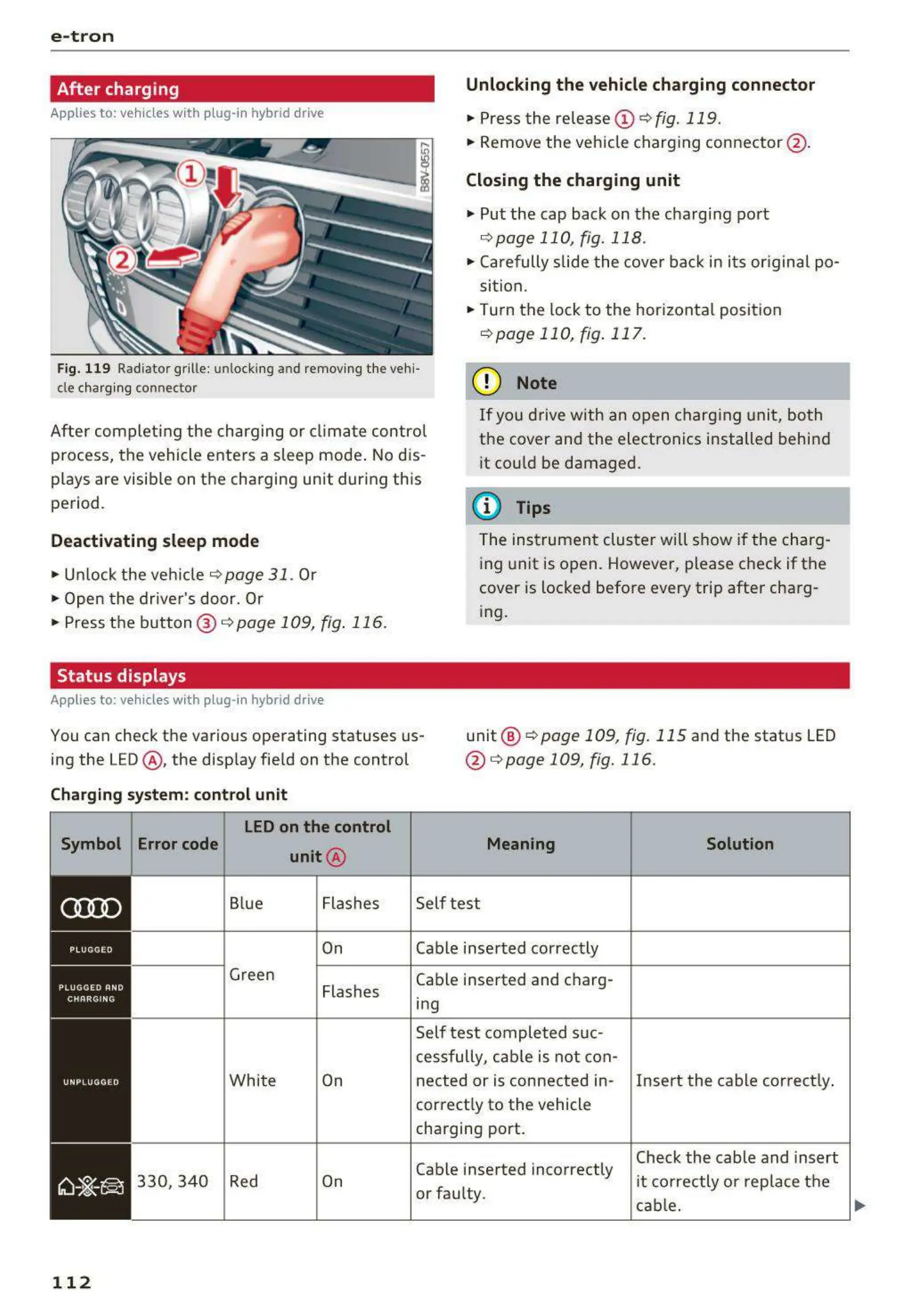
Unlocking the vehicle charging connector
.,. Press the re lease (i) ¢ fig.119 .
.,. Remove the veh icle charg ing conne ctor @ .
Closing the charging unit
.,. Put the cap back on the charg ing port
¢ page 110, fig. 118 .
.,. Carefully slide t he cove r bac k in it s or igina l po-
sit ion .
.,. Turn the lock to the hor izonta l position
¢ page 110, fig. 117.
Fig. 119 Radiator grille : unlocking and removing t he vehi-
cle charging connector
(D Note
Aft er com pleti ng the cha rging or climat e control
p rocess, t he vehicle enters a sleep mode . No d is-
plays are visib le on t he cha rging unit dur ing this
pe riod .
If you drive with an open charg ing unit, both
the cover and the electronics installed behi nd
it could be damaged .
(D Tips
Deactivating sleep mode
.,. Unlock the ve hicle ¢ page 31 . Or
.,. Open t he driver's door. Or
.,. Press t he button @ ¢
page 109, fig. 116 .
Status displays
Applies to: vehicles with plug- in hybrid drive
The ins t rumen t clu ster will show if the charg-
ing unit is open. However, please check if the
cover is locked befo re every trip after cha rg-
ing .
You can check the various ope rating statuses us-
ing the LED@ , the disp lay fie ld on the control
unit @
¢ page 109, fig. 115 and the status LED
@ ¢
page 109, fig. 116 .
Charging system: control unit
Symbol Error code
LED on the control
unit @
Blue Flashes
On
Green
Flash es
Whi t e On
330, 340 Red On
112
Meaning
Self test
Cable inse rted correctly
Cable inserted and charg-
ing
Self test comple t ed suc-
cessfully, cab le is not con-
Solution
nected or is connected in- Insert the cable cor rect ly.
correct ly to the vehicle
charging port.
Cable inse rted incorrectly
or fau lty.
Check the cable and insert
it correctly o r rep lace t he
cab le.
1)1,,



 To Next Page