Navigation
.,. Select: left control button > Geographical coor-
dinates .
- Select Latitude / Longitude.
- Press the control knob to set t he individua l val-
ues.
- Turn the cont rol knob to the left/r ight to
change the se lected value .
- Select and confirm
Start route guidance.
Adding a stopover
Applies to: vehicles with navigation system
You can enter an additional destination when
route guidance is active .
_________ N_a_v_,_g_a_t _,o_n_ . _F_n_t _e_, _d_e_,_1_, n_a _t,_o_n ________
~~
jl1 Bear Vall ey Rd 79 9 m;
' HC'spcria. CA, 92345 1:22 AM
J Cance l route g~1dance ::0 -·-·-·-
.JI' Elias Thomas Snack Bar
' 111 N Hill St, Los Angeles, CA
Delete stopover ====~lfJ
250yd
6:05 AM
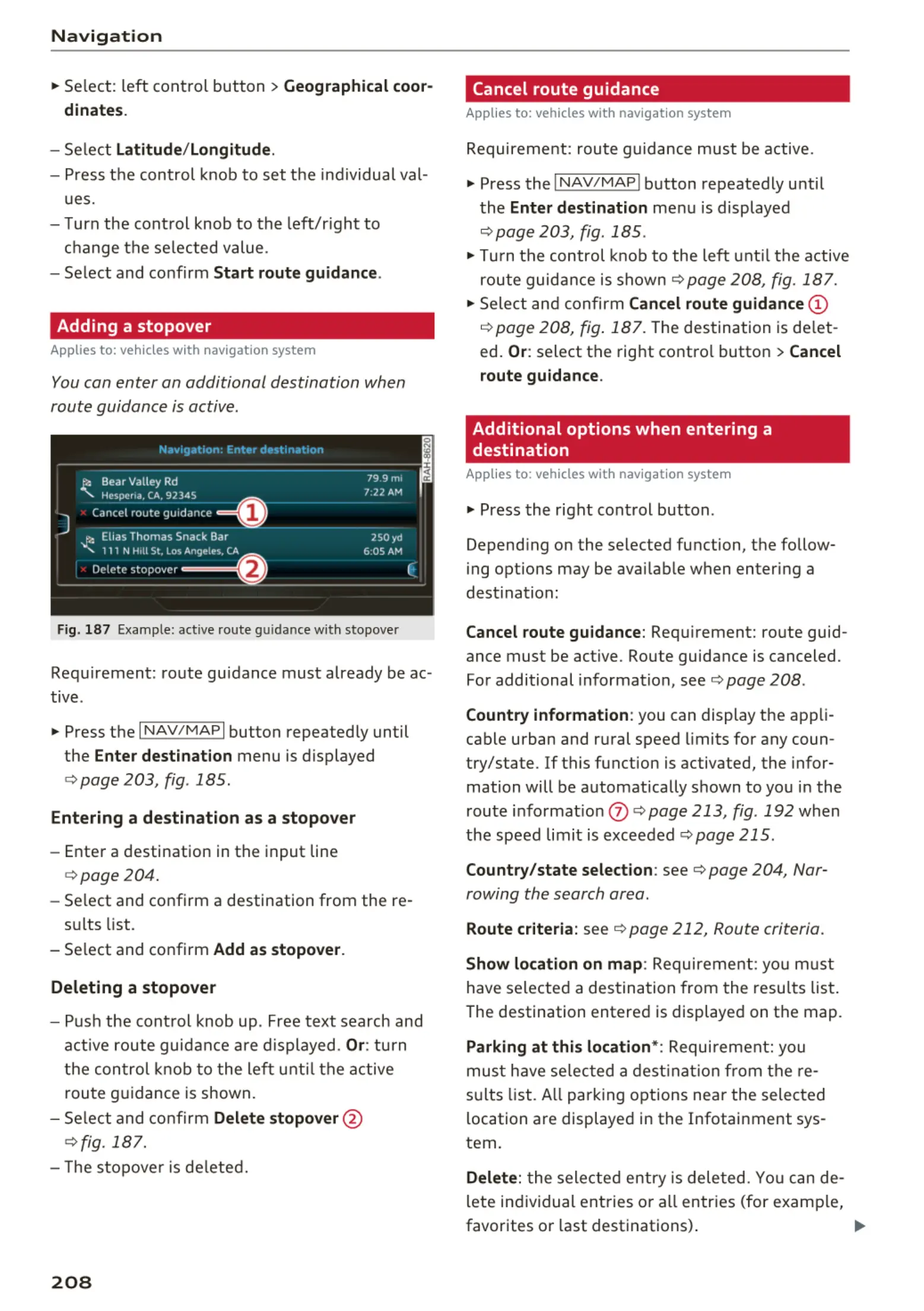
Fig. 187 Example: active route guidance w ith stopover
Requirement: route guidance must already be ac-
tive .
.,. Press the
I NAV/MAPI button repeatedly until
the
Enter destination menu is displayed
¢ page 203, fig . 185 .
Entering a destination as a stopover
- Enter a destination in the input line
¢ page 204.
- Se lect and confirm a destination from the re -
sults list .
- Select and confirm
Add as stopover.
Deleting a stopover
- Push the cont rol knob up . Free text search and
active route guidance are displayed.
Or: turn
the control knob to t he left until the active
route guidance is shown.
- Select and confirm
Delete stopover @
¢ fig. 187.
- The stopove r is deleted.
208
Cancel route guidance
Applies to: vehicles with navigation system
Requirement: route gu idance must be active.
.,. Press the
I NAV/MAPI button repeatedly until
the
Enter destination menu is displayed
¢ page 203, fig. 185 .
.,. Turn the control knob to the left until the active
route guidance is shown¢
page 208, fig. 187 .
.,. Select and confirm Cancel route guidance (D
¢ page 208, fig. 187. The destination is de let -
ed.
Or: select the right contro l button > Cancel
route guidance.
Additional options when entering a
destination
Applies to: vehicles with navigation system
.,. Press the right control button .
Depend ing on the selected function, the follow-
ing opt ions may be avai lable when entering a
dest ination:
Cancel route guidance: Requ irement: route guid-
ance must be active. Route guidance is canceled.
For additional information, see ¢ page 208 .
Country information : you can display the app li-
cab le urban and rural speed limits for any coun -
try/state. If this function is activated, the infor-
mation will be automatically shown to you in the
route informat ion
(J) ¢ page 213 , fig . 192 when
the speed limit is exceeded
¢ page 215.
Country/state selection: see¢ page 204, Nar-
rowing the search area .
Route criteria: see ¢ page 212, Route criteria .
Show location on map: Requirement: you must
have se lected a destination from the results list.
The destination entered is displayed on the map .
Parking at this location* : Requirement: you
must have se lected a destination from th e re-
su lts list . All parking options near the selected
location are displayed in the Infotainment sys-
tem.
Delete: t he selected entry is deleted. You can de-
lete individual entries or a ll entries (for examp le,
favorites or last destinations) .
...



 To Next Page