a
co
......
N
r--.
N
......
0
0
:E
'<I'
Audi connect at this location *: Requirement: you
must have selected a destination from the re-
sults list . Allows you to search for items in the vi-
cinity of the selected location, such as
Travel in-
formation.
Online traffic data* :
the on line traffic informa-
tion
r::;, page 219 can be switched on or off .
Add destination to contact : see r::;, page 211.
Store as favorite : see r::;, page 211 .
Voice guidance: see r::;,page 212.
Navigation settings: seer::;, page 211 .
(D Tips
Information on online traffic data* can also
be found online at www.audiusa.com.
Personal route
assistance
Applies to: vehicles with navigation system and personal
route assistance
Your MMI con learn the routes you drive fre-
quently and, depending on the current vehicle
position, suggest route guidance (for example,
your doily commute to work and back).
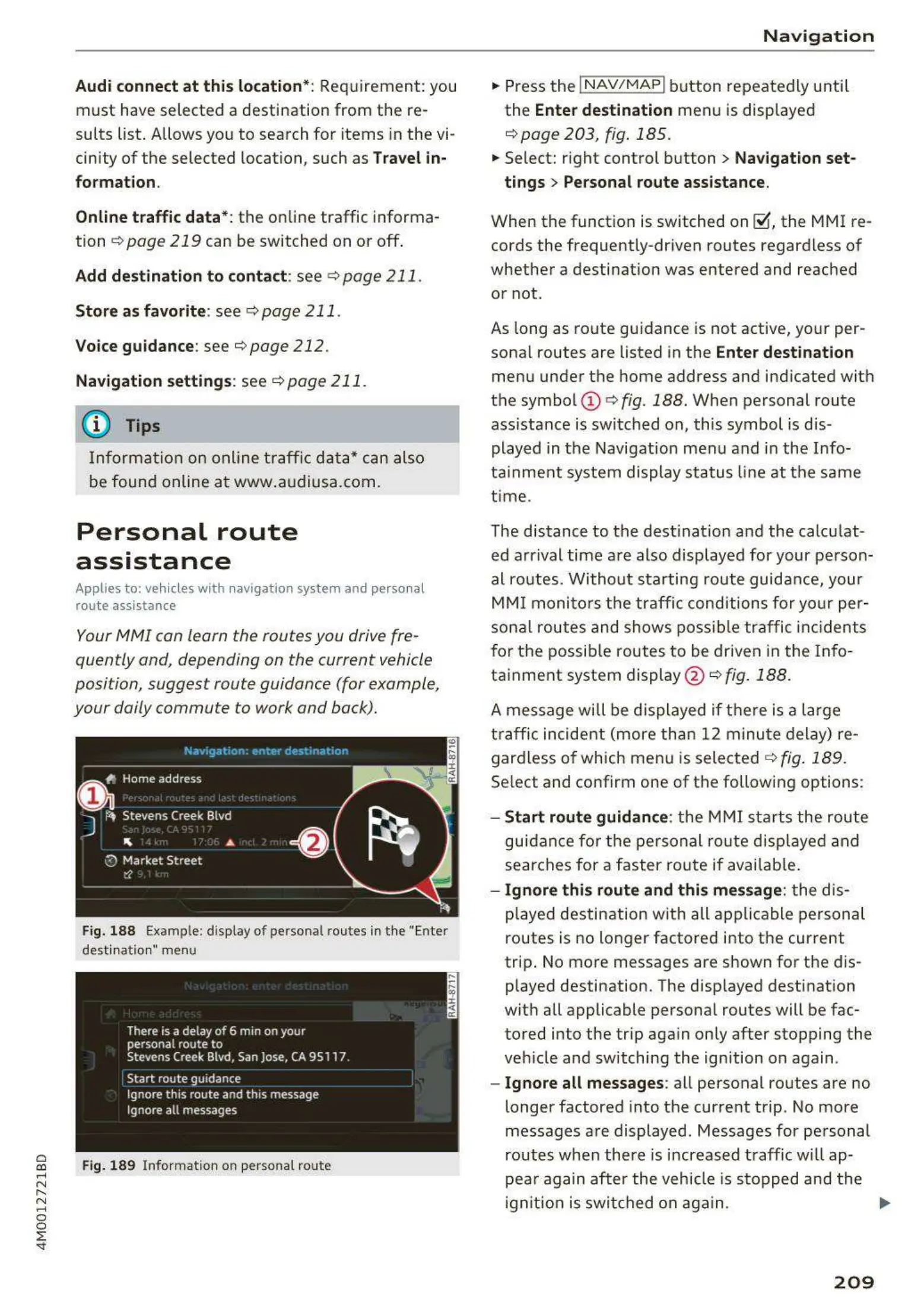
Fig. 188 Example : display of personal routes in the "Enter
desti natio n" me nu
Fig. 189 Info rmation on perso nal route
Navigation
" Press the !NAV/MAPI button repeatedly until
the
Enter destination menu is displayed
r::;, page 203, fig . 185.
" Select: right control button > Navigation set-
tings > Personal route assistance.
When the function is switched on~. the MMI re-
cords the frequently-driven routes regardless of
whether a destination was entered and reached
or not.
As long as route guidance is not active, your per-
sonal routes are listed in the
Enter destination
menu under the home address and indicated with
the symbol
(D r::;, fig. 188. When personal route
ass istance is switched on, this symbol is dis-
played in the Navigation menu and in the Info-
tainment system display status line at the same
time .
The distance to the destination and the calculat-
ed arrival time are also displayed for your person-
al routes. Without starting route guidance, your
MMI monitors the traffic conditions for your per-
sonal routes and shows possible traffic incidents
for the possible routes to be driven in the Info-
tainment system display @ r::;,
fig. 188.
A message will be displayed if there is a large
traffic incident (more than 12 minute delay) re-
gardless of which men u is selected
r::;, fig . 189.
Select and confirm one of the following options:
- Start route guidance: the MMI starts the route
guidance for the personal rout e displayed and
searches for a faster route if available.
- Ignore this route and this message: the dis-
played destination with all applicable personal
routes is no longer factored into the cur rent
trip . No more messages are shown for the dis-
played destination. The disp layed destination
with all applicable personal routes will be fac-
tored into the trip aga in only after stopping the
veh icle and switching the ign ition on again .
- Ignore all messages: all personal routes are no
longer factored into the current trip. No more
messages are displayed. Messages for personal
routes when there is increased traff ic will ap-
pea r again after the vehicle is stopped and the
ign it ion is switched on again . .,.
209



 To Next Page