a
co
......
N
r--.
N
......
0
0
:E
'<I'
the inside of the vehicle in a crash and cause
serious injuries. Store these types of devices
securely while driving.
- Do not use any wireless devices on the front
seats within range of the airbags while driv-
ing. Also read and follow the warnings in
c::> page 2 73, Front airbags .
CD Note
- Always follow the information found in c:>@
in Wi-Fi hotspot on page 194 .
- Please note that there generally are addi-
tional costs when using an online media
service account, especially when it is used
internationally .
(D Tips
- Depending on the Internet connection and
network traffic, a connection loss can occur
during playback of on line media services.
- Online media and Internet radio usage de-
pends on the service availability of the third
party provider .
- Audi AG simply makes the access to online
media services possible through the MMI
and does not take any responsibility for the
contents of the online media services.
- Always read the chapter
c::> page 194, Audi
connect (Infotainment) general informa-
tion .
- Depending on the mobile device used, there
may be interruptions during media playback
and when using the
Audi MMI connect app.
To avoid interruptions when using a mobile
device, do not lock the screen on your mo-
bile device and keep the
Audi MMI connect
app in the foreground .
- Contact an authorized Audi dealer or au-
thorized Audi Service Facility for additional
information about online media .
Media
Multimedia connections
USB adapter for Audi music interface or
USB charging port
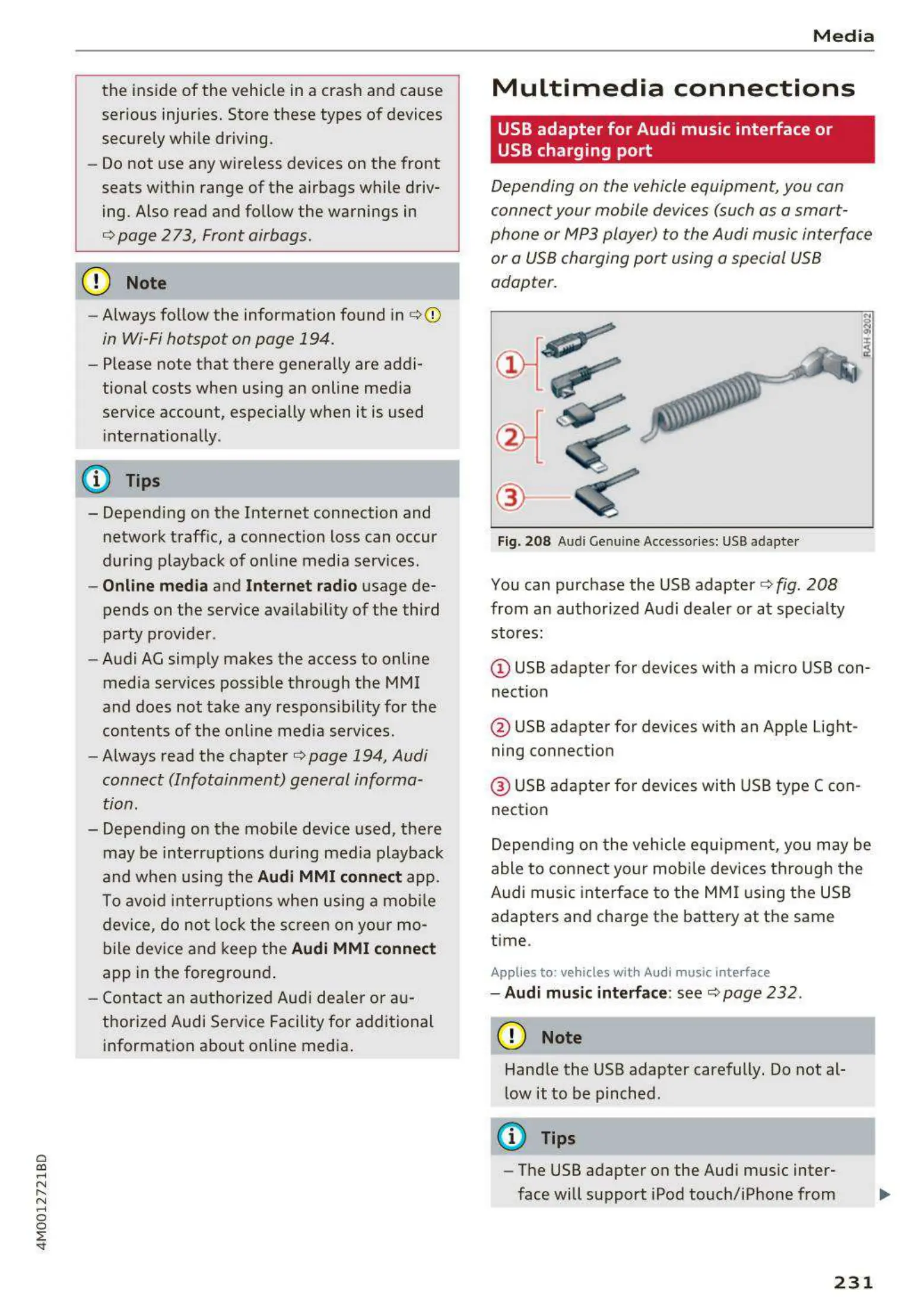
Depending on the vehicle equipment, you can
connect your mobile devices (such as a smart -
phone or MP3 player) to the Audi music interface
or a USB charging port using a special USB
adapter.
@-
Fig. 208 Audi Genuin e Accessories: USB adapter
You can purchase the USB adapter c::> fig. 208
from an authorized Audi dealer or at specialty
stores:
I
(D USB adapter for devices with a micro USB con-
nection
@ USB adapter for devices with an Apple Light-
ning connection
@ USB adapter for devices with USB type C con-
nection
Depending on the vehicle equipment, you may be
able to connect your mobile devices through the
Audi music interface to the MMI using the USB
adapters and charge the battery at th e same
time .
Applies to : vehicles wit h Audi music interface
- Audi music interface : see c::> page 232 .
CD Note
Handle the USB adapter carefully. Do not al-
low it to be pinched.
@ Tips
- The USB adapter on the Audi music inter-
face will support iPod touch/iPhone from
231



 To Next Page