Diamond PD Power Drive : Instruction Manual
Dominator Instruction Manual AM800, AM808 & AM888
13
© Copyright 2017
6.4 Setting Speed and Limits
6.4.1 Setting Speed Mode
The default speed of the operator has been set to suit the majority of
applications. However, there are 3 speed modes available if required:
The speed settings can only be changed before setting the travel limits. If
the operator speed needs to be changed, please complete the following
steps below. If medium (default) mode is appropriate skip straight to
Section 6.3.2 (Setting Travel Limits). Pressing the OPERATE button will
cycle through all three speed modes. To change the speed setting, use
the following steps:
a. Engage the C-Rail’s trolley (attached to the door via the arms) with the
chain index by moving the door.
b. If the trolley does not “click” firmly onto the chain index, ensure that
the manual release cord is not in the disengaged position by pulling it
backwards.
c. Turn on the power to the operator. The Close Limit LED will be
flashing.
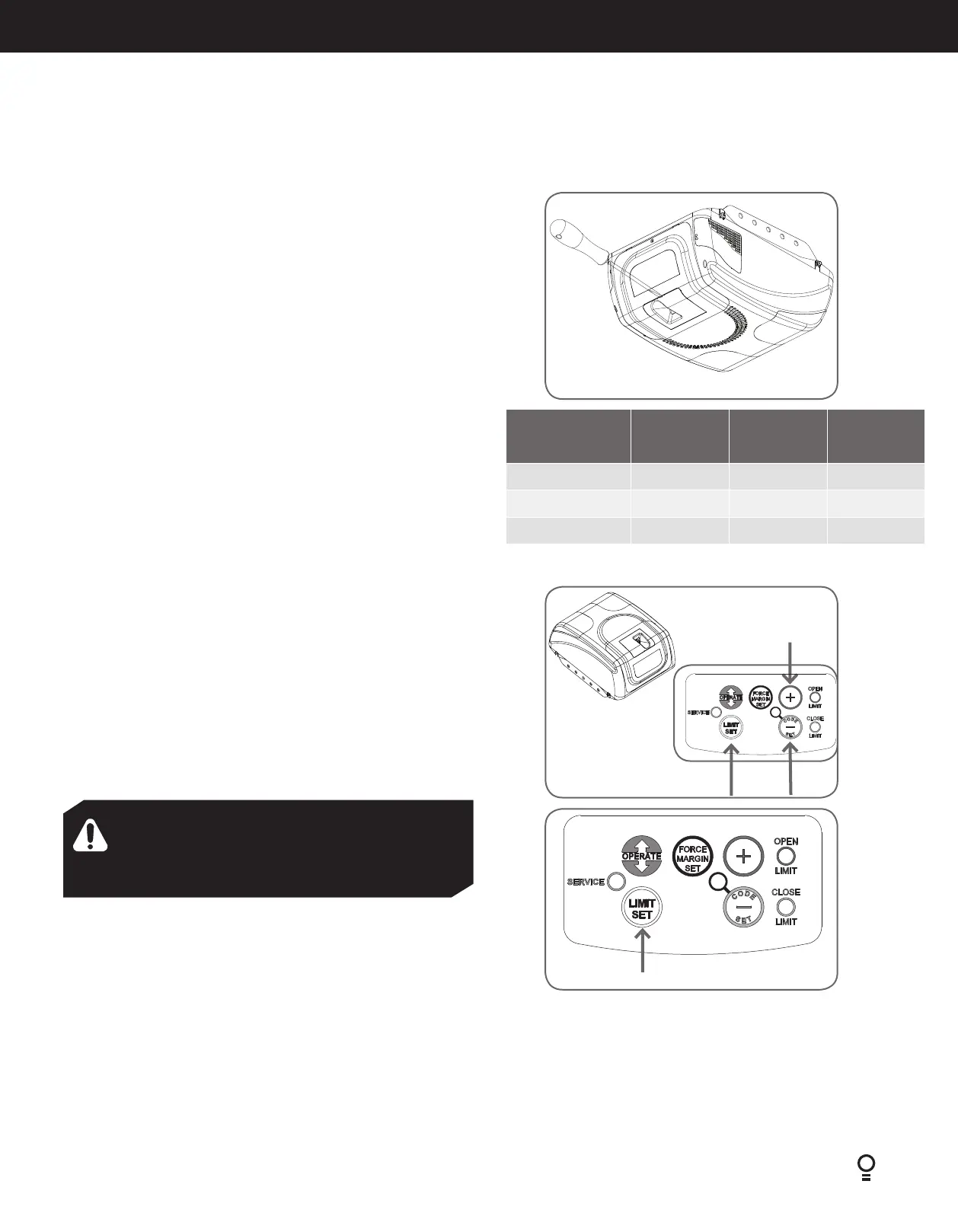
d. Remove the button ver (Fig. 6.4.1).
e. Press the OPERATE button once, twice or three time to select SLOW,
MEDIUM or FAST speed mode.
Fig.6.4.1
Door Opener
Speed Mode
Open LED
(green) status
Open LED
(red) status
Beeper
Slow OFF ON OFF
Medium ON ON ON
Fast (Default) ON OFF ON
AM808 / AM888 Model shown
6.4.2 Setting Travel Limits
Remove the controls cover (Fig.6.4.1) to access the controls panel and
place it back when finish programming.
To Set Limits Positions (Fig. 6.4.2)
a. Press red Minus (-) Button and hold it, the door will start closing.
Release the button once when the door has reached your desired
closed limit position.
b. Press the limit set button. This action will store into memory the
closed limit position.
c. Press the green Plus (+) Button and hold it, the door will start
opening. Release the button once when the door has reached your
desired open limit position.
d. Read the WARNING below.
Fig.6.4.3
Fig.6.4.2
IMPORTANT NOTE: The operate button will not function until the
open and close limits positions are set.
NOTE: The door and shuttle must be engaged into the chain/belt
index. The door should be open approximately half way.
IMPORTANT WARNING! Be aware that the garage
door will start closing automatically once. Step “d” is
performed. The door will also automatically re-open after
fully closing with a small pause between the cycles.
e. Press the Limit set button. This action will store into memory the
door limit position. The door will now automatically close to its limit
position then fully open to calculate the safety obstruction forces.
Please be aware of the above warning.
The door operator can now be operated via the OPERATE button.
6.4.3 Resetting Door Limit Positions
The door travel limit positions can be deleted for new positions by the
following steps below:
a. Press and hold Limit set button for six (6) seconds (Fig 6.4.3)until
you hear three beeps and the red Close Limit LED starts to flash.
b. Release the button.
c. Follow Section 6.4.2 to set new travel limit positions.
AM800 Model shown







 To Next Page