EMX-SKLUP User’s Manual
52 EMX-SKLUP User’s Manual
Manual Mode[Default]/Mode 01/Mode
02/Mode 03/Mode 04/Mode 05/Mode
06/Mode 07/Mode 08/Mode 09/Mode
10/Mode 11/Mode 12/Mode 13/Mode
14/Mode 15/Mode 16/Mode 17/Mode
18/Mode 19/Mode 20
CPU Smart Fan Mode Select.
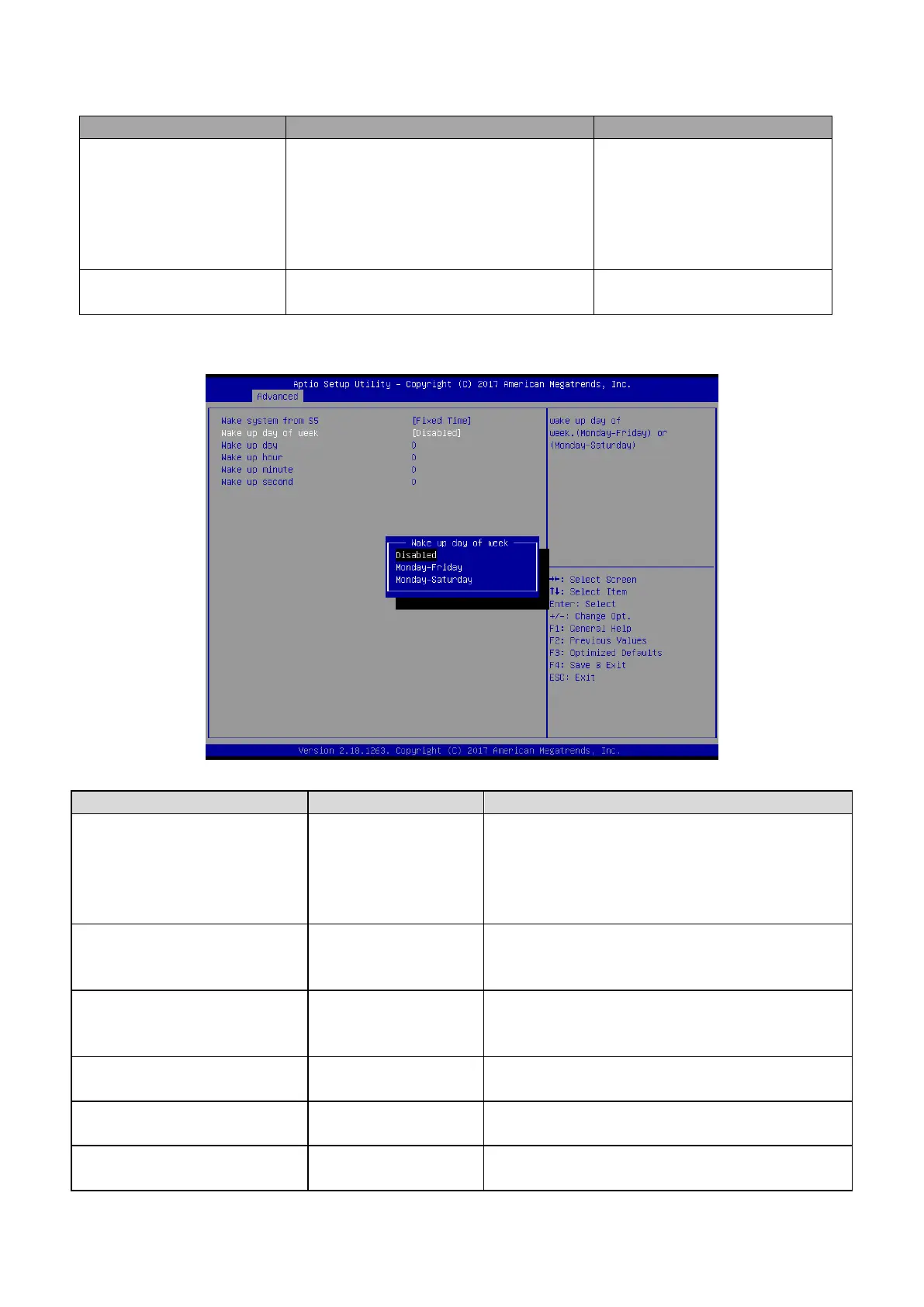
3.6.2.7 S5 RTC Wake Settings
Disabled[Default],
Fixed Time
Dynamic Time
Enable or disable System wake on alarm event.
Select FixedTime, system will wake on the
hr::min::sec specified. Select DynamicTime,
System will wake on the current time + Increase
minutes(s).
Disabled[Default],
Monday-Friday
Monday-Saturday
Wake up day of week. (Monday-Friday) or
(Monday-Saturday).
Select 0 for daily system wake up 1-31 for which
day of the month that you would like the system to
wake up.
Select 0-23 For example enter 3 for 3am and 15 for
3pm.
Select 0-23 For example enter 3 for 3am and 15 for
3pm.
Select 0-23 For example enter 3 for 3am and 15 for
3pm.













 To Next Page