Parameter Dimension
Width 326.41 mm
Length 369.87 mm
Height 74.7 mm
Icons
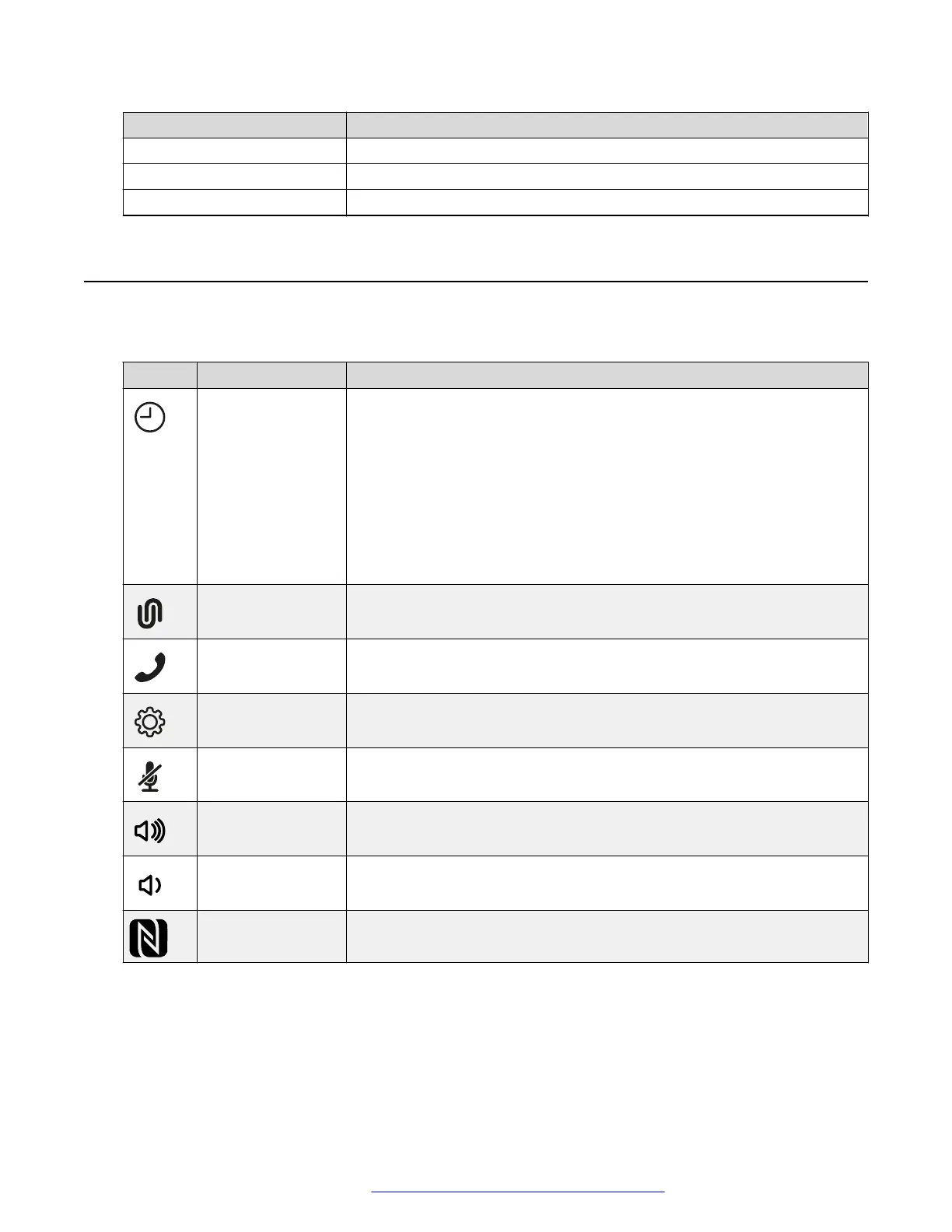
Icons on the home screen of Avaya Conference Phone B199
Icon Name Description
Recent To check the call list. The phone provides the following information about
the calls:
• Number. You can view the phone number of the contact.
• Date. You can view the information when the phone received the call.
This applies only to the calls preceding the current day.
• Time. For the current day, the phone shows the time of the call in
hh:mm format.
• Direction. You can view the incoming, outgoing and missed calls.
Conference
Assistant
To access the Avaya
®
Conference Assistant settings.
Call To dial phone numbers and codes for telephone operations or Avaya
®
Conference Assistant connection.
Settings To check and configure the settings from the phone. You can view the
phone status and reach the menu.
Microphone Muted To mute and unmute the phone.
Volume Up To increase the phone volume level.
Volume Down To decrease the phone volume level.
NFC To indicate the built-in NFC tag.
Overview
August 2020 Using Avaya Conference Phone B199 14
Comments on this document? infodev@avaya.com



 To Next Page