16 USER MANUAL
__________________________________________________________________________________________________________________
Scale turning on / off (calling I/ key press):
Computer Scale: S S CR LF (53h 53h 0Dh 0Ah),
Scale Computer: without response,
Entering to special function menu (calling MENU key press):
Computer Scale: S F CR LF (53h 46h 0Dh 0Ah),
Scale Computer: without response,
Setting low threshold value (option):
Computer Scale: S L D1...DN CR LF (53h 4Ch D1...DN 0Dh 0Ah)
D1...DN – threshold value, maximum 8 characters („-” – negative value, digits, dot – decimal
separator), number of digits after dot should be the same as on scale display,
Scale Computer: without response,
Example:
in order to set low threshold 1000g in scale B1.5 (d=0.5g) the following order should be sent:
S L 1 0 0 0 . 0 CR LF (53h 4Ch 31h 30h 30h 30h 2Eh 30h 0Dh 0Ah),
in order to set low threshold 100kg in scale B150 (d=50g) the following order should be sent:
S L 1 0 0 . 0 0 CR LF (53h 4Ch 31h 30h 30h 2Eh 30h 30h 0Dh 0Ah),),
Setting high threshold value (option):
Computer Scale: S H D1...DN CR LF (53h 48h D1...DN 0Dh 0Ah),
D1...DN – threshold value (see )
Scale Computer: without response.
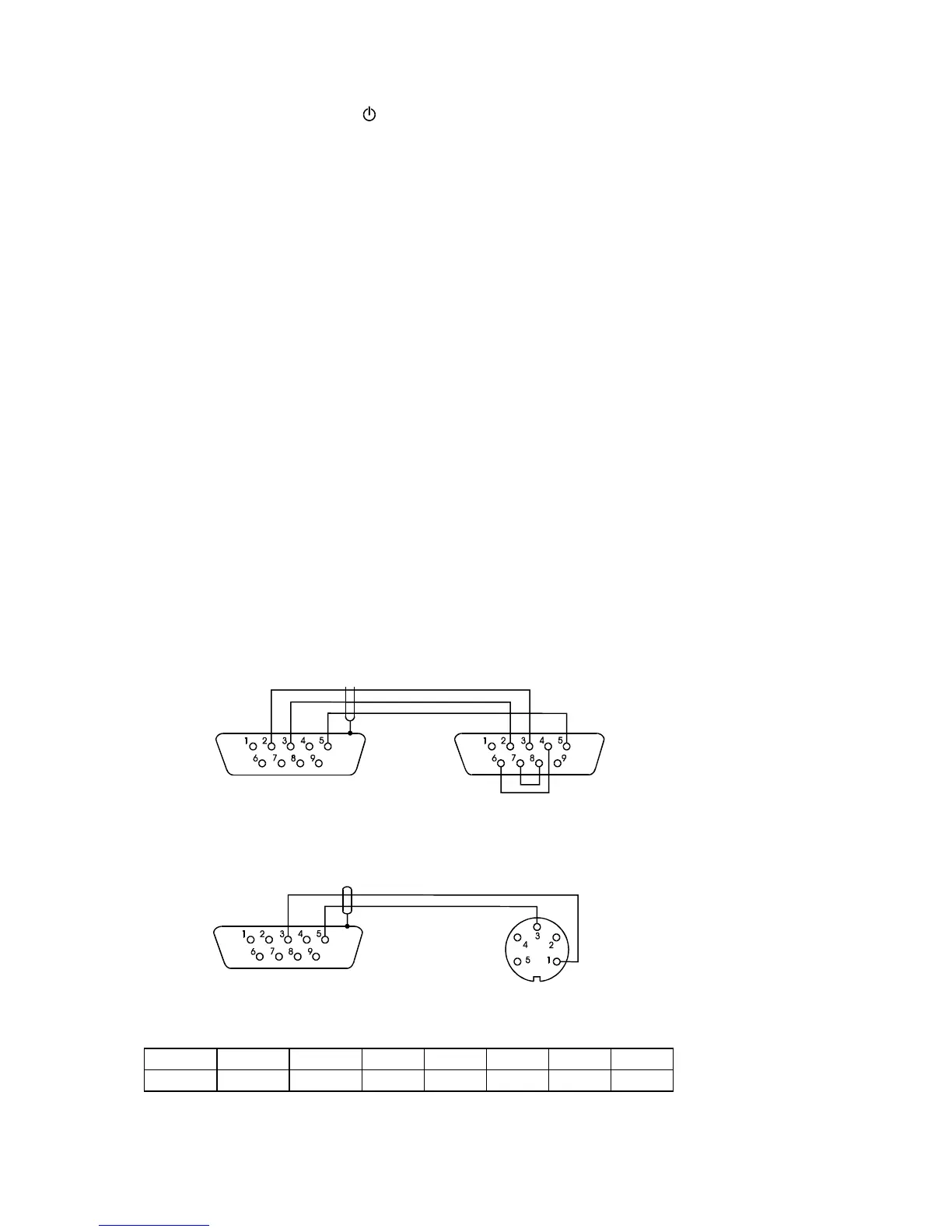
Connecting cable WK-1 (scale – computer / 9-pin interface):
Connecting cable WD-1 (connects printer with scale):
AXIS C-001 printer internal switches setting:



 To Next Page