56 USER MANUAL
__________________________________________________________________________________________________________________
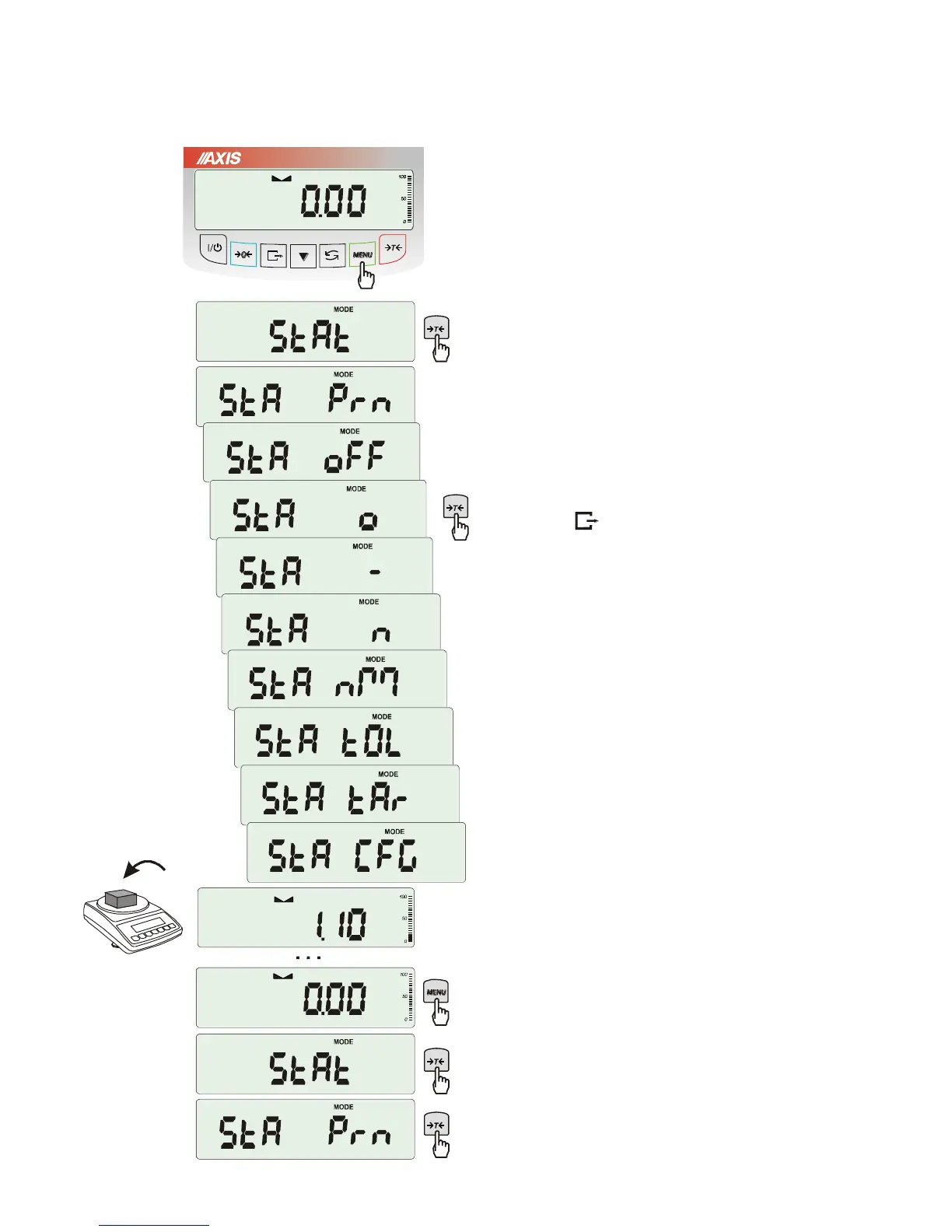
Order of operations:
Press MENU key.
When StAt is displayed press
T
key.
The following options are displayed:
- StA Prn – monitoring and printout of statistical
data,
- StA oFF – deactivate function,
- StA
– activate function, work with printout of
chosen weighting results,
- StA - – activate function, work without printout,
- StA n – maximal samples value,
- Sta nM – inscribing nominal value for statistics,
- Sta tOL – inscribing tolerance in %,
- Sta tAr – automatic tare on/off
- StA CFG – function configuration:
-Auto – Automatic work (samples are confirmed
after loading the scale and indication
stabilization.),
-ManuAL – manual work (confirmation is made
by pressing key).
- out – exit from function.
Remember first to inscribe nominal weight value
and tolerance (mentioned above).
After that, push
T
key when StA o is
displayed.
Put on successive objects on the pan (remove
after indication stabilization) in order to add them
to measurements register.
In order to obtain printed statistical results from
measurements series press MENU key and
T
key when StAt is displayed and later StA
Prn.
After printout two options are enabled:
- rESET – erasing results,
- Contin – continuation.



 To Next Page