USER MANUAL 57
__________________________________________________________________________________________________________________
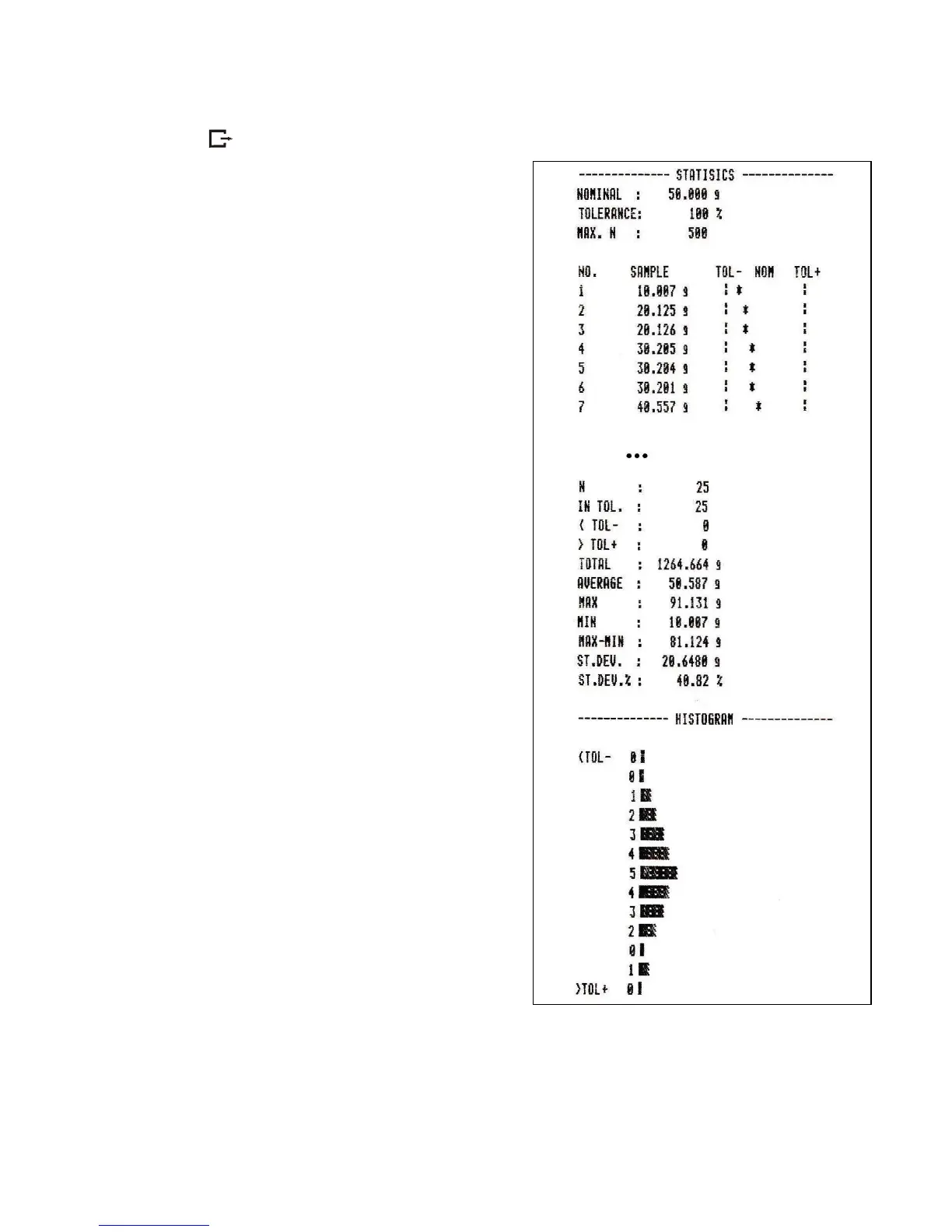
Pressing key printouts estimated values and histogram :
Nominal - nominal value,
Tolerance - accepted value in percentage.
N - number of sample
IN TOL. – number of samples in toleranc
-TOL – amount of measurements
under allowable lower value
+TOL – amount of measurements above
allowable upper value
TOTAL - sum of weights of all n samples
AVERAGE – average weight as (Total)/n
MIN – minimum weight in n samples
MAX– maximum weight in n samples
ST. DEV. – standard deviation
ST. DEV.% – standard deviation percentage
To finish work with this function and
zeroing result register press MENU
key and then when StAt. and Sta oFF is
displayed press T button.
Statistics function cooperation with computer and
Printer. Scale can be equipped with two serial ports
marked as RS232C-I (computer) and RS232C-II
(printer). After each data printout by printer identical
set of data is sent to computer. After sending by
computer initialization signal S A CR LF
(53h 49h 0Dh 0Ah) the scale sends to computer
statistic data enclosed in histogram.



 To Next Page