Changing the Saw Blade
35
WARNING!
DISCONNECT THE MACHINE
FROM THE MAINS
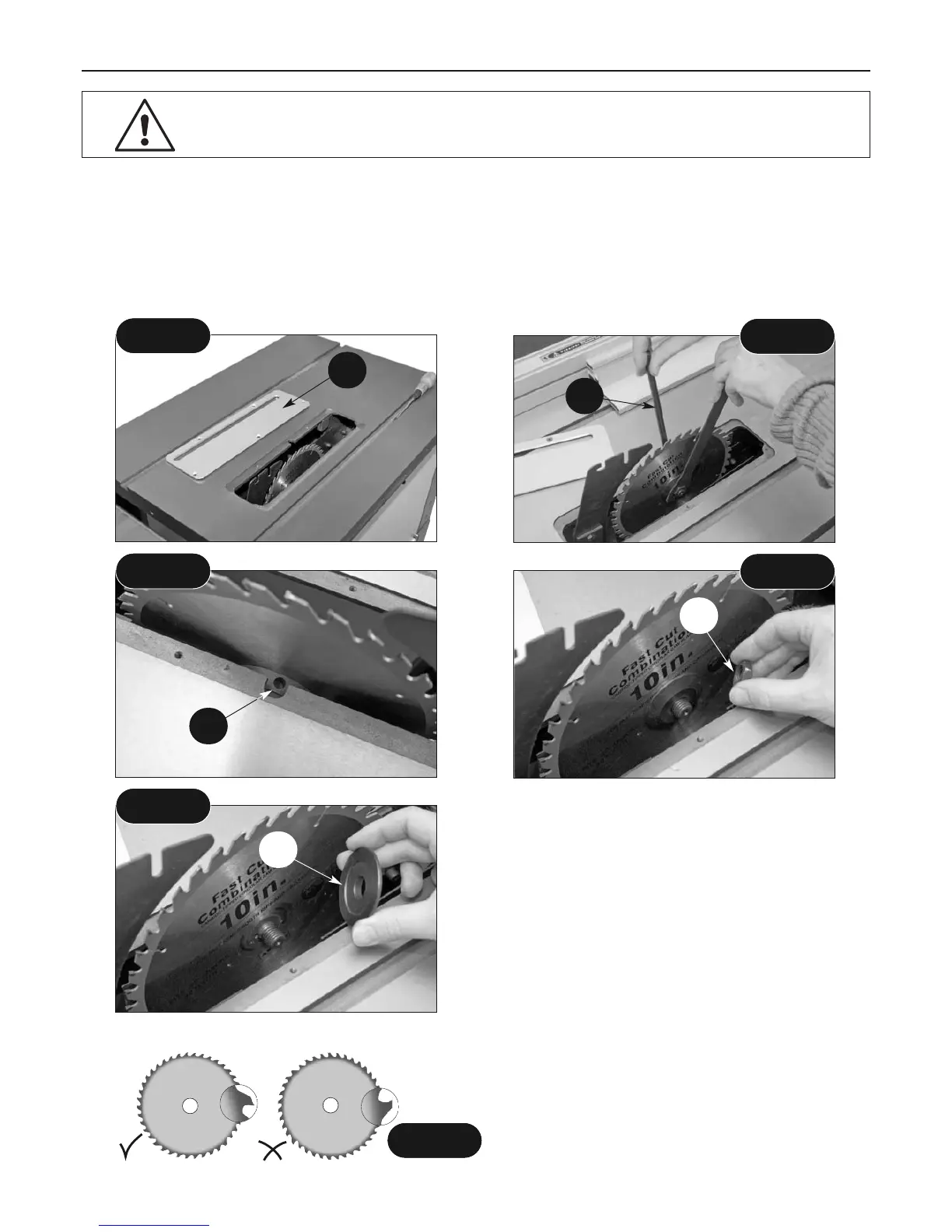
Raise the saw blade to it's highest point. Remove the saw blade guard. Remove the 5 screws that
secure the table insert, place carefully aside and remove the table insert. (A) Using the spanner
and the tommy bar provided, put the spanner onto the flats on the nut. Turn the saw until the
tommy bar hole (B) is visible. Insert the tommy bar (18A) and turn the saw to allow it to rest
against the front edge of the saw slot. The tommy bar hole is in the inside platewasher
component. (See figs 110-111-112)
Fig 110
Fig 111
Fig 112
Fig 113
Slacken off the saw nut (remember left hand
thread). Remove the saw nut (C), then remove
the sawplate washer (D) and the saw blade.
Now is a good time to give the interior of the
machine, the dust extraction channels, etc. a
thorough clean. (See figs 113-114)
Check the new blade for damage, missing
teeth,sharpness etc. Fit the new blade, ensure
that the teeth are pointing towards the front of
the machine. (See fig 115) Put the sawplate
washer onto the shaft and twist on the saw nut.
Spin the nut up finger tight and check the saw
is correctly seated.
Fig 114
Fig 115
Teeth pointing
to the front
A
B
C
D
18A



 To Next Page