11
* View “Navigate Settings Menu” on page 7.
A
B
C
E
I
D
G
F
H
BALBOA | Your Single Source Solution Document No. 42418 Rev. B1 - 04/16/24
Language: English
TP740 User Guide
Keep your water clean and ready to enjoy!
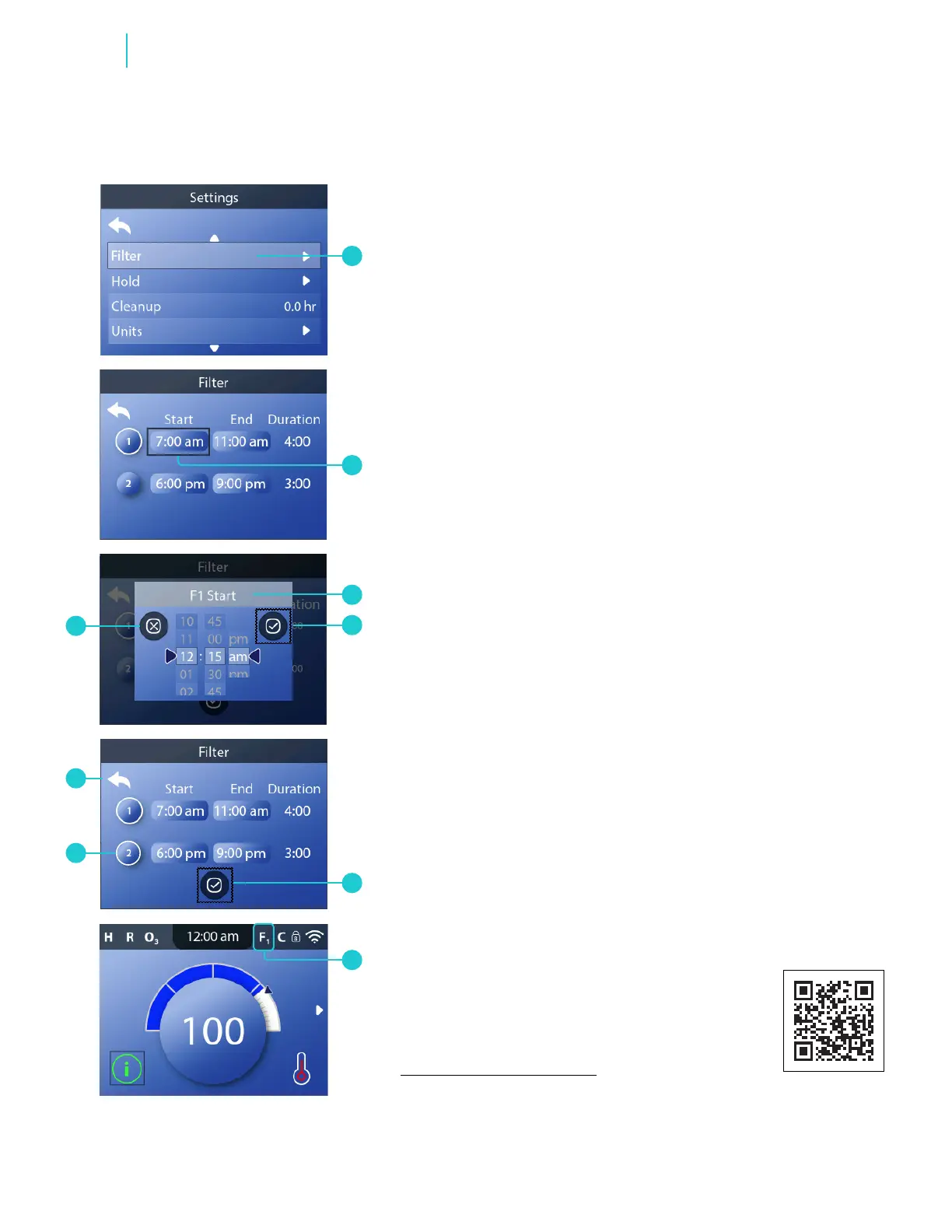
Follow these steps to set the lter cycle time:
1 - Go to the Main menu, Settings, Filter (A) and Start (B) to
view the Filter Cycle 1 Start screen (C).*
2 - Set the time.
3 - Cancel your settings ( I ), or save your settings (D).
4 - Follow the same process to change the other lter cycle
time times.
5 - Once all of the times are set, you can cancel your settings
by using the Back icon (H), or save your settings (E).
How can you tell if lter cycle 2 is enabled?
A white ring appears around the “2” icon (G).
How can you tell when a filter cycle is running?
“F
1
” appears (F) when lter cycle 1 is running.
“F
2
” appears (F) when lter cycle 2 is running.
“F
12
” appears (F) when lter cycles 1 & 2 are
running together.
SET FILTER CYCLE TIME
Functions
panel overview
https://youtu.be/2gQOrHf21j0
time of day
https://youtu.be/YCjRzOSYAZg
lter cycle
https://youtu.be/Y7WrEcsYJw0
set temperature
https://youtu.be/Sw_aJJV0Zzk
heat mode
https://youtu.be/8AUz_G36Jto
temperature range
https://youtu.be/Jo-rEgleH0o
panel settings
https://youtu.be/0stxBJIbf5g
View Quick Tip video.



 To Next Page