27
A
Groups
1
Zone A
Zone B
Zone C
2
Group
3 4
Zone Settings
< No Name >
Name Function
Normal
Zone A
< No Name > Normal
Zone B
< No Name > Normal
Zone C
Groups
Zones
Colors
Tests
H 12:00 amR O F
13
C
Spa Light Music Settings Invert Test
H 12:00 amR O F
13
C
Light
Spa
H 12:00 amR O F
13
C
Zone A
Zone A
Zone A
Zone A
Zone Settings
< No Name >
Name Function
Normal
Zone A
Settings
12:00 AM
Time
Reminders
Locks
Filter
Time
10
11
12
01
02
58
59
00
01
02
PM
AM
PM
:
< No Name > Normal
Zone B
< No Name > Normal
Zone C
Settings
0.5 hr
Cleanup
Units
Language
Name
< no name >
Water
Water 1
Zone Settings
Water
Name Function
Normal
Zone A
< No Name > Normal
Zone B
< No Name > Normal
Zone C
Zone Settings
< No Name >
Name Function
Normal
Zone A
< No Name > Normal
Zone B
< No Name > Normal
Zone C
Water Temperature
Status Pro
Normal
Function
Groups
1
Zone A
Zone B
Zone C
2
Group
3 4
Groups
1
Zone A
Zone B
Zone C
2
Group
3 4
Groups
1
Zone A
Zone B
Zone C
2
Group
3 4
Groups
1
Zone A
Zone B
Zone C
2
Group
3 4
Zone A
Group 1: AB
Zone A
Zone A: Water Zone A: Status Pro
Color 2
255
0
0
Color 2
190
70
255
Color 2
190
70
255
Color 2
190
70
255
Zone A
Color 2
190
70
255
OK
Press OK to restore the default
colors.
Restore Defaults
Cancel
OK
Restore defaults.
Restore Defaults
Cancel
B
Groups
1
Zone A
Zone B
Zone C
2
Group
3 4
Zone Settings
< No Name >
Name Function
Normal
Zone A
< No Name > Normal
Zone B
< No Name > Normal
Zone C
Groups
Zones
Colors
Tests
H 12:00 amR O F
13
C
100
Spa
H 12:00 amR O F
13
C
Spa Light Music Settings Invert Test
H 12:00 amR O F
13
C
Light
Spa
H 12:00 amR O F
13
C
Zone A
Zone A
Zone A
Zone A
Zone Settings
< No Name >
Name Function
Normal
Zone A
Settings
12:00 AM
Time
Reminders
Locks
Filter
Time
10
11
12
01
02
58
59
00
01
02
PM
AM
PM
:
< No Name > Normal
Zone B
< No Name > Normal
Zone C
Settings
0.5 hr
Cleanup
Units
Language
Name
< no name >
Water
Water 1
Zone Settings
Water
Name Function
Normal
Zone A
< No Name > Normal
Zone B
< No Name > Normal
Zone C
Zone Settings
< No Name >
Name Function
Normal
Zone A
< No Name > Normal
Zone B
< No Name > Normal
Zone C
Water Temperature
Status Pro
Normal
Function
Groups
1
Zone A
Zone B
Zone C
2
Group
3 4
Groups
1
Zone A
Zone B
Zone C
2
Group
3 4
Groups
1
Zone A
Zone B
Zone C
2
Group
3 4
Groups
1
Zone A
Zone B
Zone C
2
Group
3 4
Zone A
Group 1: AB
Zone A
Zone A: Water Zone A: Status Pro
Color 2
255
0
0
Color 2
190
70
255
Color 2
190
70
255
Color 2
190
70
255
Zone A
Color 2
190
70
255
OK
Press OK to restore the default
colors.
Restore Defaults
Cancel
OK
Restore defaults.
Restore Defaults
Cancel
C
Groups
1
Zone A
Zone B
Zone C
2
Group
3 4
Zone Settings
< No Name >
Name Function
Normal
Zone A
< No Name > Normal
Zone B
< No Name > Normal
Zone C
Groups
Zones
Colors
Tests
H 12:00 amR O F
13
C
100
Spa
H 12:00 amR O F
13
C
Spa Light Music Settings Invert Test
H 12:00 amR O F
13
C
Light
Spa
H 12:00 amR O F
13
C
Zone A
Zone A
Zone A
Zone Settings
< No Name >
Name Function
Normal
Zone A
Settings
12:00 AM
Time
Reminders
Locks
Filter
Time
10
11
12
01
02
58
59
00
01
02
PM
AM
PM
:
< No Name > Normal
Zone B
< No Name > Normal
Zone C
Settings
0.5 hr
Cleanup
Units
Language
Name
< no name >
Water
Water 1
Zone Settings
Water
Name Function
Normal
Zone A
< No Name > Normal
Zone B
< No Name > Normal
Zone C
Zone Settings
< No Name >
Name Function
Normal
Zone A
< No Name > Normal
Zone B
< No Name > Normal
Zone C
Water Temperature
Status Pro
Normal
Function
Groups
1
Zone A
Zone B
Zone C
2
Group
3 4
Groups
1
Zone A
Zone B
Zone C
2
Group
3 4
Groups
1
Zone A
Zone B
Zone C
2
Group
3 4
Groups
1
Zone A
Zone B
Zone C
2
Group
3 4
Zone A
Group 1: AB
Zone A
Zone A: Water Zone A: Status Pro
Color 2
255
0
0
Color 2
190
70
255
Color 2
190
70
255
Color 2
190
70
255
Zone A
Color 2
190
70
255
OK
Press OK to restore the default
colors.
Restore Defaults
Cancel
OK
Restore defaults.
Restore Defaults
Cancel
Groups
1
Zone A
Zone B
Zone C
2
Group
3 4
Zone Settings
< No Name >
Name Function
Normal
Zone A
< No Name > Normal
Zone B
< No Name > Normal
Zone C
Groups
Zones
Colors
Tests
H 12:00 amR O F
13
C
100
Spa
H 12:00 amR O F
13
C
Spa Light Music Settings Invert Test
H 12:00 amR O F
13
C
Light
Spa
H 12:00 amR O F
13
C
Zone A
Zone A
Zone A
Zone A
Zone Settings
< No Name >
Name Function
Normal
Zone A
Settings
12:00 AM
Time
Reminders
Locks
Filter
Time
10
11
12
01
02
58
59
00
01
02
PM
AM
PM
:
< No Name > Normal
Zone B
< No Name > Normal
Zone C
Settings
0.5 hr
Cleanup
Units
Language
Name
< no name >
Water
Water 1
Zone Settings
Water
Name Function
Normal
Zone A
< No Name > Normal
Zone B
< No Name > Normal
Zone C
Zone Settings
< No Name >
Name Function
Normal
Zone A
< No Name > Normal
Zone B
< No Name > Normal
Zone C
Water Temperature
Status Pro
Normal
Function
Groups
1
Zone A
Zone B
Zone C
2
Group
3 4
Groups
1
Zone A
Zone B
Zone C
2
Group
3 4
Groups
1
Zone A
Zone B
Zone C
2
Group
3 4
Groups
1
Zone A
Zone B
Zone C
2
Group
3 4
Zone A
Group 1: AB
Zone A
Zone A: Water Zone A: Status Pro
Color 2
255
0
0
Color 2
190
70
255
Color 2
190
70
255
Color 2
190
70
255
Zone A
Color 2
190
70
255
OK
Press OK to restore the default
colors.
Restore Defaults
Cancel
OK
Restore defaults.
Restore Defaults
Cancel
E
D
G
M
N
F
I
H
L
J
K
O
Hot Tub Lighting
* View “Navigate Settings Menu” on page 7.
BALBOA | Your Single Source Solution Document No. 42418 Rev. B1 - 04/16/24
Language: English
TP740 User Guide
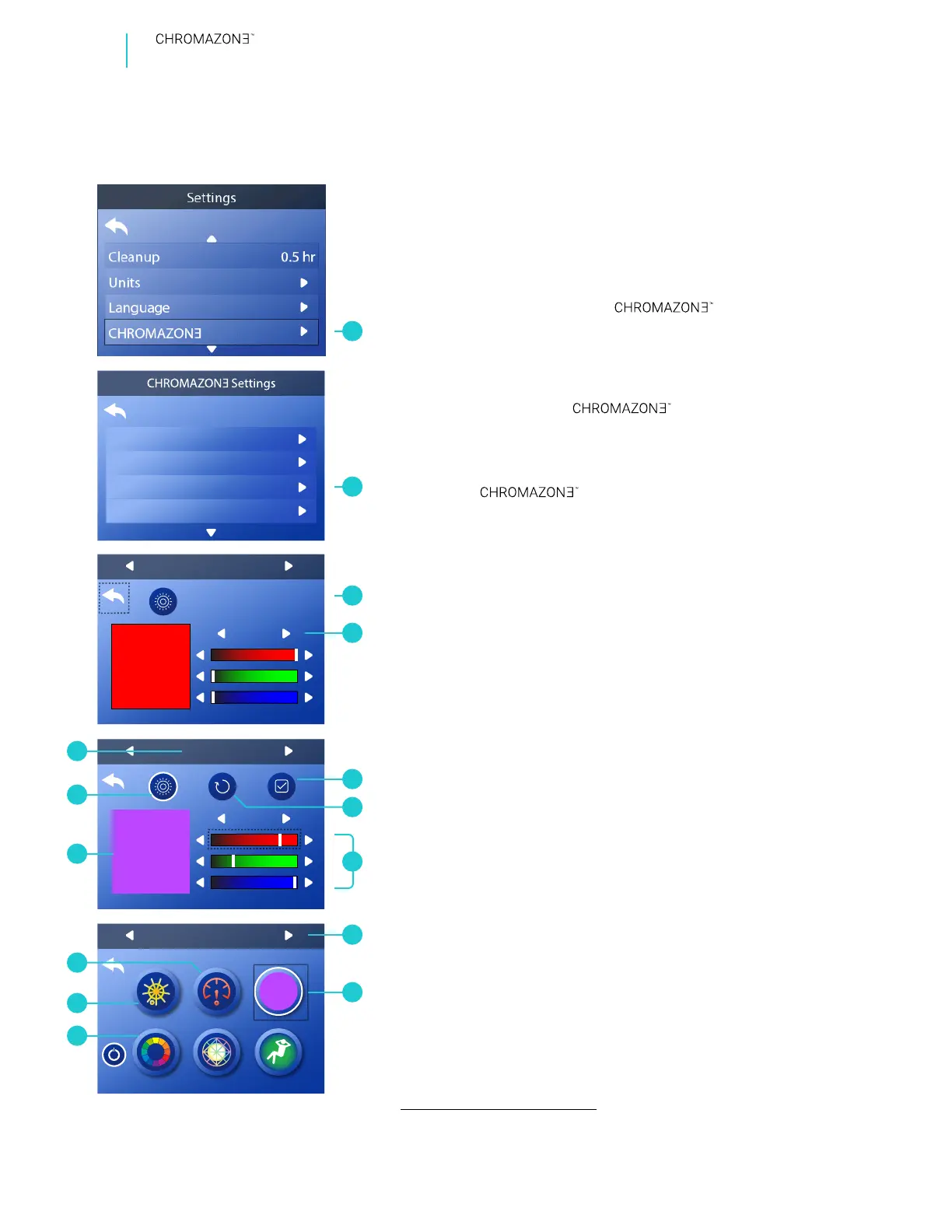
There are eight solid colors that you can customize.
Follow these steps to customize a solid color:
1 - Go to the Main menu, Settings, (A)
and Colors (B) to view the color editor (C).*
2 - Select one of eight colors (D). Color 2 is selected in
this example.
3 - Create a custom color with the color bars (G).
4 - Preview your color automatically on the screen (M). Or,
preview your color with the lights in the
spa in the selected zone (O) by activating this icon (N).
Zone A is selected in this example (O).
5 - If don’t like your color, reset it (F).
6 - Save your custom color (E).
7 - Go to the screen and select a
Zone (H). Zone A is selected in this example (H).
8 - Press the SELECT button to cycle through the colors
until your custom color appears ( I ).
If you use the Speed adjustment icon (L) while in Solid
Color mode ( I ), the mode will automatically switch
from Solid Color to Color Wheel (J). Color Wheel mode
has a speed adjustment. Solid color mode does not
have a speed adjustment. Solid color mode does have a
brightness adjustment (K).
CUSTOMIZE YOUR COLORS


 To Next Page
 Loading...









