9
H 12:00 amR O F
13
C
100
H 12:00 amR O F
13
C
100
H 12:00 amR O F
13
C
100
H 12:00 amR O F
13
C
100
H 12:00 amR O F
13
C
100
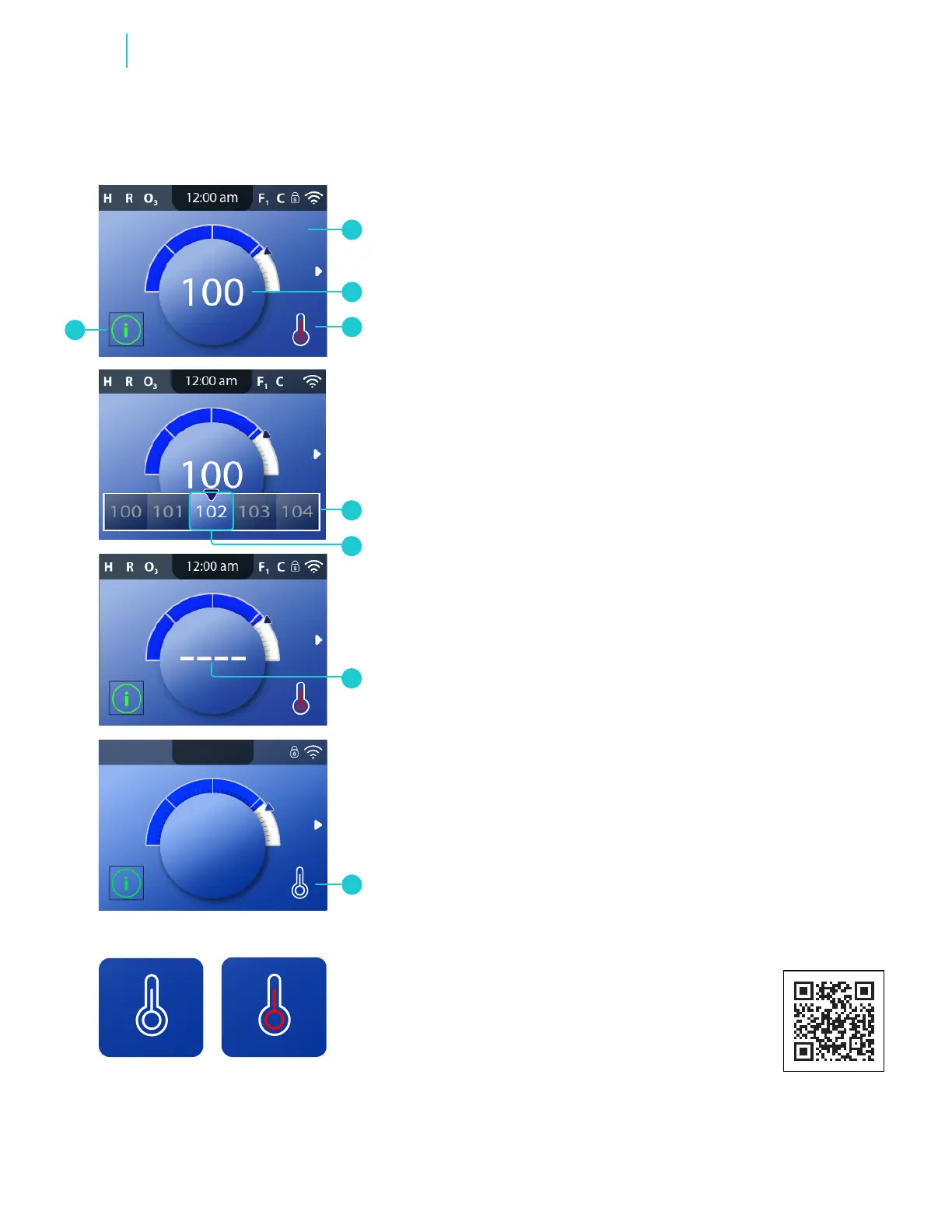
Heater Off Heater On
Main screen
H
BALBOA | Your Single Source Solution Document No. 42418 Rev. B1 - 04/16/24
Language: English
TP740 User Guide
A
D
E
B
C
G
F
Follow these steps to change or view the Set Temperature:
1 - Start at the Main screen (A), and press the SELECT navigation
button to view the temperature menu (D). If the selection box is
on a message icon (H), press the RIGHT navigation button and
then the SELECT navigation button to view the Temperature
menu.
2 - The center box (E) indicates the current Set Temperature.
3 - Press (or press-and-hold) the RIGHT or LEFT navigation
buttons to change the Set Temperature.
4 - Once the desired Set Temperature is in the center box, press
the SELECT navigation button to exit the Temperature menu. Or,
wait a few seconds, and the panel will exit the Temperature
menu automatically.
How do I view the water temperature?
The water temperature is displayed on the Main screen (B).
How do I know when the water heater is On?
The center of the Heater Status icon turns red (C). The center
ashes red when the heater is preparing to turn On. The center
turns white (G) when the heater is Off.
What do the dashes mean (F)?
They indicate that the spa control has not checked the water
temperature for approximately an hour. A pump needs to
cycle water through the heater for the control system to check
the water temperature. After water cycles through the heater
for 1 minute, the dashes are replaced with the current water
temperature (B). Whenever the control system is powered On,
dashes appear (F) for one minute while a pump cycles water
through the heater to check the current water temperature.
CHANGE/VIEW SET TEMPERATURE
Functions
panel overview
https://youtu.be/2gQOrHf21j0
time of day
https://youtu.be/YCjRzOSYAZg
lter cycle
https://youtu.be/Y7WrEcsYJw0
set temperature
https://youtu.be/Sw_aJJV0Zzk
heat mode
https://youtu.be/8AUz_G36Jto
temperature range
https://youtu.be/Jo-rEgleH0o
panel settings
https://youtu.be/0stxBJIbf5g
View Quick Tip video.



 To Next Page