29
A
Groups
1
Zone A
Zone B
Zone C
2
Group
3 4
Zone Settings
< No Name >
Name Function
Normal
Zone A
< No Name > Normal
Zone B
< No Name > Normal
Zone C
Groups
Zones
Colors
Tests
H 12:00 amR O F
13
C
Spa Light Music Settings Invert Test
H 12:00 amR O F
13
C
Light
Spa
H 12:00 amR O F
13
C
Zone A
Zone A
Zone A
Zone A
Zone Settings
< No Name >
Name Function
Normal
Zone A
Settings
12:00 AM
Time
Reminders
Locks
Filter
Time
10
11
12
01
02
58
59
00
01
02
PM
AM
PM
:
< No Name > Normal
Zone B
< No Name > Normal
Zone C
Settings
0.5 hr
Cleanup
Units
Language
Name
< no name >
Water
Water 1
Zone Settings
Water
Name Function
Normal
Zone A
< No Name > Normal
Zone B
< No Name > Normal
Zone C
Zone Settings
< No Name >
Name Function
Normal
Zone A
< No Name > Normal
Zone B
< No Name > Normal
Zone C
Water Temperature
Status Pro
Normal
Function
Groups
1
Zone A
Zone B
Zone C
2
Group
3 4
Groups
1
Zone A
Zone B
Zone C
2
Group
3 4
Groups
1
Zone A
Zone B
Zone C
2
Group
3 4
Groups
1
Zone A
Zone B
Zone C
2
Group
3 4
Zone A
Group 1: AB
Zone A
Zone A: Water Zone A: Status Pro
Color 2
255
0
0
Color 2
190
70
255
Color 2
190
70
255
Color 2
190
70
255
Zone A
Color 2
190
70
255
OK
Press OK to restore the default
colors.
Restore Defaults
Cancel
OK
Restore defaults.
Restore Defaults
Cancel
B
Groups
1
Zone A
Zone B
Zone C
2
Group
3 4
Zone Settings
< No Name >
Name Function
Normal
Zone A
< No Name > Normal
Zone B
< No Name > Normal
Zone C
Groups
Zones
Colors
Tests
H 12:00 amR O F
13
C
100
Spa
H 12:00 amR O F
13
C
Spa Light Music Settings Invert Test
H 12:00 amR O F
13
C
Light
Spa
H 12:00 amR O F
13
C
Zone A
Zone A
Zone A
Zone A
Zone Settings
< No Name >
Name Function
Normal
Zone A
Settings
12:00 AM
Time
Reminders
Locks
Filter
Time
10
11
12
01
02
58
59
00
01
02
PM
AM
PM
:
< No Name > Normal
Zone B
< No Name > Normal
Zone C
Settings
0.5 hr
Cleanup
Units
Language
Name
< no name >
Water
Water 1
Zone Settings
Water
Name Function
Normal
Zone A
< No Name > Normal
Zone B
< No Name > Normal
Zone C
Zone Settings
< No Name >
Name Function
Normal
Zone A
< No Name > Normal
Zone B
< No Name > Normal
Zone C
Water Temperature
Status Pro
Normal
Function
Groups
1
Zone A
Zone B
Zone C
2
Group
3 4
Groups
1
Zone A
Zone B
Zone C
2
Group
3 4
Groups
1
Zone A
Zone B
Zone C
2
Group
3 4
Groups
1
Zone A
Zone B
Zone C
2
Group
3 4
Zone A
Group 1: AB
Zone A
Zone A: Water Zone A: Status Pro
Color 2
255
0
0
Color 2
190
70
255
Color 2
190
70
255
Color 2
190
70
255
Zone A
Color 2
190
70
255
OK
Press OK to restore the default
colors.
Restore Defaults
Cancel
OK
Restore defaults.
Restore Defaults
Cancel
G
E
F
Groups
1
Zone A
Zone B
Zone C
2
Group
3 4
Zone Settings
< No Name >
Name Function
Normal
Zone A
< No Name > Normal
Zone B
< No Name > Normal
Zone C
Groups
Zones
Colors
Tests
H 12:00 amR O F
13
C
100
Spa
H 12:00 amR O F
13
C
Spa Light Music Settings Invert Test
H 12:00 amR O F
13
C
Light
Spa
H 12:00 amR O F
13
C
Zone A
Zone A
Zone A
Zone A
Zone Settings
< No Name >
Name Function
Normal
Zone A
Settings
12:00 AM
Time
Reminders
Locks
Filter
Time
10
11
12
01
02
58
59
00
01
02
PM
AM
PM
:
< No Name > Normal
Zone B
< No Name > Normal
Zone C
Settings
0.5 hr
Cleanup
Units
Language
Name
< no name >
Water
Water 1
Zone Settings
Water
Name Function
Normal
Zone A
< No Name > Normal
Zone B
< No Name > Normal
Zone C
Zone Settings
< No Name >
Name Function
Normal
Zone A
< No Name > Normal
Zone B
< No Name > Normal
Zone C
Water Temperature
Status Pro
Normal
Function
Groups
1
Zone A
Zone B
Zone C
2
Group
3 4
Groups
1
Zone A
Zone B
Zone C
2
Group
3 4
Groups
1
Zone A
Zone B
Zone C
2
Group
3 4
Groups
1
Zone A
Zone B
Zone C
2
Group
3 4
Zone A
Group 1: AB
Zone A
Zone A: Water Zone A: Status Pro
Color 2
255
0
0
Color 2
190
70
255
Color 2
190
70
255
Color 2
190
70
255
Zone A
Color 2
190
70
255
OK
Press OK to restore the default
colors.
Restore Defaults
Cancel
OK
Restore defaults.
Restore Defaults
Cancel
I
Groups
1
Zone A
Zone B
Zone C
2
Group
3 4
Zone Settings
< No Name >
Name Function
Normal
Zone A
< No Name > Normal
Zone B
< No Name > Normal
Zone C
Groups
Zones
Colors
Tests
H 12:00 amR O F
13
C
100
Spa
H 12:00 amR O F
13
C
Spa Light Music Settings Invert Test
H 12:00 amR O F
13
C
Light
Spa
H 12:00 amR O F
13
C
Zone A
Zone A
Zone A
Zone A
Zone Settings
< No Name >
Name Function
Normal
Zone A
Settings
12:00 AM
Time
Reminders
Locks
Filter
Time
10
11
12
01
02
58
59
00
01
02
PM
AM
PM
:
< No Name > Normal
Zone B
< No Name > Normal
Zone C
Settings
0.5 hr
Cleanup
Units
Language
Name
< no name >
Water
Water 1
Zone Settings
Water
Name Function
Normal
Zone A
< No Name > Normal
Zone B
< No Name > Normal
Zone C
Zone Settings
< No Name >
Name Function
Normal
Zone A
< No Name > Normal
Zone B
< No Name > Normal
Zone C
Water Temperature
Status Pro
Normal
Function
Groups
1
Zone A
Zone B
Zone C
2
Group
3 4
Groups
1
Zone A
Zone B
Zone C
2
Group
3 4
Groups
1
Zone A
Zone B
Zone C
2
Group
3 4
Groups
1
Zone A
Zone B
Zone C
2
Group
3 4
Zone A
Group 1: AB
Zone A
Zone A: Water Zone A: Status Pro
Color 2
255
0
0
Color 2
190
70
255
Color 2
190
70
255
Color 2
190
70
255
Zone A
Color 2
190
70
255
OK
Press OK to restore the default
colors.
Restore Defaults
Cancel
OK
Restore defaults.
Restore Defaults
Cancel
H
Hot Tub Lighting
BALBOA | Your Single Source Solution Document No. 42418 Rev. B1 - 04/16/24
Language: English
TP740 User Guide
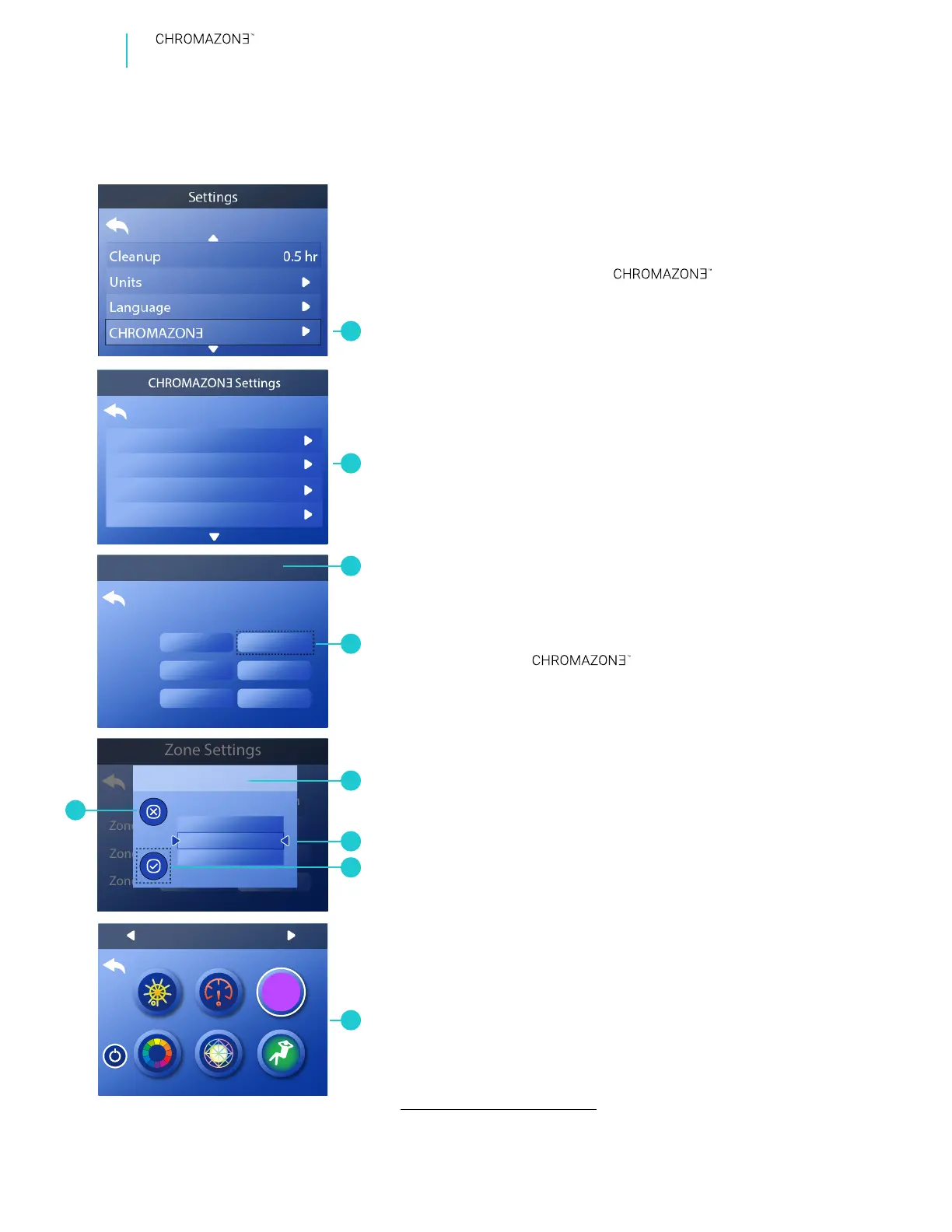
Follow these steps to select how a zone will function:
1 - Go to the Main Menu, Settings, (A)
and Zones (B) to view the Zone Settings screen (C).*
2 - In this example we will change the function of Zone
A to Status Pro. Go to this eld (D) to view the Function
screen (E).
3 - Scroll the list of functions until Status Pro appears
between the arrows (F).
4 - Cancel your selection ( I ), or save your selection (G).
Follow the same steps to change the functions of
zones B and C.
AVAILABLE FUNCTIONS
One of the following three functions can be assigned
to a zone:
1 - Normal
2 - Status Pro
3 - Water Temperature
Normal displays solid colors or color patterns that are
controllable from the
screen (H)
.
Status Pro displays the spa status as one of the
following colors of light.
SELECT ZONE FUNCTIONALITY
Green: Spa pack is operational. There are no messages, faults or error codes.
Blue: Spa pack is operational. There is a reminder and/or information message,
and there is no fault or error codes.
Red: There are warning messages or faults present.
Red (ashing): There are severe warning messages or faults present.
Red: Above 108° F (42.2° C).
Red (ashing): Temperature unknown because of a system error or
temperature sensor error.
Orange: Between 2° (1° C) above the set temperature and 107° F (41.6° C).
Green: Within +/- 2° F (+/- 1° C) of the set temperature.
Blue: Between 46° F (7.7° C) and 2° (1° C) F below the set temperature.
White: Less than 45° F (7.2° C).
Purple: Temperature unknown because the water has not been cycled.
Water Temperature displays the temperature as one of
the following colors of light.
C
D
* View “Navigate Settings Menu” on page 7.


 To Next Page
 Loading...









