25
Groups
1
Zone A
Zone B
Zone C
2
Group
3 4
Zone Settings
< No Name >
Name Function
Normal
Zone A
< No Name > Normal
Zone B
< No Name > Normal
Zone C
Groups
Zones
Colors
Tests
H 12:00 amR O F
13
C
100
Spa
H 12:00 amR O F
13
C
Spa Light Music Settings Invert Test
H 12:00 amR O F
13
C
Light
Spa
H 12:00 amR O F
13
C
Zone A
Zone A
Zone A
Zone A
Zone Settings
< No Name >
Name Function
Normal
Zone A
Settings
12:00 AM
Time
Reminders
Locks
Filter
Time
10
11
12
01
02
58
59
00
01
02
PM
AM
PM
:
< No Name > Normal
Zone B
< No Name > Normal
Zone C
Settings
0.5 hr
Cleanup
Units
Language
Name
< no name >
Water
Water 1
Zone Settings
Water
Name Function
Normal
Zone A
< No Name > Normal
Zone B
< No Name > Normal
Zone C
Zone Settings
< No Name >
Name Function
Normal
Zone A
< No Name > Normal
Zone B
< No Name > Normal
Zone C
Water Temperature
Status Pro
Normal
Function
Groups
1
Zone A
Zone B
Zone C
2
Group
3 4
Groups
1
Zone A
Zone B
Zone C
2
Group
3 4
Groups
1
Zone A
Zone B
Zone C
2
Group
3 4
Groups
1
Zone A
Zone B
Zone C
2
Group
3 4
Zone A
Group 1: AB
Zone A
Zone A: Water Zone A: Status Pro
Color 2
255
0
0
Color 2
190
70
255
Color 2
190
70
255
Color 2
190
70
255
Zone A
Color 2
190
70
255
OK
Press OK to restore the default
colors.
Restore Defaults
Cancel
OK
Restore defaults.
Restore Defaults
Cancel
B
A
C
D
H
G
F
E
I
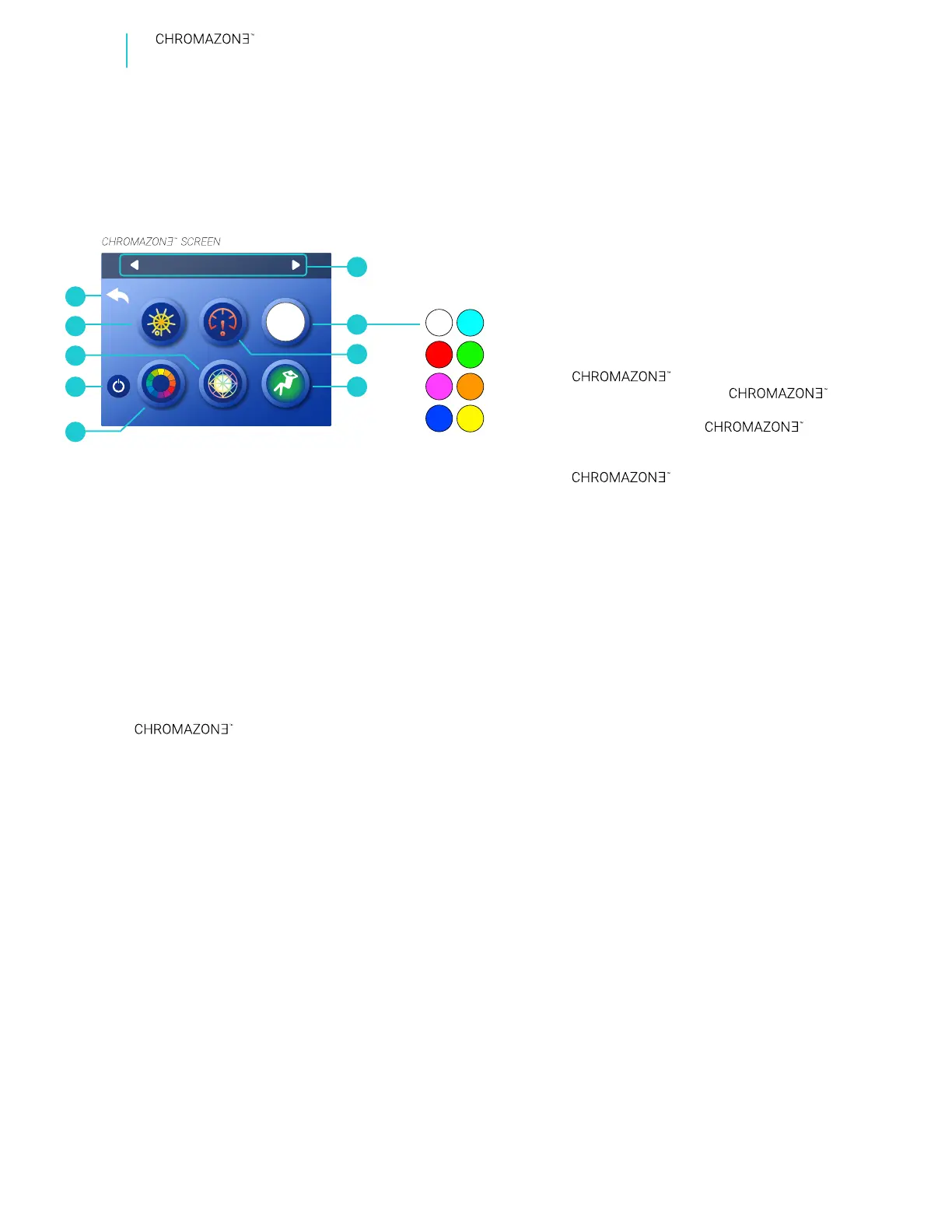
8 solid colors
to choose from
Groups
1
Zone A
Zone B
Zone C
2
Group
3 4
Zone Settings
< No Name >
Name Function
Normal
Zone A
< No Name > Normal
Zone B
< No Name > Normal
Zone C
Groups
Zones
Colors
Tests
H 12:00 amR O F
13
C
100
Spa
H 12:00 amR O F
13
C
Spa Light Music Settings Invert Test
H 12:00 amR O F
13
C
Light
Spa
H 12:00 amR O F
13
C
Zone A
Zone A
Zone A
Zone A
Zone Settings
< No Name >
Name Function
Normal
Zone A
Settings
12:00 AM
Time
Reminders
Locks
Filter
Time
10
11
12
01
02
58
59
00
01
02
PM
AM
PM
:
< No Name > Normal
Zone B
< No Name > Normal
Zone C
Settings
0.5 hr
Cleanup
Units
Language
Name
< no name >
Water
Water 1
Zone Settings
Water
Name Function
Normal
Zone A
< No Name > Normal
Zone B
< No Name > Normal
Zone C
Zone Settings
< No Name >
Name Function
Normal
Zone A
< No Name > Normal
Zone B
< No Name > Normal
Zone C
Water Temperature
Status Pro
Normal
Function
Groups
1
Zone A
Zone B
Zone C
2
Group
3 4
Groups
1
Zone A
Zone B
Zone C
2
Group
3 4
Groups
1
Zone A
Zone B
Zone C
2
Group
3 4
Groups
1
Zone A
Zone B
Zone C
2
Group
3 4
Zone A
Group 1: AB
Zone A
Zone A: Water Zone A: Status Pro
Color 2
255
0
0
Color 2
190
70
255
Color 2
190
70
255
Color 2
190
70
255
Zone A
Color 2
190
70
255
OK
Press OK to restore the default
colors.
Restore Defaults
Cancel
OK
Restore defaults.
Restore Defaults
Cancel
Groups
1
Zone A
Zone B
Zone C
2
Group
3 4
Zone Settings
< No Name >
Name Function
Normal
Zone A
< No Name > Normal
Zone B
< No Name > Normal
Zone C
Groups
Zones
Colors
Tests
H 12:00 amR O F
13
C
100
Spa
H 12:00 amR O F
13
C
Spa Light Music Settings Invert Test
H 12:00 amR O F
13
C
Light
Spa
H 12:00 amR O F
13
C
Zone A
Zone A
Zone A
Zone A
Zone Settings
< No Name >
Name Function
Normal
Zone A
Settings
12:00 AM
Time
Reminders
Locks
Filter
Time
10
11
12
01
02
58
59
00
01
02
PM
AM
PM
:
< No Name > Normal
Zone B
< No Name > Normal
Zone C
Settings
0.5 hr
Cleanup
Units
Language
Name
< no name >
Water
Water 1
Zone Settings
Water
Name Function
Normal
Zone A
< No Name > Normal
Zone B
< No Name > Normal
Zone C
Zone Settings
< No Name >
Name Function
Normal
Zone A
< No Name > Normal
Zone B
< No Name > Normal
Zone C
Water Temperature
Status Pro
Normal
Function
Groups
1
Zone A
Zone B
Zone C
2
Group
3 4
Groups
1
Zone A
Zone B
Zone C
2
Group
3 4
Groups
1
Zone A
Zone B
Zone C
2
Group
3 4
Groups
1
Zone A
Zone B
Zone C
2
Group
3 4
Zone A
Group 1: AB
Zone A
Zone A: Water Zone A: Status Pro
Color 2
255
0
0
Color 2
190
70
255
Color 2
190
70
255
Color 2
190
70
255
Zone A
Color 2
190
70
255
OK
Press OK to restore the default
colors.
Restore Defaults
Cancel
OK
Restore defaults.
Restore Defaults
Cancel
Hot Tub Lighting
BALBOA | Your Single Source Solution Document No. 42418 Rev. B1 - 04/16/24
Language: English
TP740 User Guide
A - Selected zone or group.
B - Selected solid color.
C - Speed control for light patterns.
D - Light pattern: Lounge. This smoothly cycles
through a soothing pattern.
E - Light pattern: Color Wheel. This smoothly
cycles through the full color spectrum.
F - power icon. It powers
On/Off all user-controlled
lights. If the icon has a white ring, at least
some user-controlled
lights are powered On. If the button doesn’t
have a white ring, all user-controlled
lights are powered Off.
G - Light pattern: Party. This smoothly cycles
through a festive pattern.
H - Brightness control. If brightness is reduced
all the way, the selected zone (A) will turn
Off. In this example, Zone A would turn Off.
I - Back icon.
REVIEW SCREEN
What is a zone? A zone is a group of
LED lights. has three
zones with the following names:
Zone A
Zone B
Zone C
What can a zone do? A zone can display
one of eight solid colors. Solid colors
are customizable as well. Zones can be
controlled simultaneously by grouping
them together. A zone can display one
of the three following light patterns:
1 - Color Wheel
2 - Party Light
3 - Lounge Light
Speed and brightness are customizable
for each light pattern.
A zone can be assigned one of the
following special functions:
1 - Status Pro: the spa status is
displayed as a color of light.
2 - Water Temperature: the spa water
temperature is displayed as a color
of light.
OVERVIEW & TERMINOLOGY


 To Next Page
 Loading...









