14
* View “Navigate Settings Menu” on page 7.
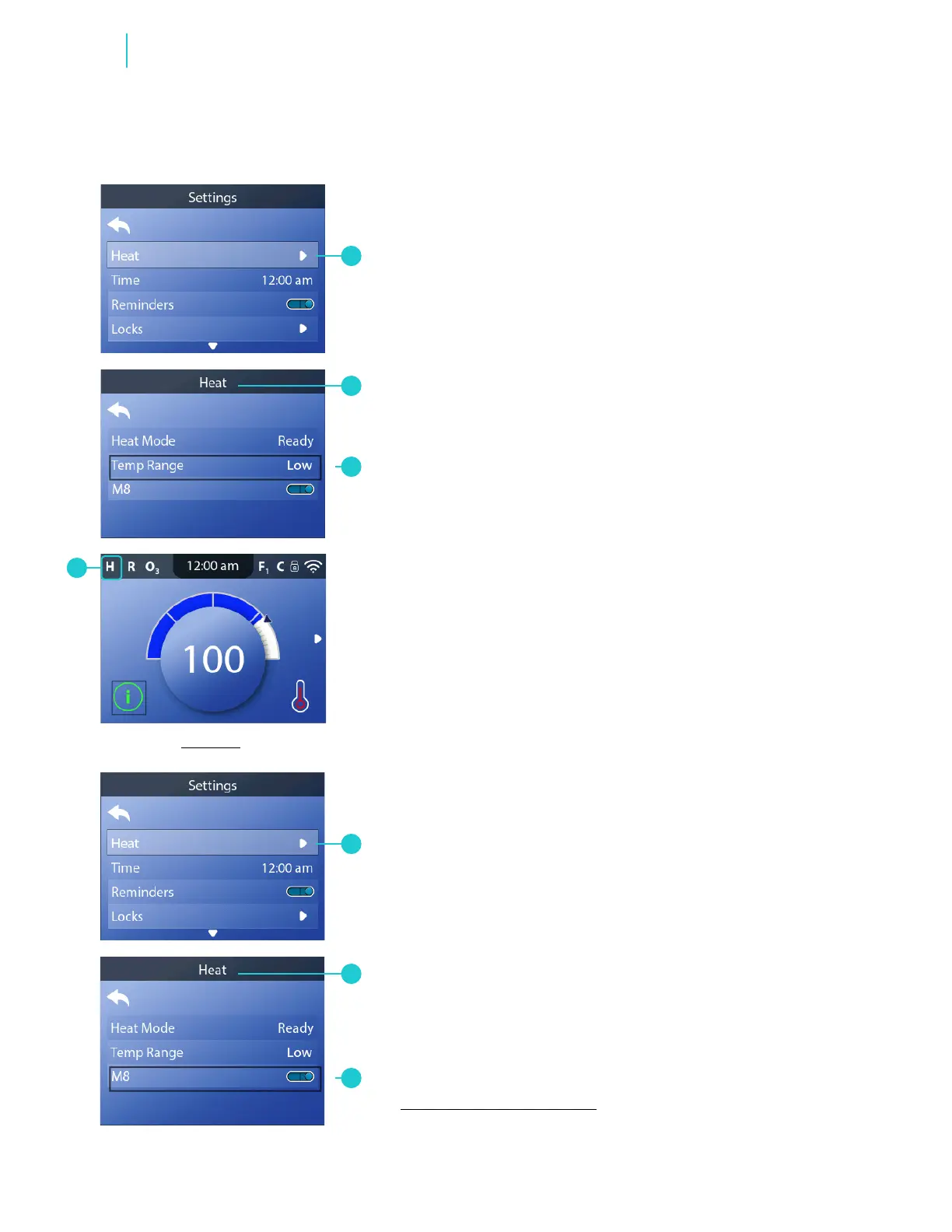
Follow these steps to turn M8 On/Off:
1 - Go to the Main menu, Settings, Heat (A) to view the Heat
screen (B).*
2 - Turn M8 On/Off. The change takes effect immediately.
No need to press a save button.
M8 looks for opportunities to decrease device usage
by evaluating water temperature readings. Stable water
temperatures equal less device usage and less wear
and tear.
Note: M8 is not available on all control systems.
Follow these steps to change the Temperature Range:
1 - Go to the Main menu, Settings, Heat (A) to view the Heat
screen (B).*
2 - Set the Temperature Range (C). The change takes effect
immediately. No need to press a save button.
There are two temperature ranges: High, Low. If your spa is
in High Range, “H” appears (D). High Range may limit the Set
Temperature range to 80° - 104° F (26.5° - 40.0° C).
If your spa is in Low Range, “L” appears (F). Low Range may limit
the Set Temperature range to 50° - 99° F (10.0° - 37.0° C).
A
D
C
CHANGE HEAT SETTINGS
CHANGE TEMPERATURE RANGE
CHANGE HEAT SETTINGS
TURN ON/OFF M8
B
A
C
B
BALBOA | Your Single Source Solution Document No. 42418 Rev. B1 - 04/16/24
Language: English
TP740 User Guide
Functions



 To Next Page