15
BALBOA | Your Single Source Solution Document No. 42418 Rev. B1 - 04/16/24
Language: English
TP740 User Guide
panel overview
https://youtu.be/2gQOrHf21j0
time of day
https://youtu.be/YCjRzOSYAZg
lter cycle
https://youtu.be/Y7WrEcsYJw0
set temperature
https://youtu.be/Sw_aJJV0Zzk
heat mode
https://youtu.be/8AUz_G36Jto
temperature range
https://youtu.be/Jo-rEgleH0o
panel settings
https://youtu.be/0stxBJIbf5g
A
B
C
D
Keep your spa heated and ready to enjoy, or keep it cool
and save energy. Heat settings help you do both.
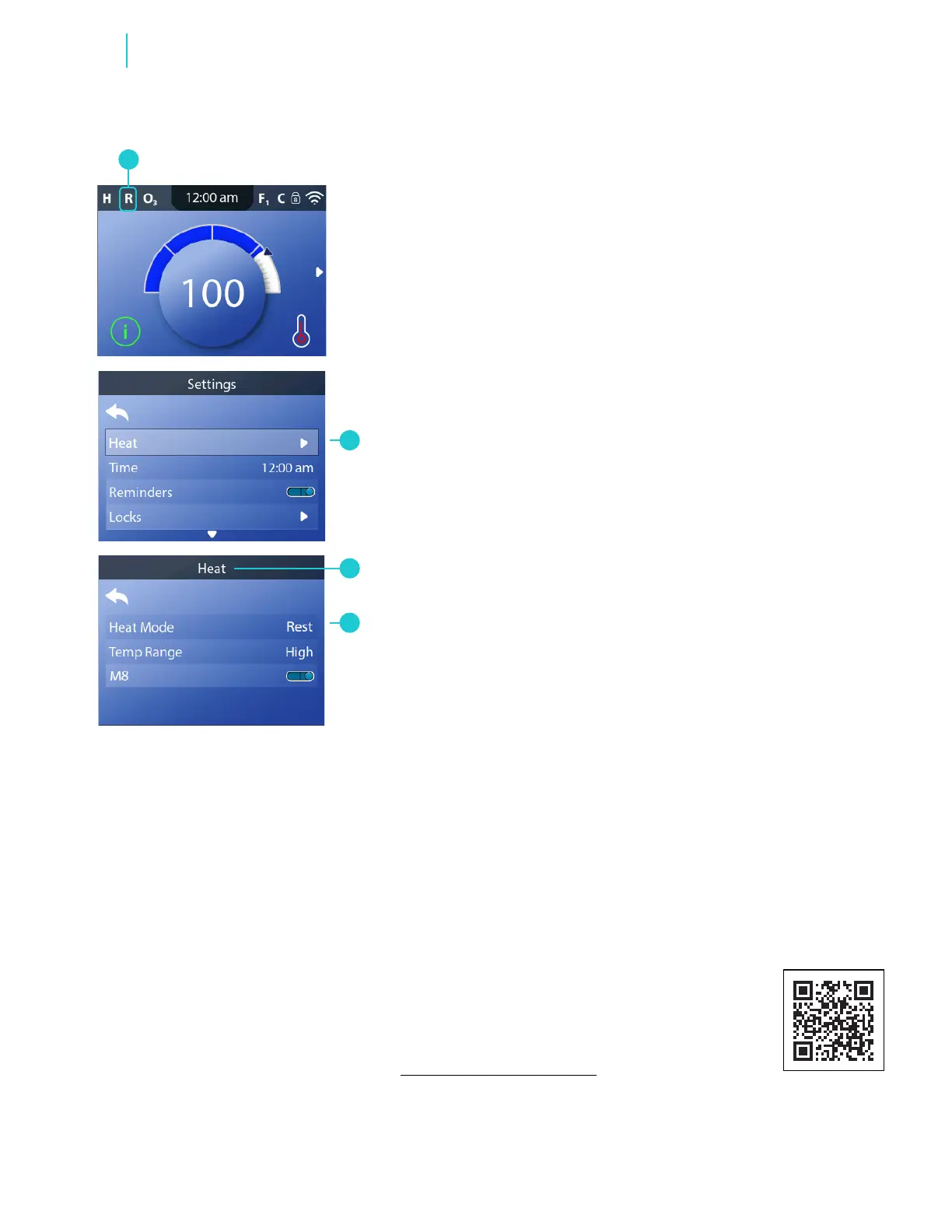
Follow these steps to set the heat mode:
1 - Go to the Main menu, Settings, Heat (B) to view the
Heat screen (C).
2 - Apply your setting (D). The change takes effect
immediately. No need to press a save button.
There are three heat modes: Ready, Rest, Ready-In-
Rest. If your spa is in Ready mode, “R” appears here
(A). Ready mode keeps the water temperature close to
the set temperature 24 hours a day. If you use your spa
consistently, select Ready mode. If your spa is in Rest
mode, “
IR
” appears here (A). Rest mode only heats the
water during lter cycles. If you do not use your spa
consistently, select Rest mode. If your spa is in Ready-In-
Rest Mode, “RR” appears here (A). Ready-in-Rest Mode
is the same as Rest Mode, except Ready-in-Rest Mode
heats the water, if necessary, for one hour when you turn
On Jets 1. If the spa is in Ready-in-Rest mode and you go
to the Heat screen (C), that cancels Ready-in-Rest Mode
and puts you back into Rest Mode, even if you press no
buttons while on the Heat screen.
CHANGE HEAT SETTINGS
SET HEAT MODE
Functions
* View “Navigate Settings Menu” on page 7.
View Quick Tip video.



 To Next Page