8
A
B
C
E
D
H
F
G
BALBOA | Your Single Source Solution Document No. 42418 Rev. B1 - 04/16/24
Language: English
TP740 User Guide
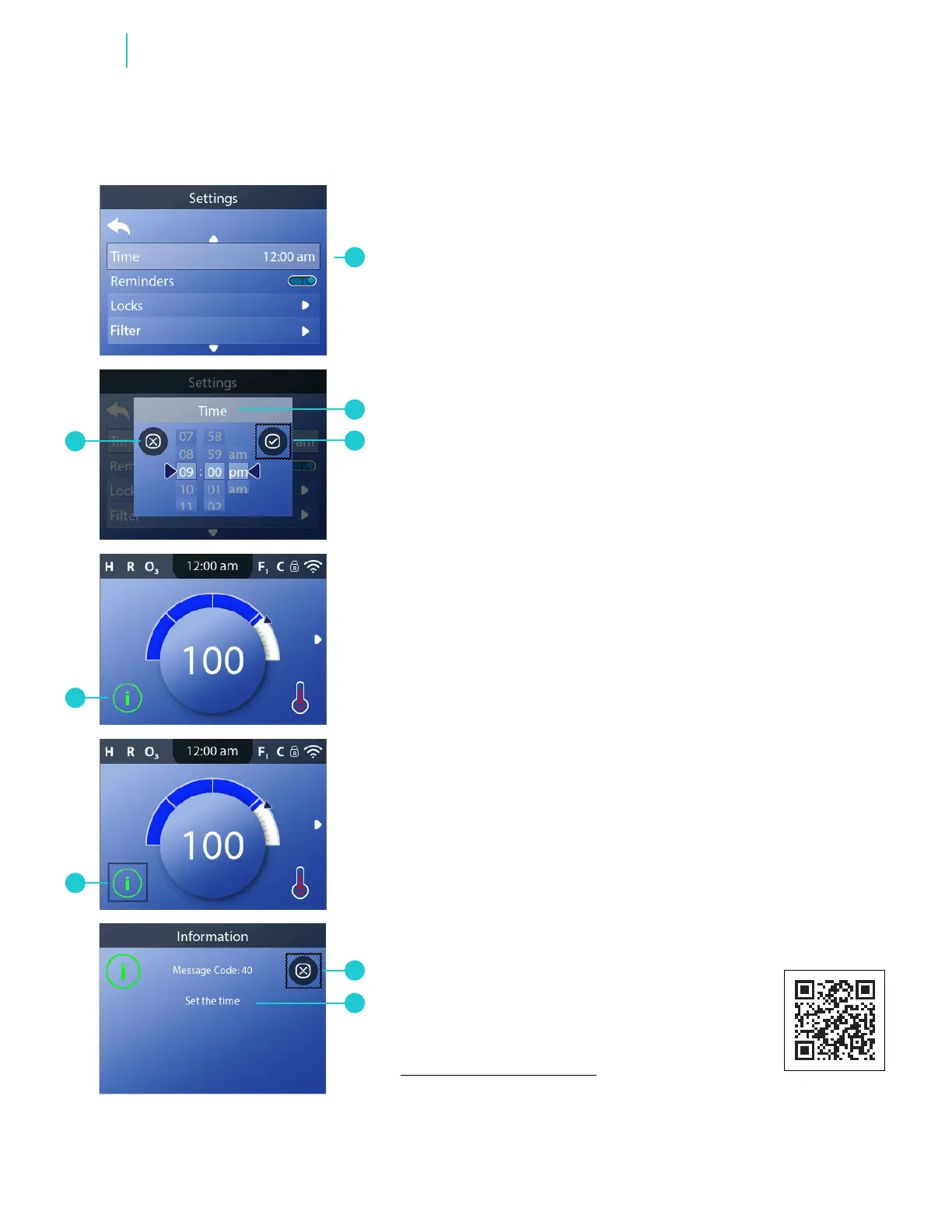
Follow these steps to set the time of day:
1 - Go to the Main menu, Settings and Time (A) to view
the Time screen (B).*
2 - Set the time.
3 - Cancel your settings (H), or save your settings (C).
Setting the time of day can be important for
determining water ltration times and other
background features.
If time of day has not been set, an information icon
appears (G). If the selection box is not already around
the Information icon (G), select the Information icon
(F). Press the SELECT navigation button to view the
corresponding message (D). Exit the information
screen (E).
You can choose a 12-hour or 24-hour time display
(View “Set Units” on page 12). CE control systems
default to a 24-hour time display.
SET TIME OF DAY
Functions
panel overview
https://youtu.be/2gQOrHf21j0
time of day
https://youtu.be/YCjRzOSYAZg
lter cycle
https://youtu.be/Y7WrEcsYJw0
set temperature
https://youtu.be/Sw_aJJV0Zzk
heat mode
https://youtu.be/8AUz_G36Jto
temperature range
https://youtu.be/Jo-rEgleH0o
panel settings
https://youtu.be/0stxBJIbf5g
* View “Navigate Settings Menu” on page 7.
View Quick Tip video.



 To Next Page