7
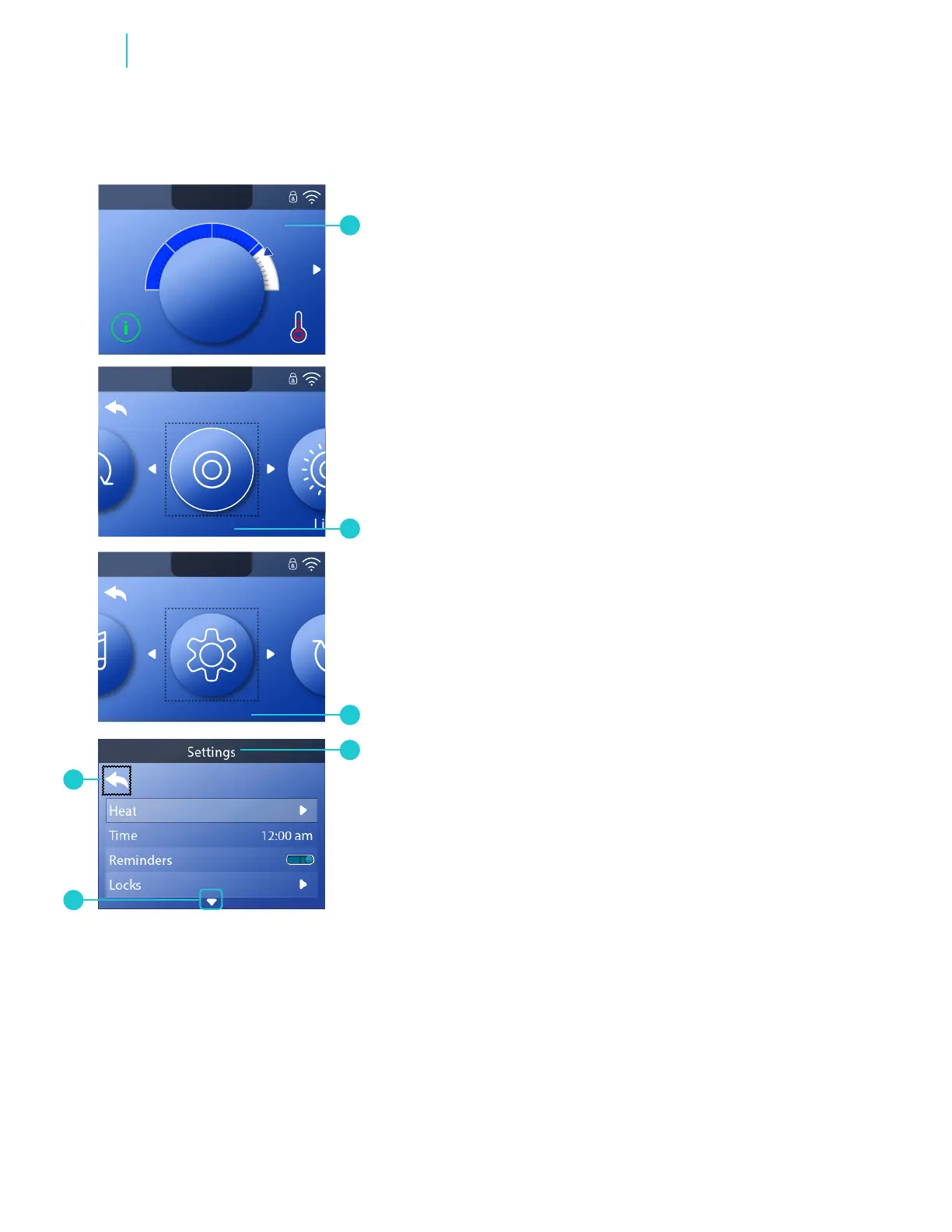
Main screen
H 12:00 amR O F
13
C
100
H 12:00 amR O F
13
C
Spa Light Music Settings Invert Test
H 12:00 amR O F
13
C
Light
Spa
H 12:00 amR O F
13
C
H 12:00 amR O F
13
C
100
H 12:00 amR O F
13
C
100
H 12:00 amR O F
13
C
100
H 12:00 amR O F
13
C
100
Spa
H 12:00 amR O F
13
C
Spa Light Music Settings Invert Test
H 12:00 amR O F
13
C
Light
Spa
H 12:00 amR O F
13
C
H 12:00 amR O F
13
C
Settings
H 12:00 amR O F
13
C
100
H 12:00 amR O F
13
C
100
H 12:00 amR O F
13
C
100
H 12:00 amR O F
13
C
100
Spa
H 12:00 amR O F
13
C
Spa Light Music Settings Invert Test
H 12:00 amR O F
13
C
Light
Spa
H 12:00 amR O F
13
C
H 12:00 amR O F
13
C
100
H 12:00 amR O F
13
C
100
A
C
D
E
B
F
BALBOA | Your Single Source Solution Document No. 42418 Rev. B1 - 04/16/24
Language: English
TP740 User Guide
NAVIGATE MAIN MENU
1 - Start from the Main screen (A), and press the RIGHT navigation
button until the Main menu (B) appears.
2 - Spa (B) is the rst item in the Main menu. Continue pressing the
RIGHT navigation button to view all items in the Main menu.
3 - If you want to navigate back to the Main screen, press the UP
navigation button to select the Back icon (F). Once the Back icon is
selected, press the SELECT navigation button and the Main screen
will appear (A).
NAVIGATE SETTINGS MENU
1 - Start from the Main screen (A), and press the RIGHT navigation
button until the Main menu (B) appears.
2 - Spa (B) is the rst item in the Main menu. Continue pressing the
RIGHT navigation button until Settings (C) is selected.
3 - Press the SELECT navigation button to view the Settings menu (D).
4 - The arrow (E) indicates more settings. Press the DOWN navigation
button to scroll down the Settings list.
5 - If you are at the bottom of a long list, press the LEFT navigation
button to select the Back icon (F).
PRESS-AND-HOLD
If you need to navigate a long list, press-and-hold the UP or DOWN
navigation button. For example, press-and-hold the DOWN navigation
button to scroll down the Settings menu (D).
VIEW MESSAGE SCREEN
Go to page 42.
Review



 To Next Page