6
Main screen
H 12:00 amR O F
13
C
100
H 12:00 amR O F
13
C
100
Spa
H 12:00 amR O F
13
C
Spa Light Music Settings Invert Test
H 12:00 amR O F
13
C
Light
Spa
H 12:00 amR O F
13
C
H 12:00 amR O F
13
C
Settings
H 12:00 amR O F
13
C
100
H 12:00 amR O F
13
C
100
Settings
12:00 AM
Heat
Time
Reminders
Locks
Locks
Settings
Panel
Locks
Settings
Panel
H 12:00 amR O F
13
100
H 12:00 amR O F
13
100
Switch OnSwitch Off
Settings
12:00 AM
Heat
Time
Reminders
Locks
Locks
Settings
Panel
Locks
Settings
Panel
H 12:00 amR O F
13
100
H 12:00 amR O F
13
100
Review
Review
panel overview
https://youtu.be/2gQOrHf21j0
time of day
https://youtu.be/YCjRzOSYAZg
lter cycle
https://youtu.be/Y7WrEcsYJw0
set temperature
https://youtu.be/Sw_aJJV0Zzk
heat mode
https://youtu.be/8AUz_G36Jto
temperature range
https://youtu.be/Jo-rEgleH0o
panel settings
https://youtu.be/0stxBJIbf5g
A
K
D
B
CL
E
F
G
H
J
I
F
M
BALBOA | Your Single Source Solution Document No. 42418 Rev. B1 - 04/16/24
Language: English
TP740 User Guide
MENU NAVIGATION
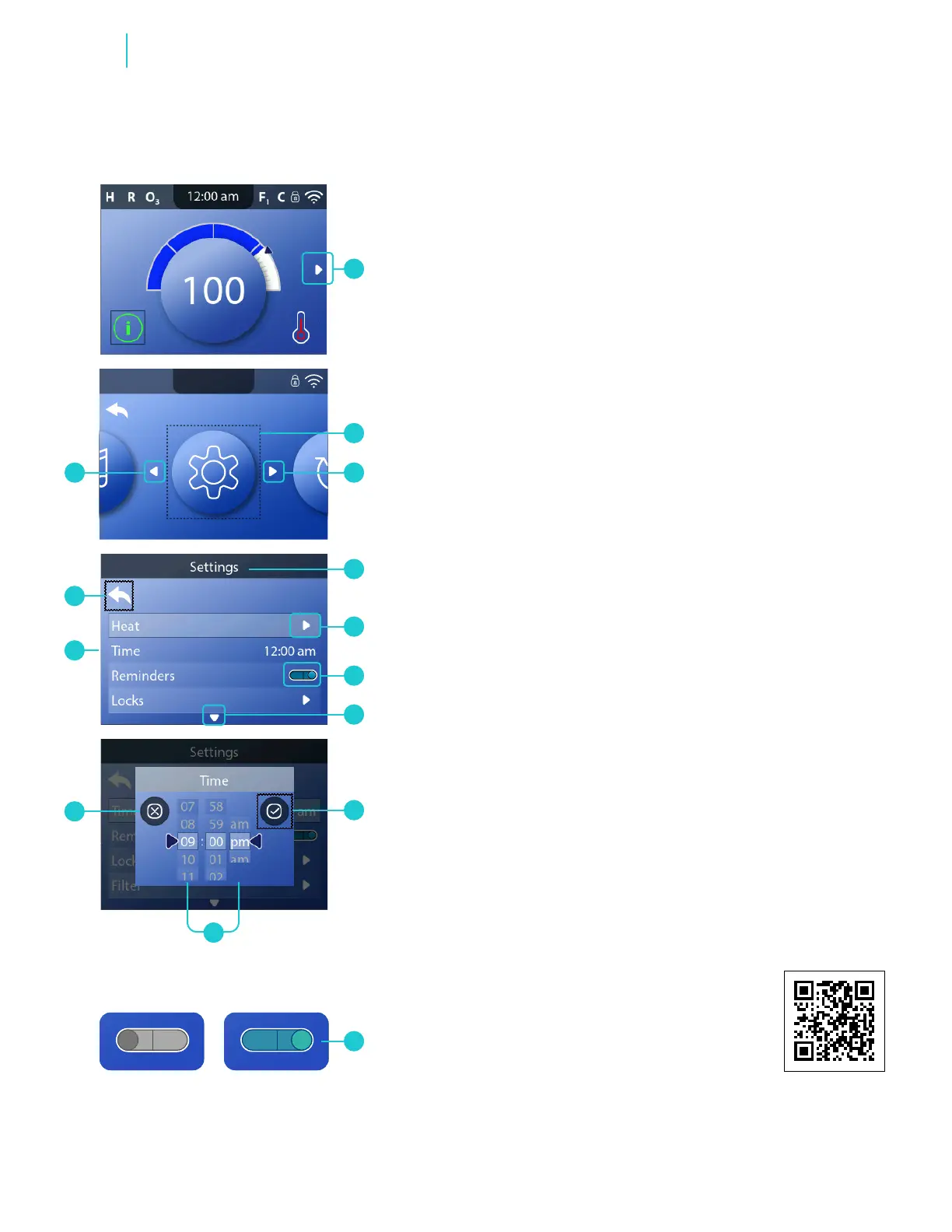
The arrow (A) on the Main screen indicates the Main menu.
Press the RIGHT navigation button until you enter the Main
menu. A selection box (B) indicates that a menu item is
selected. In this example Settings (B) is selected. Press the
SELECT navigation button to enter the Settings screen (D).
ARROWS
Arrows (C, E, G, L) indicate more menu items. Each arrow
corresponds with a navigation button (view page 5). For
example, the right arrow (C) corresponds with the RIGHT
navigation button. The left arrow (L) corresponds with the
LEFT navigation button, etc.
BACK BUTTON
Use the Back icon (K) to navigate back in the menu structure.
Use the navigation buttons to select the Back icon. The
selection box (K) indicates that the Back icon is selected.
When the Back icon is selected, press the SELECT navigation
button to navigate back.
ON/OFF SWITCHES
In this example Reminders has an On/Off switch (F). When
Reminders is selected, press the SELECT navigation button to
turn the switch On/Off. In this example the switch is On (F).
MENU ITEMS WITHOUT AN ARROW OR
ON/OFF SWITCH
If a menu item, such as Time (M), doesn’t have an arrow (E) or
an On/Off switch (F), use the SELECT button to enter a screen
related to that menu item.
SELECT, SAVE, CANCEL
Select one of these columns ( I ) with the RIGHT and LEFT
navigation buttons. Change the selected setting with the UP
and DOWN navigation buttons. After you change the settings,
select the Save icon (H) and press the SELECT navigation
button. After you press SELECT, the setting is now saved. If
you decide to cancel your new settings, select the Cancel icon
(J) and press the SELECT navigation button.



 To Next Page