5
H 12:00 AMR O F
13
C
100
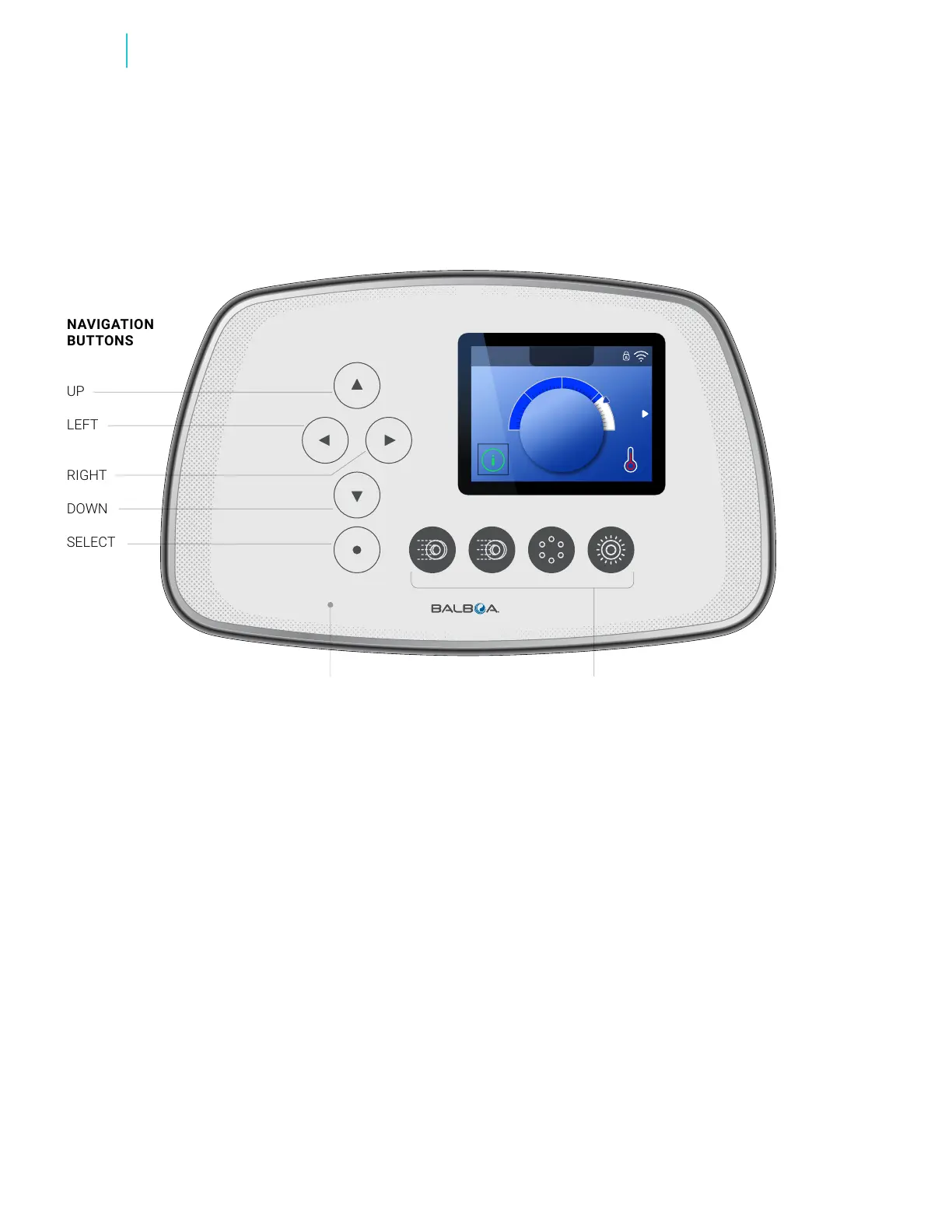
NAVIGATION
BUTTONS
UP
LEFT
RIGHT
DOWN
SELECT
Review
BALBOA | Your Single Source Solution Document No. 42418 Rev. B1 - 04/16/24
Language: English
TP740 User Guide
REVIEW USER INTERFACE
SPA DEVICE BUTTONSTP740 CONTROL PANEL
SPA DEVICE BUTTONS
These buttons control various spa devices, such as Jets,
Lights and/or Blowers.
NAVIGATION BUTTONS
Navigate the entire menu structure with the 5 navigation
buttons on the control panel. The names shown to the
left refer to the navigation buttons in this user guide. The
button names will be written in uppercase letters. Operating
or changing a selected item on the panel screen is generally
done with the SELECT button.
INVERTED DISPLAY
View page 19 for inverted panel operation.
SELECTION BOX
The Selection box is a fundamental navigation tool. It
indicates a selected item. Move the selection box by pressing
the UP, DOWN, LEFT, RIGHT navigation buttons. When an item
is selected, press the SELECT navigation button to act upon
the selected item. The next page shows various examples of
selected items (B, H, K).



 To Next Page