23
H 12:00 AMR O F
13
C
100
E
G
F
H 12:00 amR O F
13
C
100
H 12:00 amR O F
13
C
----
Test
Setup # 5
Fault Log
Select Logo
Display
Test
Setup # 5
Fault Log
Select Logo
Display
Setup #
4
5
6
Information
Message Code: 40
Set the time
Error
Message Code: MO28
The heater may be dry
Priming Mode
C
A B
D
H 12:00 amR O F
13
C
----
Test
Setup # 5
Fault Log
Select Logo
Display
Test
Setup # 5
Fault Log
Select Logo
Display
Setup #
4
5
6
Information
Message Code: 40
Set the time
Error
Message Code: MO28
The heater may be dry
Priming Mode
H
BALBOA | Your Single Source Solution Document No. 42418 Rev. B1 - 04/16/24
Language: English
TP740 User Guide
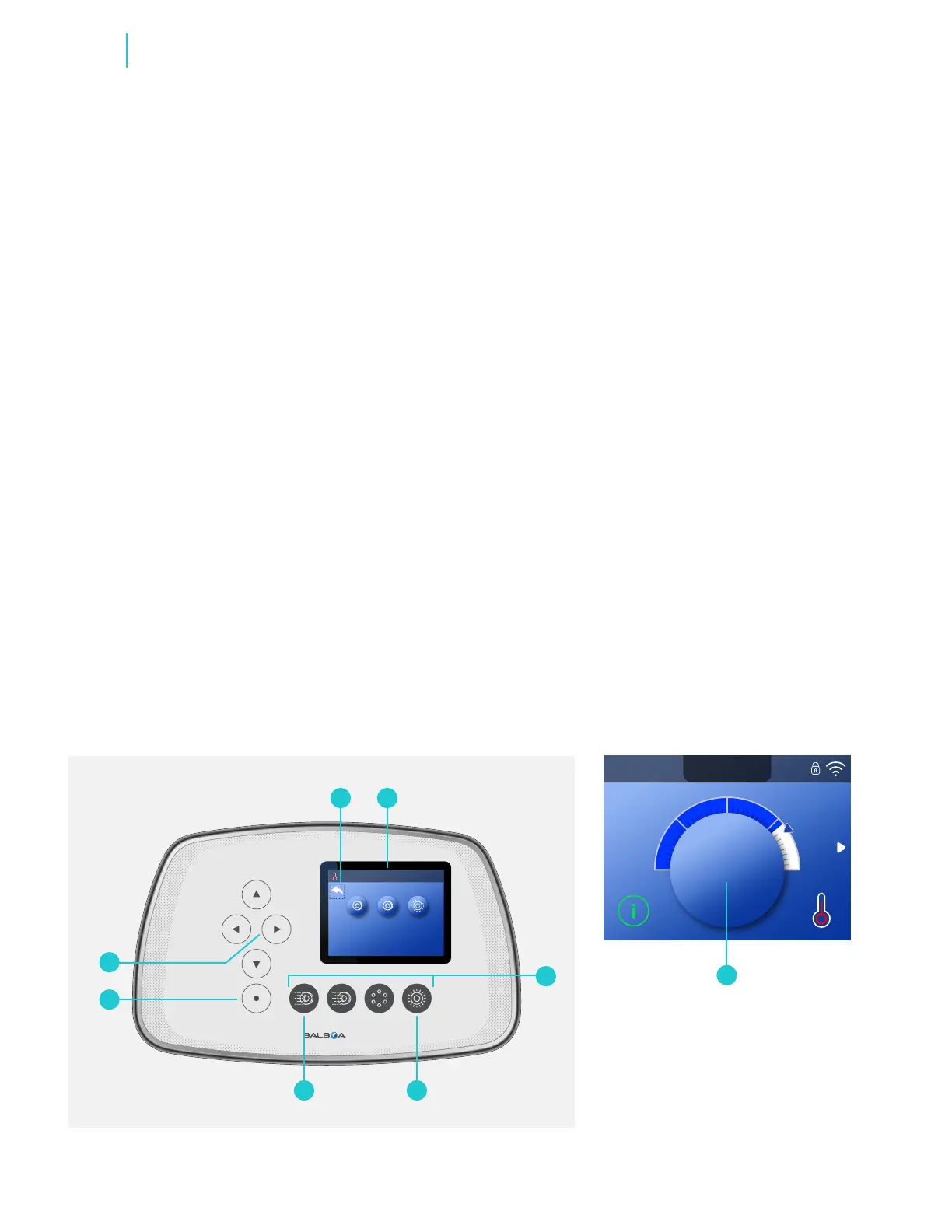
PRIMING THE PUMPS
There are two ways to prime the pumps
(and other water devices).
1 - Prime pumps by pressing the Spa
Device buttons (C).
2 - Prime pumps from the Priming
Mode screen (B).
One Priming Mode screen can display
a maximum of six pumps (and other
water devices). If there are more than
six devices, a small navigation arrow
will appear on the screen, indicating that
more devices are available to control on
the next Priming Mode screen. Press the
RIGHT navigation button (G) to view the
next screen.
The techniques for Priming pumps and
running spa devices are almost identical.
View page 10 for more information on
running spa devices.
This panel message (B) indicates that the
spa is in Priming Mode. Note: Turning the
power Off and back On again will initiate
a new pump priming session. If you need
more than 4 minutes to prime all of the
pumps, cycle power to the spa again.
FOLLOW THESE STEPS TO PRIME
A TWO-SPEED PUMP:
Press the button (JETS 1, JETS 2, etc.)
for that pump once to turn it On at low
speed. Press the button again to run the
pump at high speed. Run the pump at
high speed for 2 minutes. If priming is
not complete after 2 minutes, turn Off
the pump and repeat the process.
FOLLOW THESE STEPS TO PRIME
ANY ONE-SPEED PUMP, INCLUDING
A CIRCULATION PUMP:
Press the button (JETS 1, JETS 2, etc.)
for that pump once to turn it On. Run
the pump for 2 minutes. If priming is not
complete after 2 minutes, turn Off the
pump and repeat the process.
WHICH PUMP IS THE
HEATER PUMP?
When the spa has just entered Priming
Mode, press the LIGHT button (D) and
see if any water ows. If so, you have a
circulation pump serving as the heater
pump. If not, a two-speed pump serves
as the heater pump. A circulation pump
is controlled with the LIGHT (D) button (in
Priming Mode only). A two-speed heater
pump is controlled by pressing the JETS
1 (E) button.
Once the heater pump is primed, prime
any additional pumps.
IMPORTANT: A pump should not be
allowed to run without priming for more
than 2 minutes. Under NO circumstances
should a pump be allowed to run without
priming beyond the end of the 4 minute
Priming Mode. Doing so may cause
damage to the pump and in some cases
may cause the system to energize the
heater and go into an overheat condition.
EXITING PRIMING MODE
Priming Mode ends automatically.
However, you can manually exit Priming
Mode during this time by selecting the
Back Arrow (A) and pressing the SELECT
navigation button (F).
When Priming Mode ends (automatically
or manually) the panel will display dashes
(H). Once the control system cycles
water through the heater for one minute,
the dashes will be replaced by the water
temperature.
Fill Your Hot Tub



 To Next Page