ALPHA 2 Pro™ Wave Operator’s Instruction Manual
MKT-AH-1CC40ST [A] 25
STEP 5. Securely fasten the machine to the stand and, if
applicable, adjacent cabinet or wall.
STEP 6. Connect and route the power and network cables
where they will not be pinched, abraded, or otherwise
damaged.
• Route the power cable through a cut-out in the
base, at the left, right, or back of the machine as
appropriate for your floor plan layout.
• Open the cabinet door and verify that the power
and network cables are not pinched under the
machine or any neighboring machines.
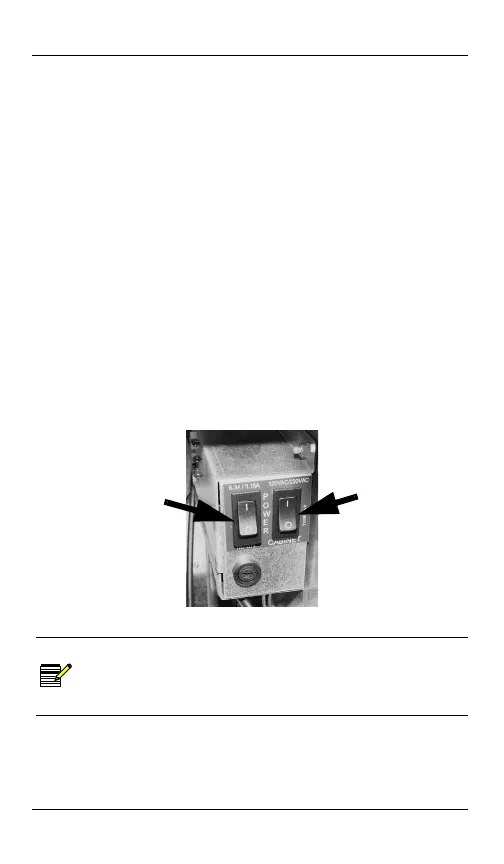
STEP 7. Press the power switches to supply power to the
machine.
• Cabinet Power Switch - supplies power only to the
cabinet components, not including the MPU
Assembly
• Main Power Switch - supplies power to the entire
cabinet and MPU Assembly
• Example - Switch Box Assembly (235532)
Cabinet and Main Power Switches
STEP 8. Set up and configure the software.
NOTE
For software setup and configuration information,
see your Alpha Game Platform™ Software Setup Field
Guide for your machine operating system software
version.
Main
Power
Switch
Cabinet
Power
Switch
MKT-AH-1CC40ST.book Page 25 Friday, November 15, 2013 3:47 PM



 To Next Page