30 P/N 43298 rev. E
Banner Engineering Corp. •Minneapolis,MNU.S.A.
www.bannerengineering.com•Tel:763.544.3164
MINI-ARRAY
®
InstructionManual
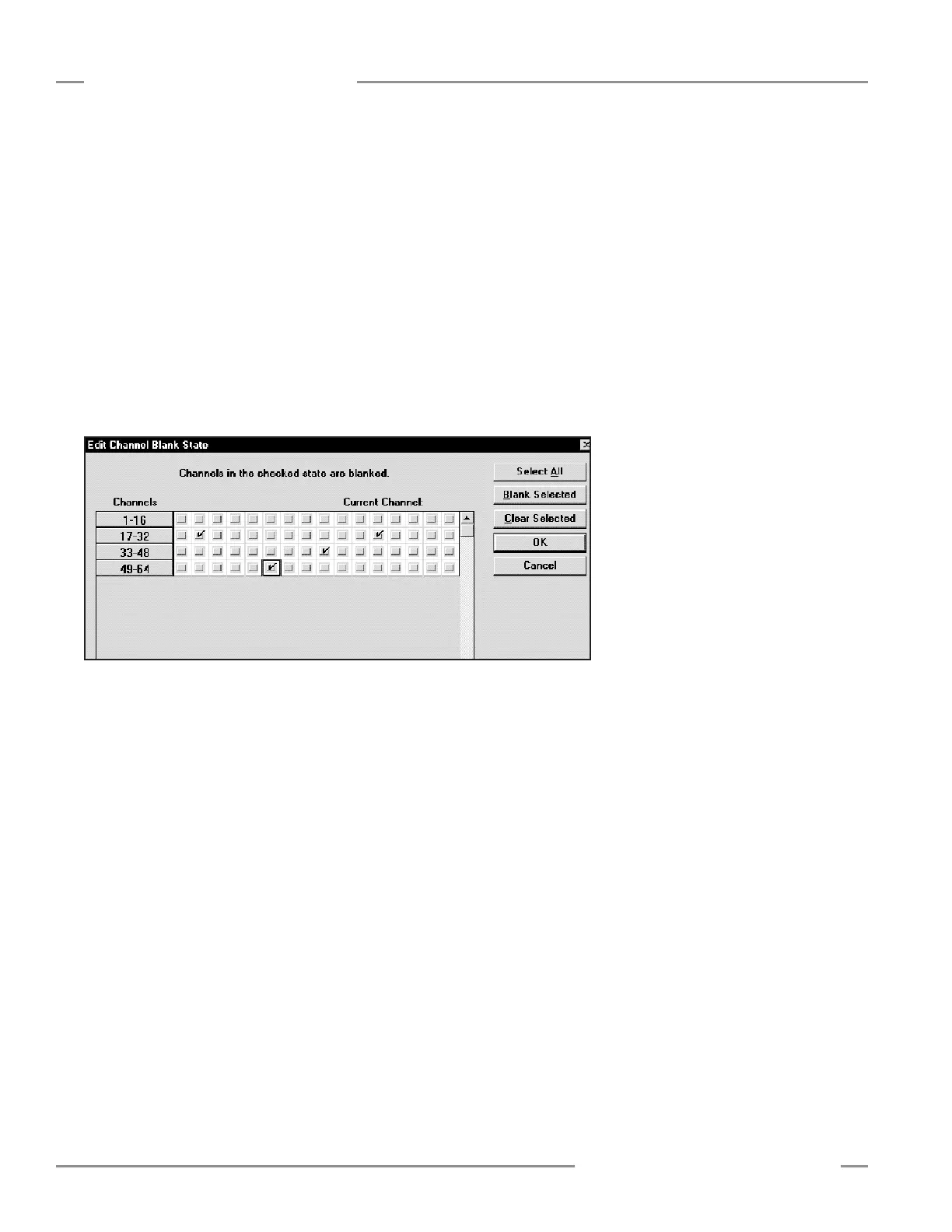
Figure 5-15. Channel Blanking Edit screen (models MAC16P-1 and MAC16N-1)
TheChannelBlankingEditScreengroupsthebeamsintorowswithacheckboxfor
eachbeam.Forinstance,thefirstrowislabeled1-16.Thefirstcheckboxrepresents
theblankingstateofchannel1.Theusercanmovethecursoroveranycheckboxand
clicktheleftmousebuttontoselectblankingforthatchannel.Acheckmarkindicates
thatthechannelhasbeenselectedforblanking.
The Blank Selected/Clear Selectedfeatureallowstheusertoselect/clearrowsof
channels.
TheOKbuttonaddsthenewblankingadditionstotheAlignmentscreen.
TheCancelbuttonvoidstheEditchanges.
Auto Blanking selectsallblockedchannelsforblanking.WhentheAutoBlanking
featureisselected,thesettingsmaybeacceptedoraborted.
Abort Auto BlankingcancelsAutoBlanking.
File Save and File Retrieve allowtheusertosaveandretrieveblankingdatatoa
file.
TheOKbuttonsavesthenewblankingconfigurationtothecontroller.Afterthe
OKbuttonisselected,RestoreControllerSettingswillreflectthenewblanking
configuration.
TheCancelbuttonpreventsthenewblankingconfigurationfrombeingsaved.
TheEditfunctionallowsindividualbeamstobeblanked.
SelectingtheEditfunctionlaunchestheChannelBlankingEditScreen,shownin
Figure5-15.
Controller Configuration





 To Next Page