P/N 43298 rev. E 29
Banner Engineering Corp. •Minneapolis,MNU.S.A.
www.bannerengineering.com•Tel:763.544.3164
MINI-ARRAY
®
InstructionManual
5.5.4 Blanking Specifications
A Blankingfeatureallowsareasofthearraytobeblanked(madeblindtoactivity
withinanarea).
Models MAC-1, MACP-1, MACN-1, MACV-1, and MACI-1
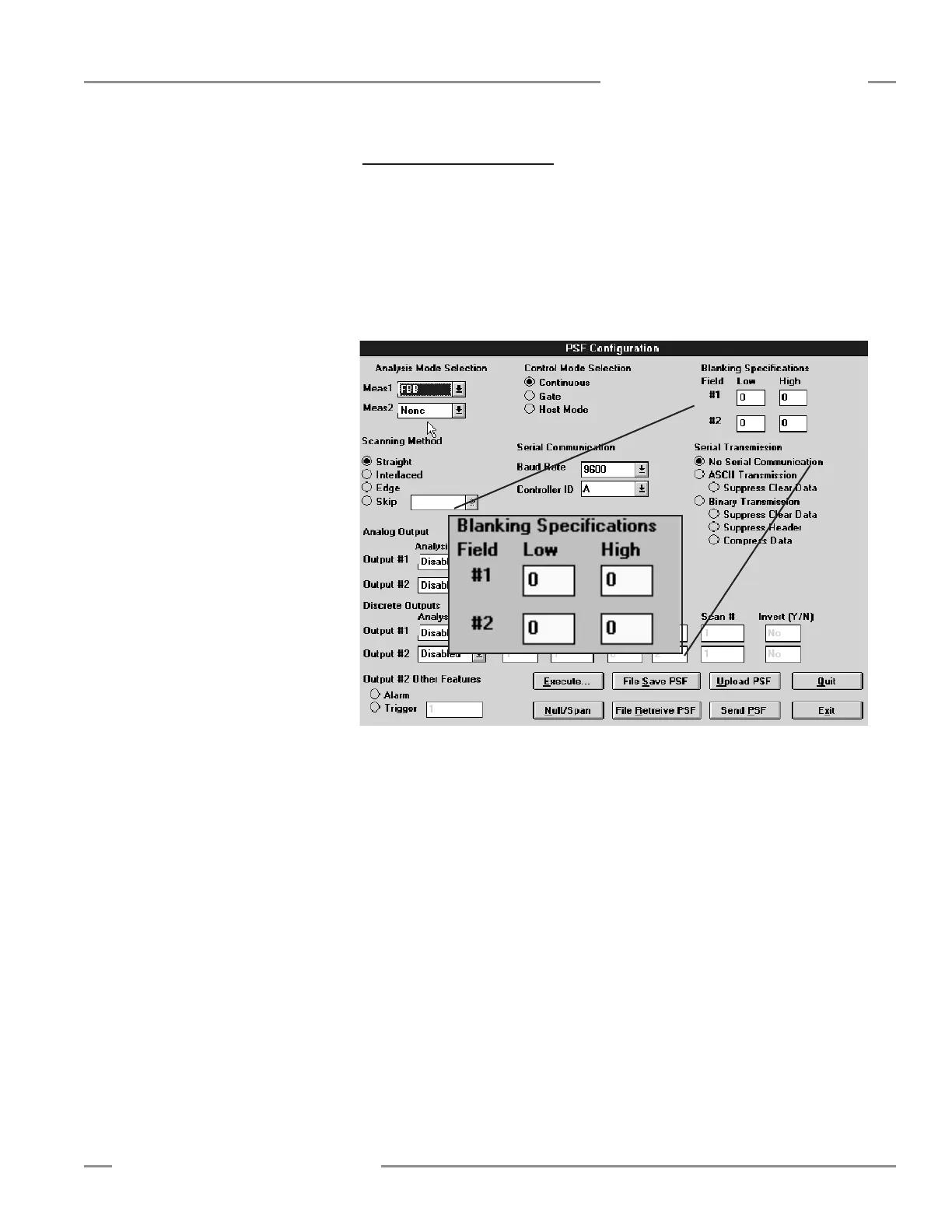
Blankingspecificationsalloweitheroneortwoareasofthearraytobeblanked(made
blindtoactivitywithinthatarea).Beamsarenumberedfromthebottom(cableend)
ofthesensorstothetopofthesensors.TheLowbeamnumberandtheHighbeam
numbercanbedesignatedtodefineaFieldtobeblanked(seeFigure5-14).Zerosare
usedasdefaultsettingstosignifynoblanking.
Figure 5-14. MINI-ARRAY software blanking specifications (models MAC-1, MACP-1,
MACN-1, MACV-1, and MACI-1)
Models MAC16P-1 and MAC16N-1
Thecontrollercanspecifyblankingofanylightchannelandsavethesespecifications
instaticmemory.Blankingoptionsarechangedusingthesuppliedsoftware.Under
theMINI-ARRAYtasks,selecttheAlignmentfunctiontoaccesstheAlignmentscreen
(Figure5-4).
TheStartbuttoncausesthesystemtoscanandupdatetheAlignmentscreen.
Blankingcommandsinclude:ClearBlankingFields,RestoreControllerSettings,Auto
Blanking,AbortAutoBlanking,SavetoFile,ReadFromFile,Cancel,OK,andEdit.
Clear Blanking Fieldsremovesallblankingspecifications.
Restore Controller Settingsreadsthepreviouslysavedblankingspecificationsfrom
theMINI-ARRAYcontroller.
Controller Configuration






 To Next Page