47R5914712 /00 SP2K-C
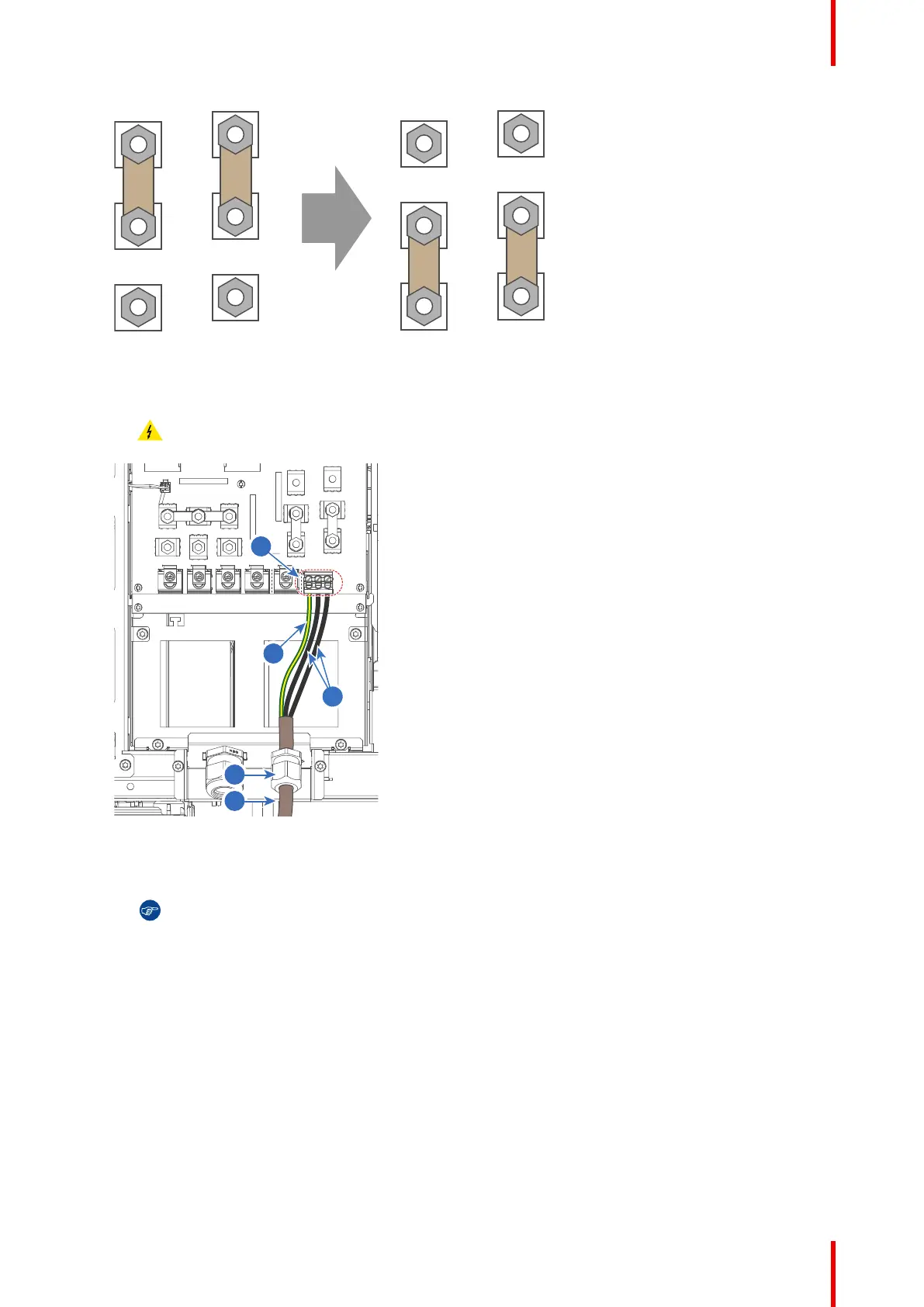
Image 4–13
4. Guide the AC power cord (reference 2) through the cable gland (reference 3). Connect the wires
(references 4 and 5) to the 3–terminal strip (reference 6) as illustrated. Use a torque screwdriver to fasten
the screws of the 3-terminal strip with a torque of 1.7Nm (1.25 lbf*ft).
Warning: Always connect the PE wire (reference 4) first, then the other wires.
Image 4–14
2 UPS Power cord
3 Cable gland
4 PE wire
5 Other power wires
6 3–terminal strip
Tip: Check for good fixation by pulling on each wire.
5. Secure the AC power cord by fastening the cable gland (reference 3). Use a 24 mm open-end wrench.
6. Place the net input cover back and seal it. Tighten the two screws (reference 1), using a T20 Torx
screwdriver.
Physical installation projector



 To Next Page