6.3 Serial Redirector software from Lantronix Inc.
A serial redirector PC software can create virtual COM ports on the PC and
reroute serial data in the back of the PC application over network to a serial
device. This makes sense when the serial device is too far away to connect
it serially to the PC, then a serial device can be connected to the Barionet
serial ports and the Redirector connects to the Barionet´s serial TCP socket.
Typical applications for that are remote maintainance of any engines or
modems and so on.
All Barionets are using a Lantronix chip inside, this company offers also a
good serial redirector software. The Lantronix Redirector software in version
3.1.0.4 is used in the following example:
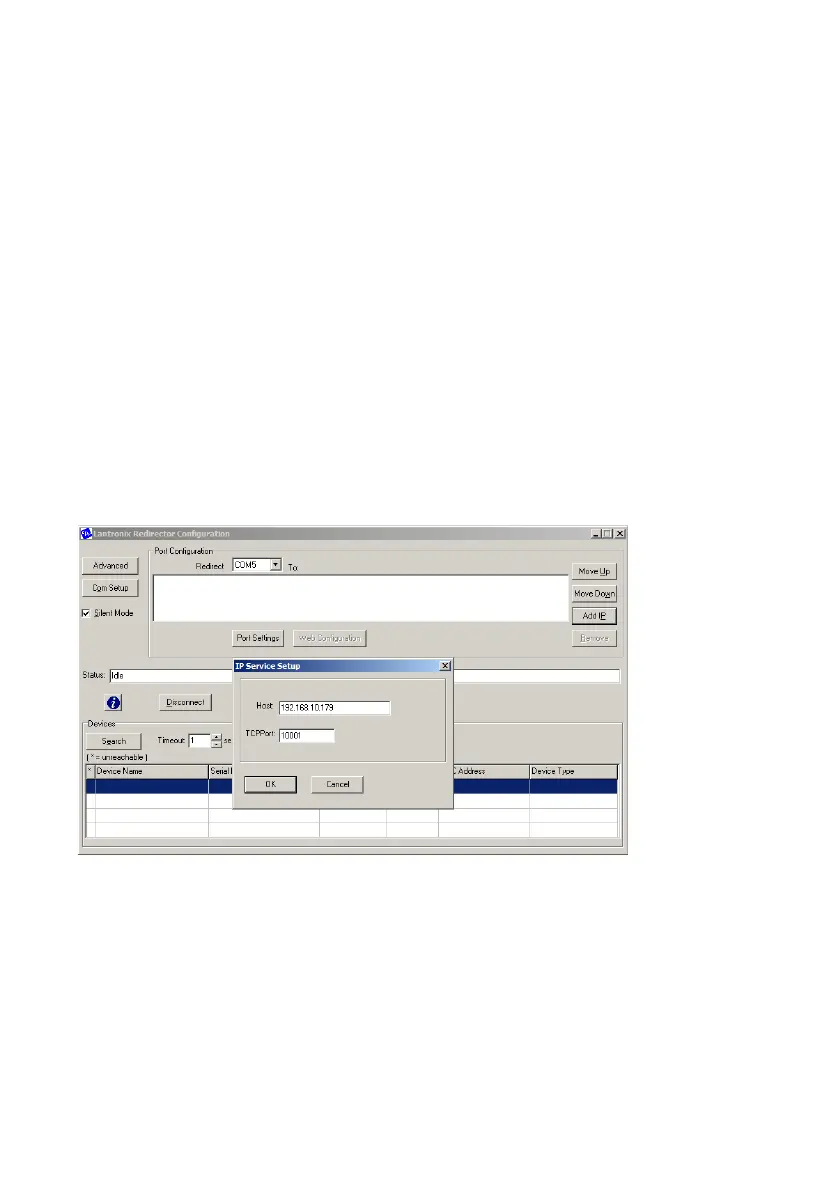
After installation of the Redirector software open it and choose/add under
“Com Setup” the new virtual COM port (e.g. COM5), then save the settings
and reboot your PC. When the PC is rebooted, open it again and select
under “Redirect” the desired COM port and click “Add IP”. In the opening
window define the Barionet´s IP-address and TCPPort number for the serial
port, then close it by clicking “OK”.
BARIX AG | 17. Oct. 2013 | Barionet Hands-on Training Guide | Page 36/38


 To Next Page