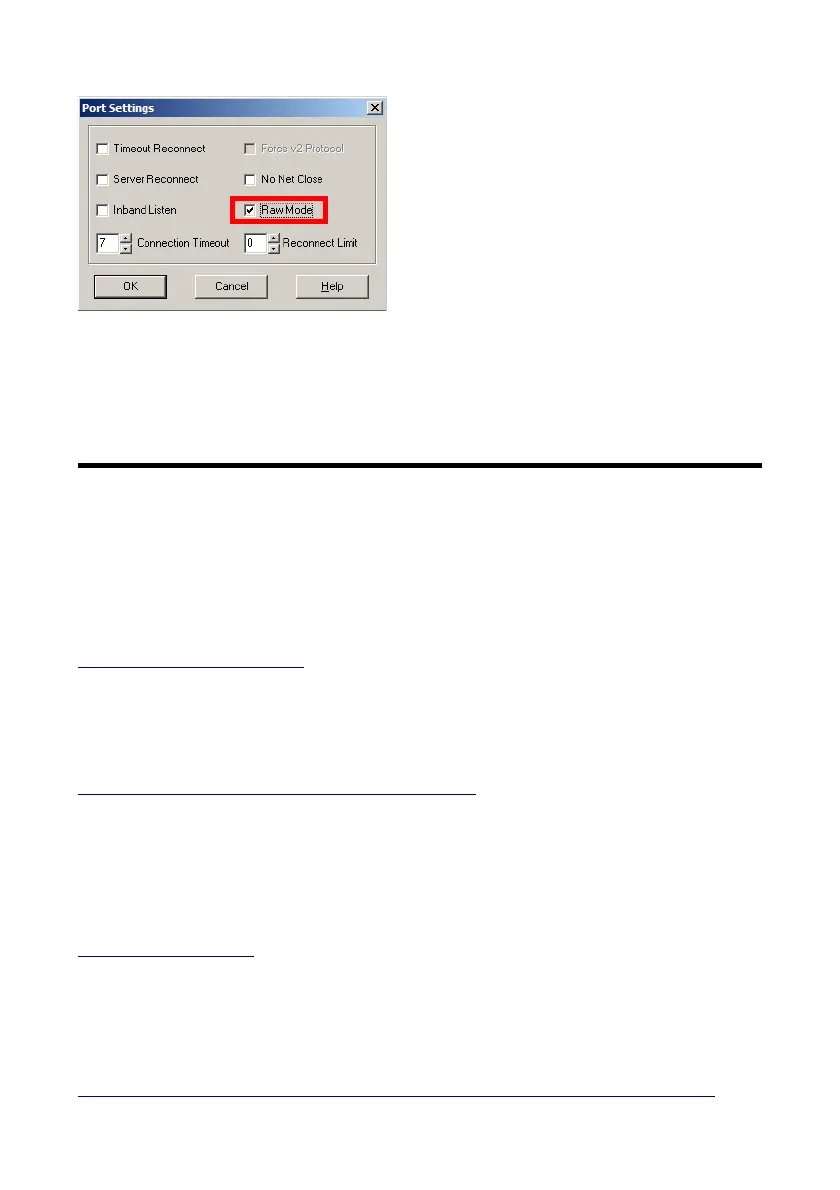
As next click “Port Settings” and mark
there “RAW Mode” and click “OK” to
close it. Finally save the settings and
close the Redirector setup. Now the
redirector is ready for the use. Open
your serial PC application and select
there the new virtual COM port and
start the communication. The newer Lantronix Redirector version 4.x is not
working with Barix products !
7 Important Barionet help links
The Barionet is a complex product, so also question may come up from you.
If you cannot find an answer to your question here, in the Barionet Family
manual or could be not answered from your distributor then there are some
support resources in the internet available:
http://bcl-applications.info
This link offers DEMO BCL applications for Barix products, e.g. for the
Barionet extension units and many more.
http://tech.groups.yahoo.com/group/barionet/
That´s the link to the Barionet Yahoo Support forum, there you will find
answers to many asked questions. Barionet experts from all over the world
are sharing their knowledge here.
http://wiki.barix.com
The Barix Wiki page provides also much valuable Barionet knowledge.
The Barionet family manual and latest firmwares are downloadable from:
http://www.barix.com/downloads/downloads-firmware/barionet-firmware/
BARIX AG | 17. Oct. 2013 | Barionet Hands-on Training Guide | Page 37/38


 To Next Page