page 19page 19
page 19page 19
page 19
930/937 Mulcher (O)
800-00256
WARNING WARNING
WARNING WARNING
WARNING
Do not alter joystick control functions without factory authorization.Do not alter joystick control functions without factory authorization.
Do not alter joystick control functions without factory authorization.Do not alter joystick control functions without factory authorization.
Do not alter joystick control functions without factory authorization.
Controls must remain the same as the way they are installed at the factory.Controls must remain the same as the way they are installed at the factory.
Controls must remain the same as the way they are installed at the factory.Controls must remain the same as the way they are installed at the factory.
Controls must remain the same as the way they are installed at the factory.
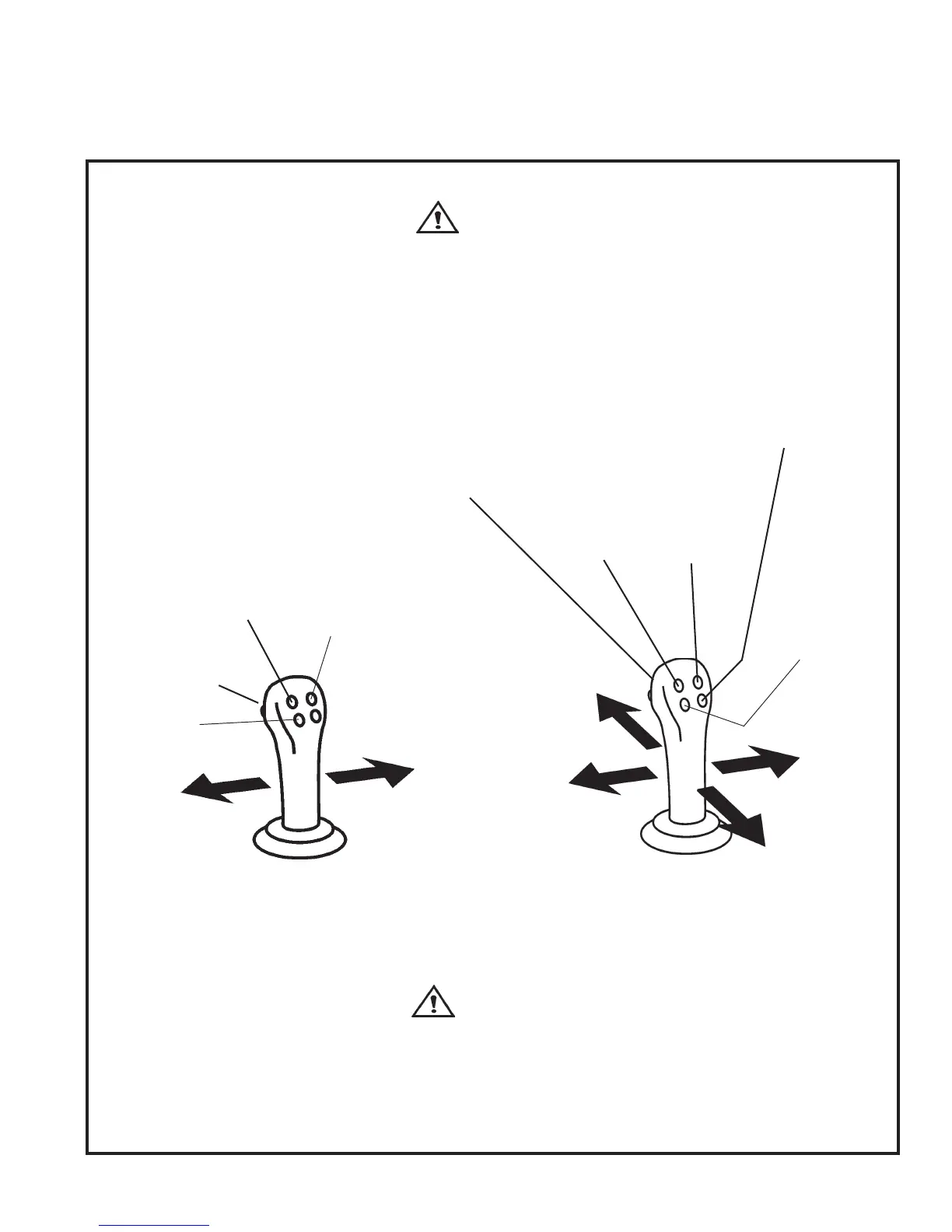
Controls are shown as if you are in the operator's seat.
TiltTilt
TiltTilt
Tilt
AttachmentAttachment
AttachmentAttachment
Attachment
ForwardForward
ForwardForward
Forward
TiltTilt
TiltTilt
Tilt
AttachmentAttachment
AttachmentAttachment
Attachment
BackBack
BackBack
Back
RaiseRaise
RaiseRaise
Raise
LiftLift
LiftLift
Lift
ArmsArms
ArmsArms
Arms
Front Axle Differential Lock ButtonFront Axle Differential Lock Button
Front Axle Differential Lock ButtonFront Axle Differential Lock Button
Front Axle Differential Lock Button
Locks front axle differential while button
is held in.
Use for traction only, not traveling.
Traveling with the front axle differential
locked will cause machine to turn wide
and hard.
See Instrument Panel (Mulchers)
section for further differential lock
options.
SteerSteer
SteerSteer
Steer
LeftLeft
LeftLeft
Left
SteerSteer
SteerSteer
Steer
RightRight
RightRight
Right
Lower LiftLower Lift
Lower LiftLower Lift
Lower Lift
ArmsArms
ArmsArms
Arms
JOYSTICK CONTROL FUNCTIONS - MULCHERJOYSTICK CONTROL FUNCTIONS - MULCHER
JOYSTICK CONTROL FUNCTIONS - MULCHERJOYSTICK CONTROL FUNCTIONS - MULCHER
JOYSTICK CONTROL FUNCTIONS - MULCHER
CAUTION CAUTION
CAUTION CAUTION
CAUTION
Do not make continuous turns on aDo not make continuous turns on a
Do not make continuous turns on aDo not make continuous turns on a
Do not make continuous turns on a
hard surface. Damage to axles canhard surface. Damage to axles can
hard surface. Damage to axles canhard surface. Damage to axles can
hard surface. Damage to axles can
result.result.
result.result.
result.
HornHorn
HornHorn
Horn
ButtonButton
ButtonButton
Button
OpenOpen
OpenOpen
Open
GateGate
GateGate
Gate
CloseClose
CloseClose
Close
GateGate
GateGate
Gate
Push BarPush Bar
Push BarPush Bar
Push Bar
RetractRetract
RetractRetract
Retract
CONTROL FUNCTIONS CONTINUED...
Mulcher Float OverrideMulcher Float Override
Mulcher Float OverrideMulcher Float Override
Mulcher Float Override
(Variable Float Only)(Variable Float Only)
(Variable Float Only)(Variable Float Only)
(Variable Float Only)
When Mulcher is turned on, this
button becomes the float override
button, lifting the mulcher head up
as the button is pushed. Head
drifts back down when button is
released.
Low LockLow Lock
Low LockLow Lock
Low Lock
On / OffOn / Off
On / OffOn / Off
On / Off
Push BarPush Bar
Push BarPush Bar
Push Bar
ExtendExtend
ExtendExtend
Extend
FloatFloat
FloatFloat
Float
Activate/Activate/
Activate/Activate/
Activate/
De-activateDe-activate
De-activateDe-activate
De-activate


 To Next Page