page 44page 44
page 44page 44
page 44
930/937 Mulcher (O)
800-00256
INSTRUMENT PANELS CONTINUED...
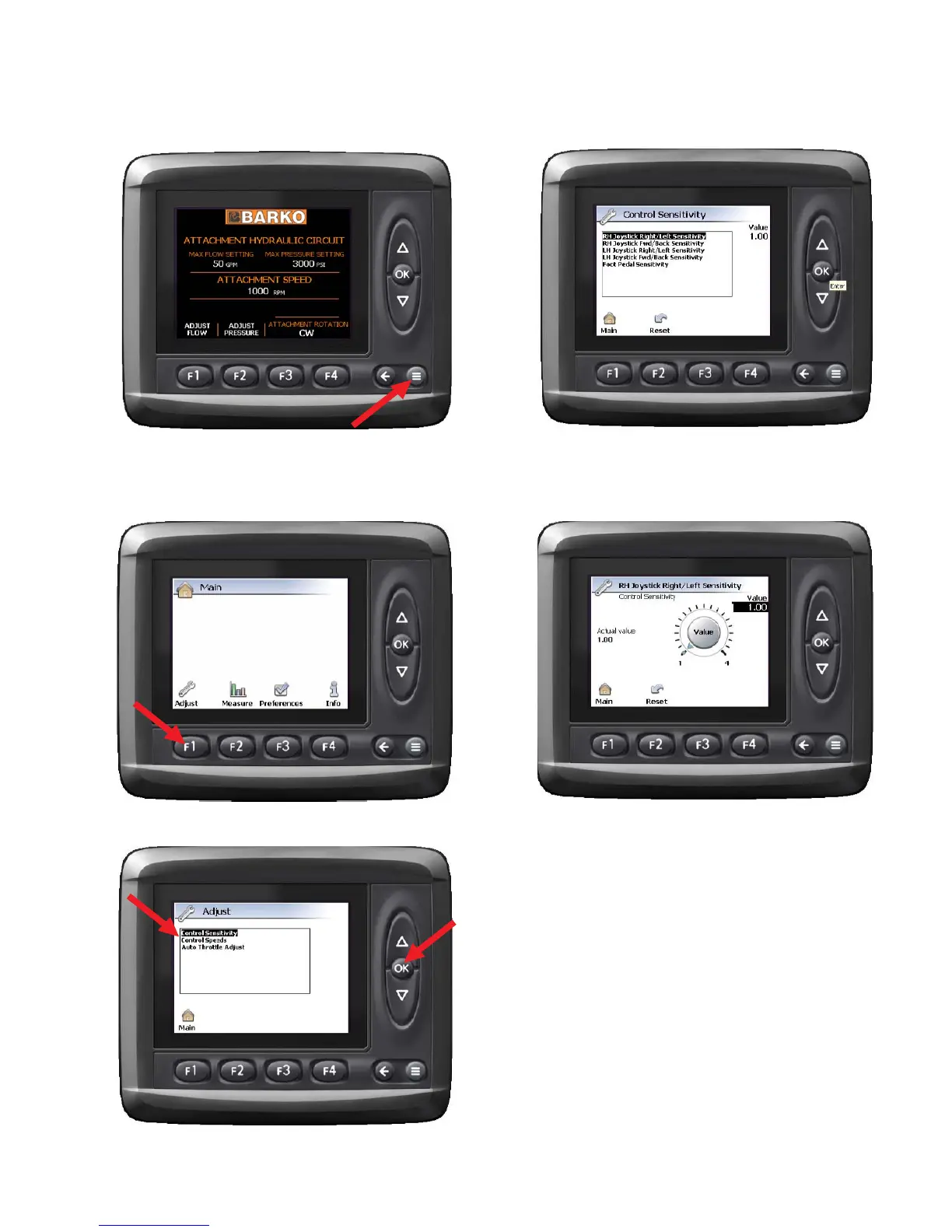
The Controls Group screens allows you to make
adjustments to several of the control functions. To
access this screen, press the system screen button to
get to the main menu.
In the Main menu press the F1 button to get to the adjust
screen.
Once in the Adjust screen, highlight Control Sensitivity .
With the Controls Group highlighted, press the OK button.
Select the control sensitivity that you would like to change
by using the UP and DOWN keys, and the OK button
once your selection is highlighted.
To change the sensitivity, use the UP and DOWN arrow
keys to select the sensitivity you desire. Then press the
OK button to accept the change. To return to the Main
menu, press F1.
ADJUST CONTROL SENSITIVITYADJUST CONTROL SENSITIVITY
ADJUST CONTROL SENSITIVITYADJUST CONTROL SENSITIVITY
ADJUST CONTROL SENSITIVITY



 To Next Page