page 41page 41
page 41page 41
page 41
930/937 Mulcher (O)
800-00256
INSTRUMENT PANELS CONTINUED...
1.1.
1.1.
1.
Flow SettingFlow Setting
Flow SettingFlow Setting
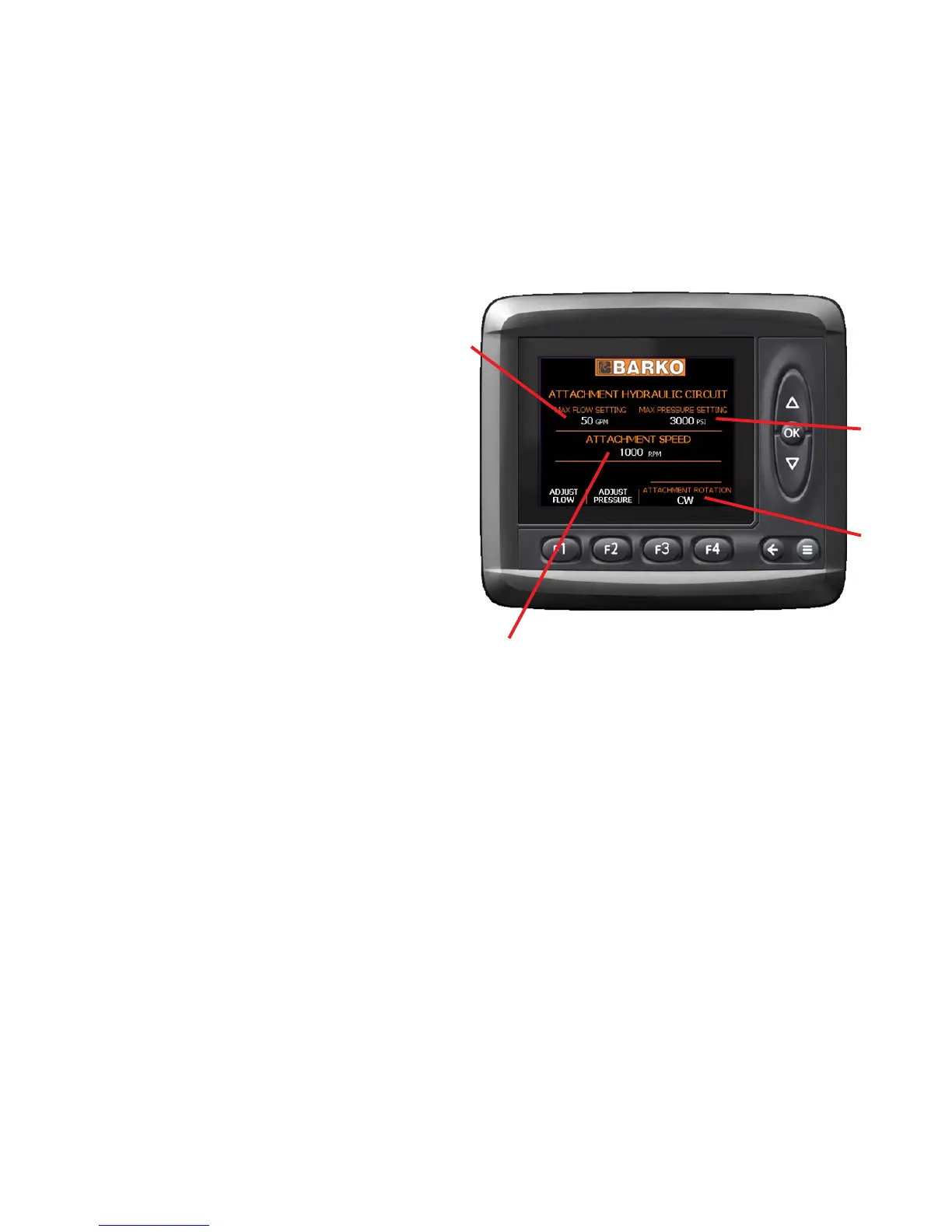
Flow Setting - Displays current maximum flow
setting to the attachment in gallons per
minute (GPM).
2.2.
2.2.
2.
Pressure SettingPressure Setting
Pressure SettingPressure Setting
Pressure Setting - Displays current
maximum pressure setting for the
attachment in pounds per square inch
(PSI).
3.3.
3.3.
3.
Attachment SpeedAttachment Speed
Attachment SpeedAttachment Speed
Attachment Speed - Displays instantaneous
attachment speed in RPM.
4.4.
4.4.
4.
Attachment DirectionAttachment Direction
Attachment DirectionAttachment Direction
Attachment Direction - Displays current of
attachment rotation - clockwise (CW) or
counter-clockwise (CCW).
MAIN SCREEN ICONSMAIN SCREEN ICONS
MAIN SCREEN ICONSMAIN SCREEN ICONS
MAIN SCREEN ICONS
DETAIL 1DETAIL 1
DETAIL 1DETAIL 1
DETAIL 1
The main screen is the first screen that will appear after starting the machine. This will be where all operations begin.
Most information need during operation will appear on this screen.
From this screen you can view current settings and navigate to other MD3 screens. To navigate to other screens
press <--- for the Diagnostic Screen and F4 for the Warning Screen.
1
2
3
4
MD3 DISPLAY - ICON LOCATIONSMD3 DISPLAY - ICON LOCATIONS
MD3 DISPLAY - ICON LOCATIONSMD3 DISPLAY - ICON LOCATIONS
MD3 DISPLAY - ICON LOCATIONS


 To Next Page