page 42page 42
page 42page 42
page 42
930/937 Mulcher (O)
800-00256
INSTRUMENT PANELS CONTINUED...
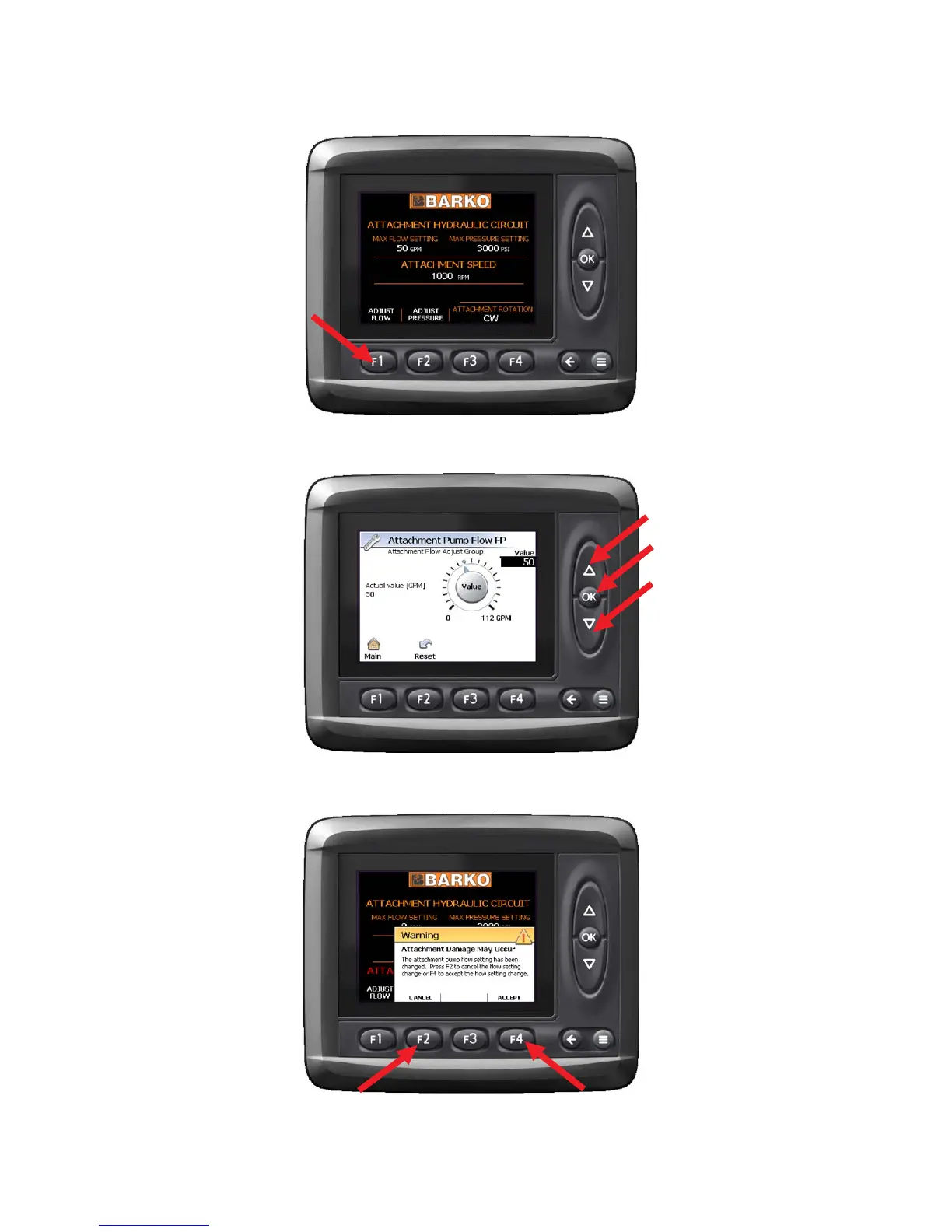
To change the pump flow, press F1, "Adjust Flow" button.
The Attachment Pump Flow screen will come up.
To change the setting, use the UP and DOWN arrow
keys to select flow setting in GPM. Press the OK button.
Once OK has been pushed, this warning message is
displayed. You must either press F4 to accept the
changes made or F2 to cancel your changes.
SETTING ATTACHMENT PUMP FLOWSETTING ATTACHMENT PUMP FLOW
SETTING ATTACHMENT PUMP FLOWSETTING ATTACHMENT PUMP FLOW
SETTING ATTACHMENT PUMP FLOW


 To Next Page