page 40page 40
page 40page 40
page 40
930/937 Mulcher (O)
800-00256
INSTRUMENT PANELS CONTINUED...
12 34 5 6
7
8
1.1.
1.1.
1.
F1F1
F1F1
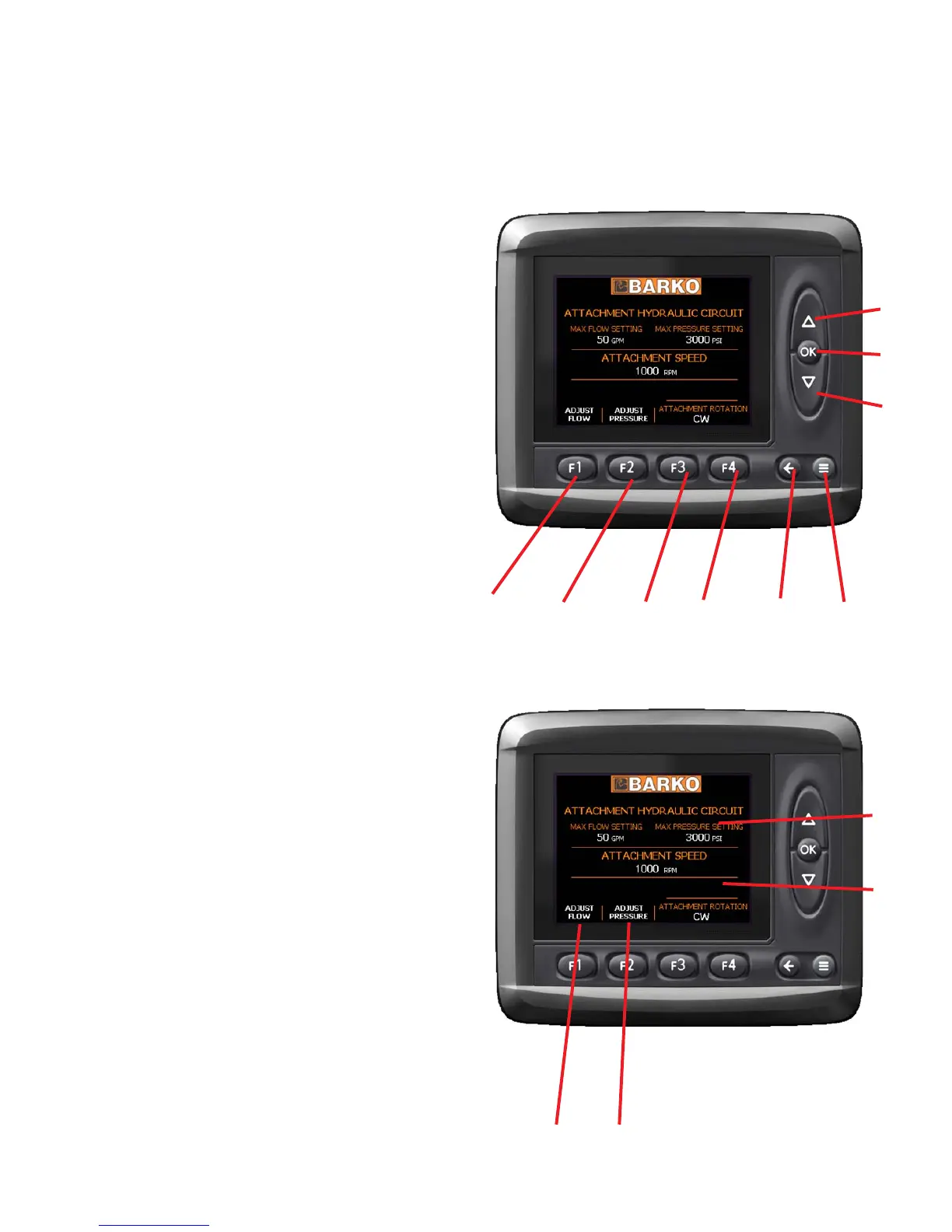
F1 - Button description written above button.
2.2.
2.2.
2.
F2F2
F2F2
F2 - Button description written above button.
3.3.
3.3.
3.
F3F3
F3F3
F3 - Button description written above button.
4.4.
4.4.
4.
F4F4
F4F4
F4 - Button description written above button.
5.5.
5.5.
5.
Return/Diagnostic ScreenReturn/Diagnostic Screen
Return/Diagnostic ScreenReturn/Diagnostic Screen
Return/Diagnostic Screen - Used to navigate
menu options or view the diagnostic screen.
6.6.
6.6.
6.
System Screen ButtonSystem Screen Button
System Screen ButtonSystem Screen Button
System Screen Button - Used to navigate
menu options. This button will take you to the
main menu from any screen.
7.7.
7.7.
7.
ArrowsArrows
ArrowsArrows
Arrows - Button description written to the left of
button , or used to navigate menu options.
8.8.
8.8.
8.
OK (enter)OK (enter)
OK (enter)OK (enter)
OK (enter) - Button description written to the left of
button , or used to navigate menu options.
1
2
3
7
1.1.
1.1.
1.
F1 Button Label LocationF1 Button Label Location
F1 Button Label LocationF1 Button Label Location
F1 Button Label Location - Description located
here to indicate what function F1 activates.
2.2.
2.2.
2.
F2 Button Label LocationF2 Button Label Location
F2 Button Label LocationF2 Button Label Location
F2 Button Label Location - Description located
here to indicate what function F2 activates.
3.3.
3.3.
3.
DOWN Arrow Label LocationDOWN Arrow Label Location
DOWN Arrow Label LocationDOWN Arrow Label Location
DOWN Arrow Label Location - Description
located here to indicate what function the
DOWN arrow activates. When there is no label
here the arrow is used to scroll down when the
option is available.
4.4.
4.4.
4.
UP Arrow Label LocationUP Arrow Label Location
UP Arrow Label LocationUP Arrow Label Location
UP Arrow Label Location - Description located
here to indicate what function the UP arrow
activates. When there is no label here the arrow
is used to scroll up when the option is available.
4
MD3 DISPLAY - BUTTON LOCATIONS & BUTTON LABELSMD3 DISPLAY - BUTTON LOCATIONS & BUTTON LABELS
MD3 DISPLAY - BUTTON LOCATIONS & BUTTON LABELSMD3 DISPLAY - BUTTON LOCATIONS & BUTTON LABELS
MD3 DISPLAY - BUTTON LOCATIONS & BUTTON LABELS


 To Next Page