page 27page 27
page 27page 27
page 27
930/937 Mulcher (O)
800-00256
INSTRUMENT PANEL CONTINUED...
11
11
1
ON / OFF / MUTEON / OFF / MUTE
ON / OFF / MUTEON / OFF / MUTE
ON / OFF / MUTE
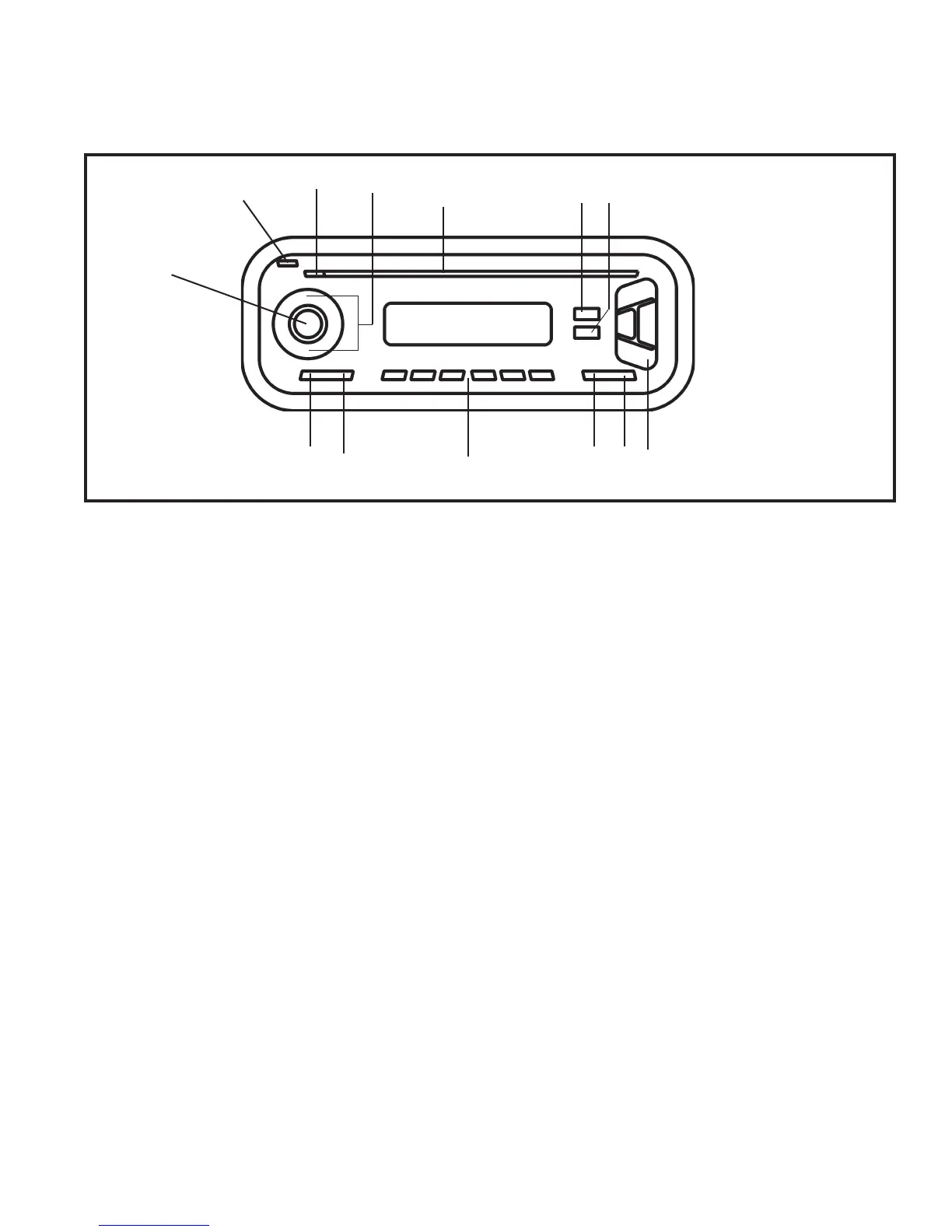
Button to switch the unit on/off and to mute the unit.
22
22
2
Release ButtonRelease Button
Release ButtonRelease Button
Release Button
Button to release the control panel.
33
33
3
EjectEject
EjectEject
Eject
CD Eject button
44
44
4
Volume ControlVolume Control
Volume ControlVolume Control
Volume Control
Push the up arrow to turn the volume up and the
down arrow to turn the volume down.
55
55
5
CD - SlotCD - Slot
CD - SlotCD - Slot
CD - Slot
Insert your cd into this slot
66
66
6
Audio ButtonAudio Button
Audio ButtonAudio Button
Audio Button
Audio button, to adjust the bass, treble, balance and
fader settings and Sound Preset Audio Button
77
77
7
MENU / SCAN ButtonMENU / SCAN Button
MENU / SCAN ButtonMENU / SCAN Button
MENU / SCAN Button
Short press: MENU button, to open the basic
settings menu.
Long press: SCAN, to start scan function
88
88
8
Arrow ButtonArrow Button
Arrow ButtonArrow Button
Arrow Button
Arrow Buttons
99
99
9
X-Bass ButtonX-Bass Button
X-Bass ButtonX-Bass Button
X-Bass Button
Button to adjust the X-Bass function.
10.10.
10.10.
10.
Display ButtonDisplay Button
Display ButtonDisplay Button
Display Button
Short press: to display the time.
Long press: to change the display priority
11.11.
11.11.
11.
KeysKeys
KeysKeys
Keys
Keys 1-6
12.12.
12.12.
12.
BND / TS buttonBND / TS button
BND / TS buttonBND / TS button
BND / TS button
Short press: to select the FM memory bank and the
AM waveband, source selection to radio mode.
Long press: to start the Travelstore function
13.13.
13.13.
13.
SRC ButtonSRC Button
SRC ButtonSRC Button
SRC Button
To select the CD, radio and CD changer or AUX
sources.
AM/FM STEREO CD PLAYERAM/FM STEREO CD PLAYER
AM/FM STEREO CD PLAYERAM/FM STEREO CD PLAYER
AM/FM STEREO CD PLAYER
1
2
3
4
5
6
7
8
910
11
12
13


 To Next Page