page 43page 43
page 43page 43
page 43
930/937 Mulcher (O)
800-00256
INSTRUMENT PANELS CONTINUED...
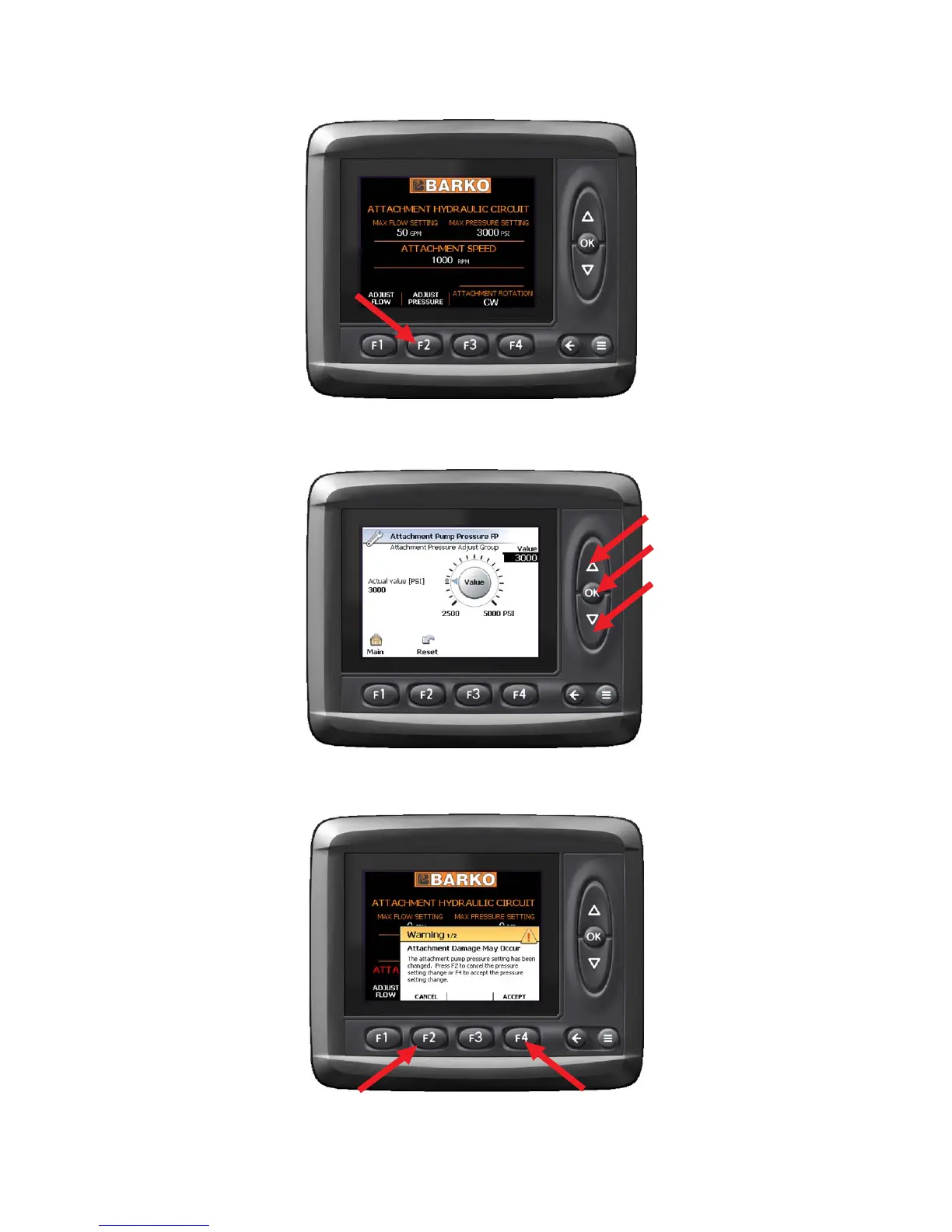
To change the pump pressure, press F2, "Adjust
Pressure" button. The Attachment Pump Pressure
screen will come up.
To change the maximum pump pressure setting, use the
UP and DOWN arrow keys to select flow setting in PSI.
Press the OK button.
Once OK has been pushed, this warning message is
displayed. You must either press F4 to accept the
changes made or F2 to cancel your changes.
SETTING ATTACHMENT PUMP PRESSURESETTING ATTACHMENT PUMP PRESSURE
SETTING ATTACHMENT PUMP PRESSURESETTING ATTACHMENT PUMP PRESSURE
SETTING ATTACHMENT PUMP PRESSURE


 To Next Page