Basics
11
Aircraft Refuelling, Operating Instructions, BA 090323, (07.03.2022)
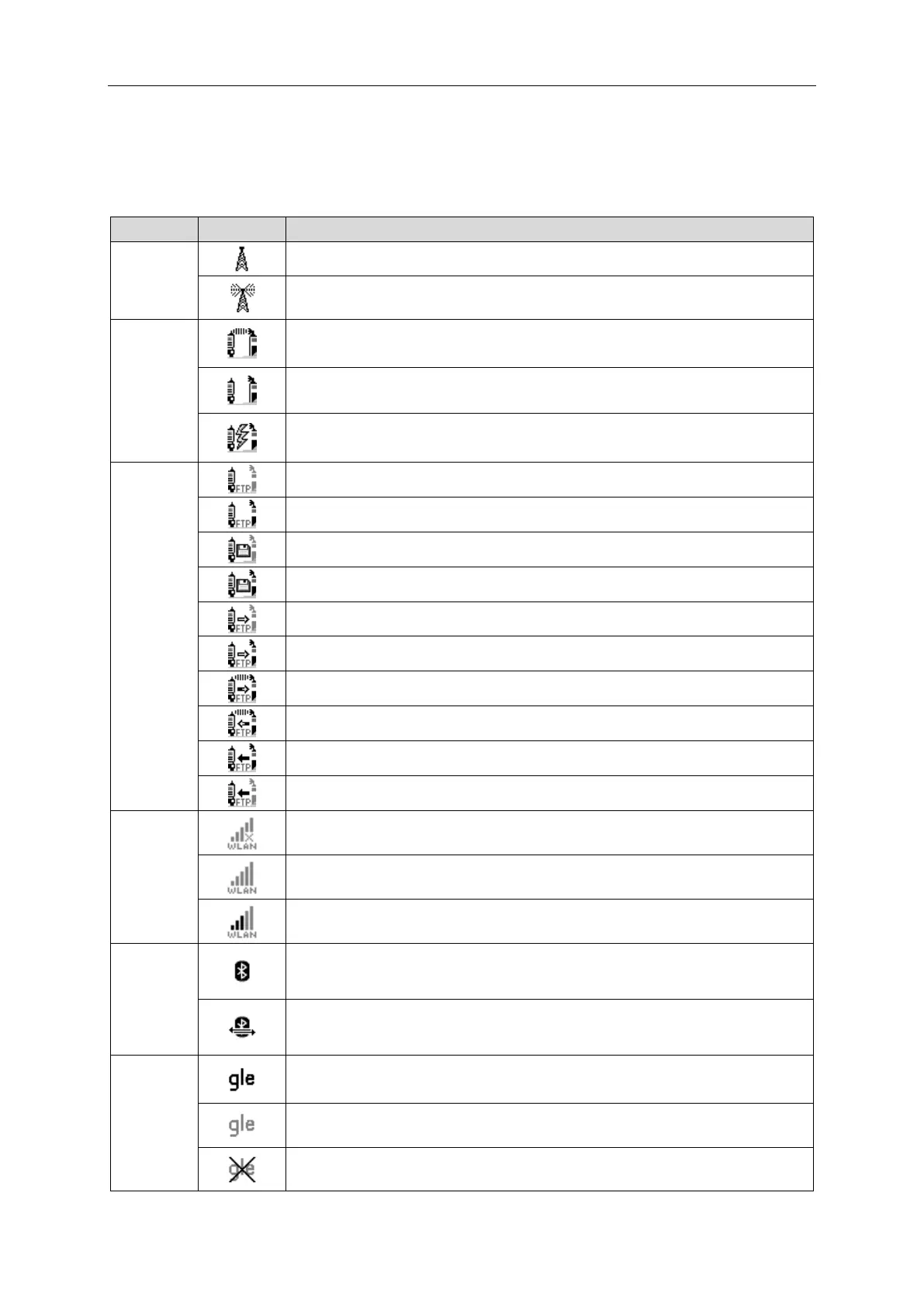
3.2.3 Monitoring the connection
The connection between the vehicle, Internet and office is constantly monitored and its status is shown
on the display. The following icons are used to display the current status of the connection. They appear
in the display above the info line.
Modem is switched on, internet connection established.
Connection to the office present
FOSI: Connection to server ok but no connection to dispatch
Disconnected from the Office
Connection to the office/server interrupted
Connection to the office/server is established.
Tour data available and connection to the office/server interrupted
Tour data available and connection to the office/server is established.
Files to upload available and connection to the office/server interrupted.
Files to upload available and connection to the office/server is established
Data is send from the vehicle to the office/server.
Data is send from the office/server to the vehicle
Downloaded files available and connection is established
Downloaded files available and connection is interrupted
Connection to WLAN interrupted
Connection ist established or interrupted.
Connection to WLAN established.
Bluetooth interface is active.
Bluetooth connection is established
Connection to
large leak
detection
Connection to GLE OK but data is not picked up


 To Next Page