EasyManua.ls Logo

Bartec PETRODAT 3003 - Editing Order Data

Bartec PETRODAT 3003
76 pages
Print Icon
To Next Page IconTo Next Page
To Previous Page IconTo Previous Page
Loading...
Delivery mode
21
Aircraft Refuelling, Operating Instructions, BA 090323, (07.03.2022)
Order deleted
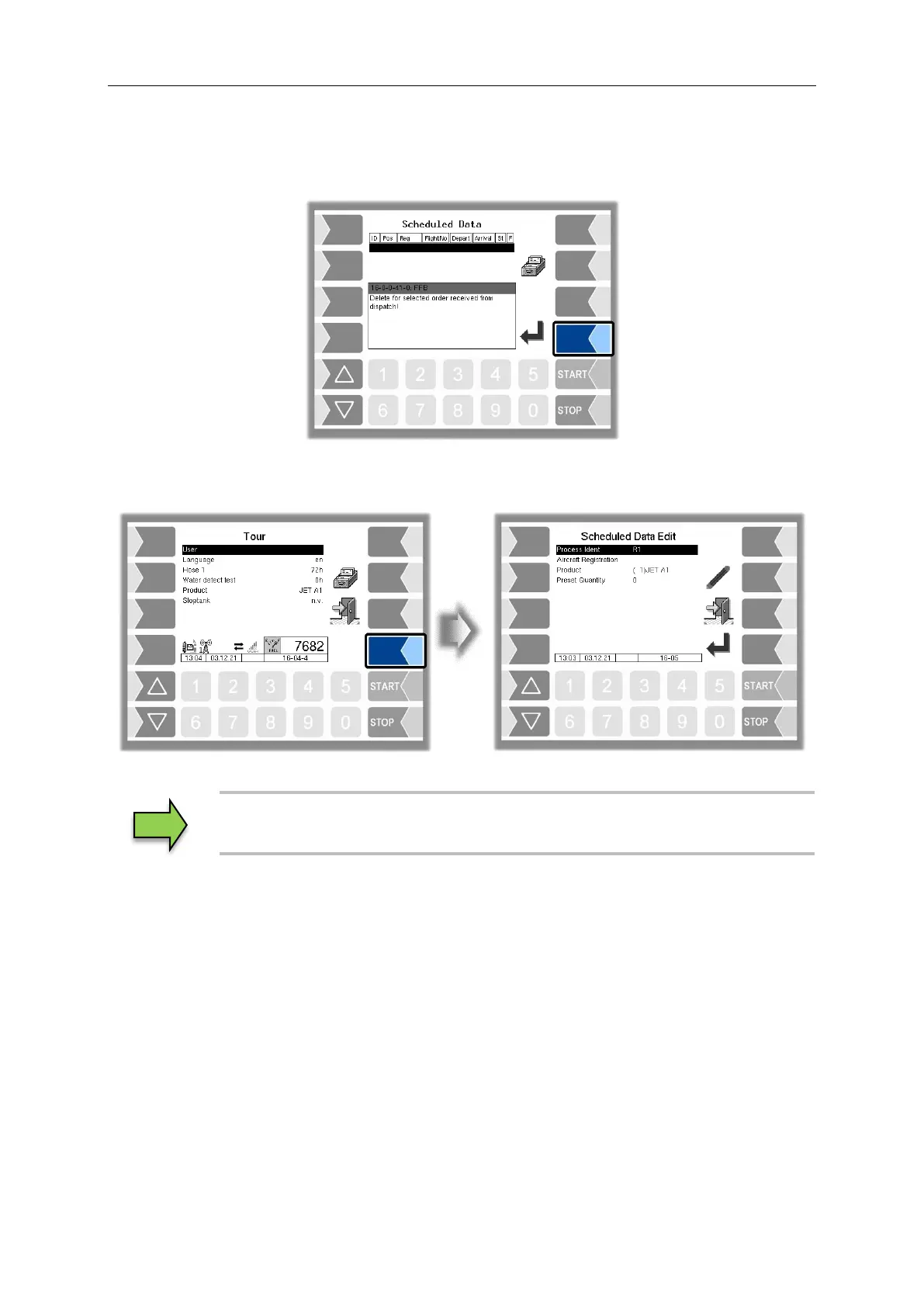
If the order is deleted by the dispatch system, a notice will be displayed, and the window “Scheduled
Data” appears.
4.2.2 “Tour” window
Only unplanned orders can be started in the “Tour” window.
4.3 Edit order data
You may be able to edit the order fields/default data of a scheduled order, depending on the
configuration. You must select the order field using the selection keys and confirm it with the "Edit"
softkey.
(Konfiguration:
Sequence Controls Menu/ Dialog Parameters/Change planned order data)
See the chapter "Special functions unscheduled order” for detailed information on editing the order
fields.

Table of Contents

Related product manuals