Delivery mode
26
Aircraft Refuelling, Operating Instructions, BA 090323, (07.03.2022)
You will need a text file to create the master data. The file name must start with CC and end with the
extension SDC, e.g. CC_aircraftdata.SDC. The SDC file can be transferred to the system via the FTL-
FTP office interface or packed in a b3i file using the service tool. The following is an example of a master
file line entry.
,AB12,Cabri G2,location,town,1,,,
Aircraft identifier/registration (alphanumeric)
Aircraft type (alphanumeric)
Product number configured on the vehicle. (numeric)
4.4 PIT entry
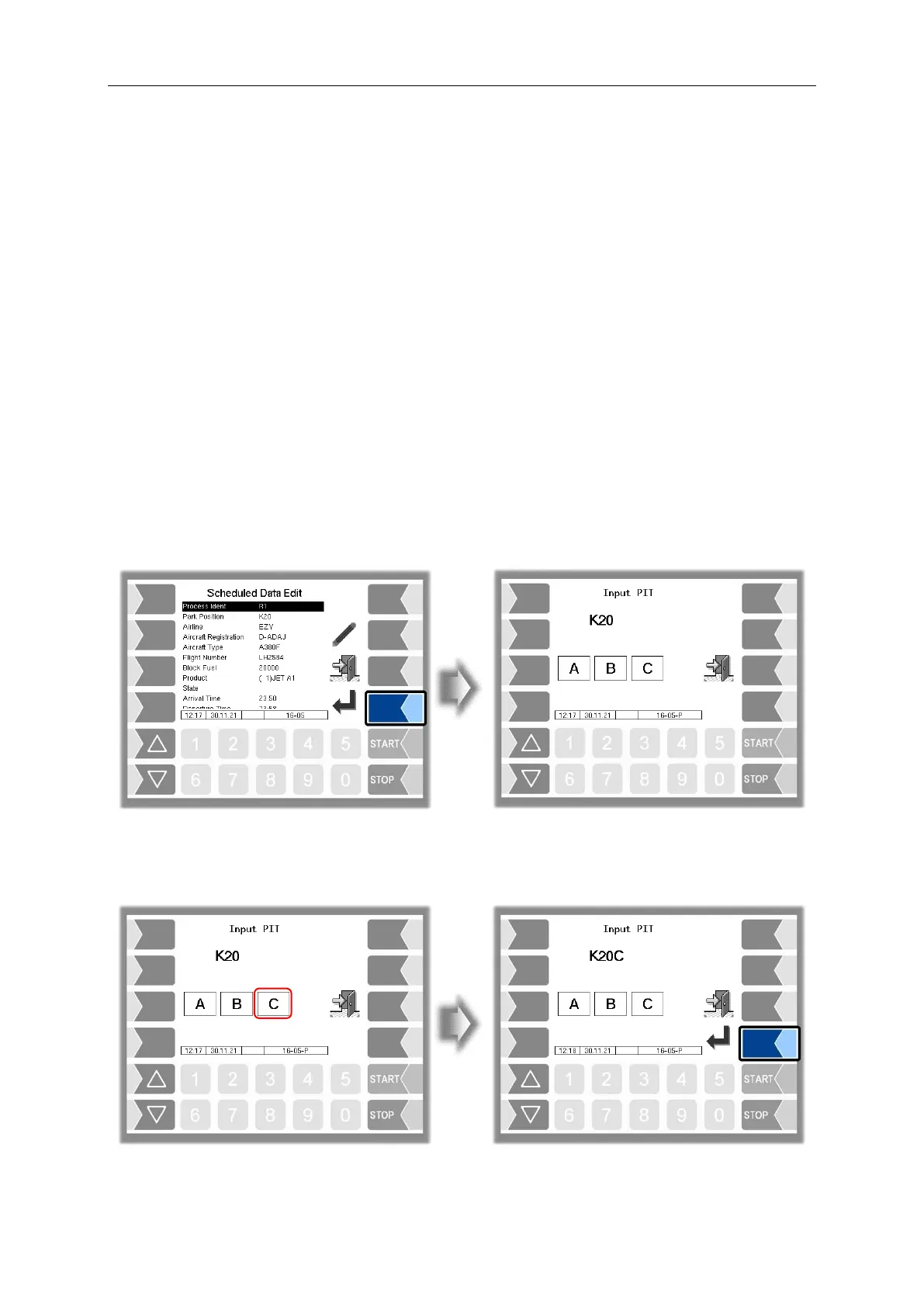
If there are several connection points at a parking position, the system offers a simple way of adding the
PIT number to the information at the parking position. The PIT number corresponds to the associated
connection point at the parking position. You specify the PIT number designation via the configuration.
Sequence Controls Menu/Dialog Parameters/Input PIT)
Enter the PIT number directly to select the connection point. The PIT number designation is then added
to the parking position. You can only switch to the next window after you have selected the connection
point.


 To Next Page